e1pi

Outsource the routine to E1pi, so your team can grow the company.

E1pi reads, reconciles and writes to Tally Prime natively. Bank statements become posted vouchers, a decade of P&L becomes one screen, and 15 companies become one workspace.
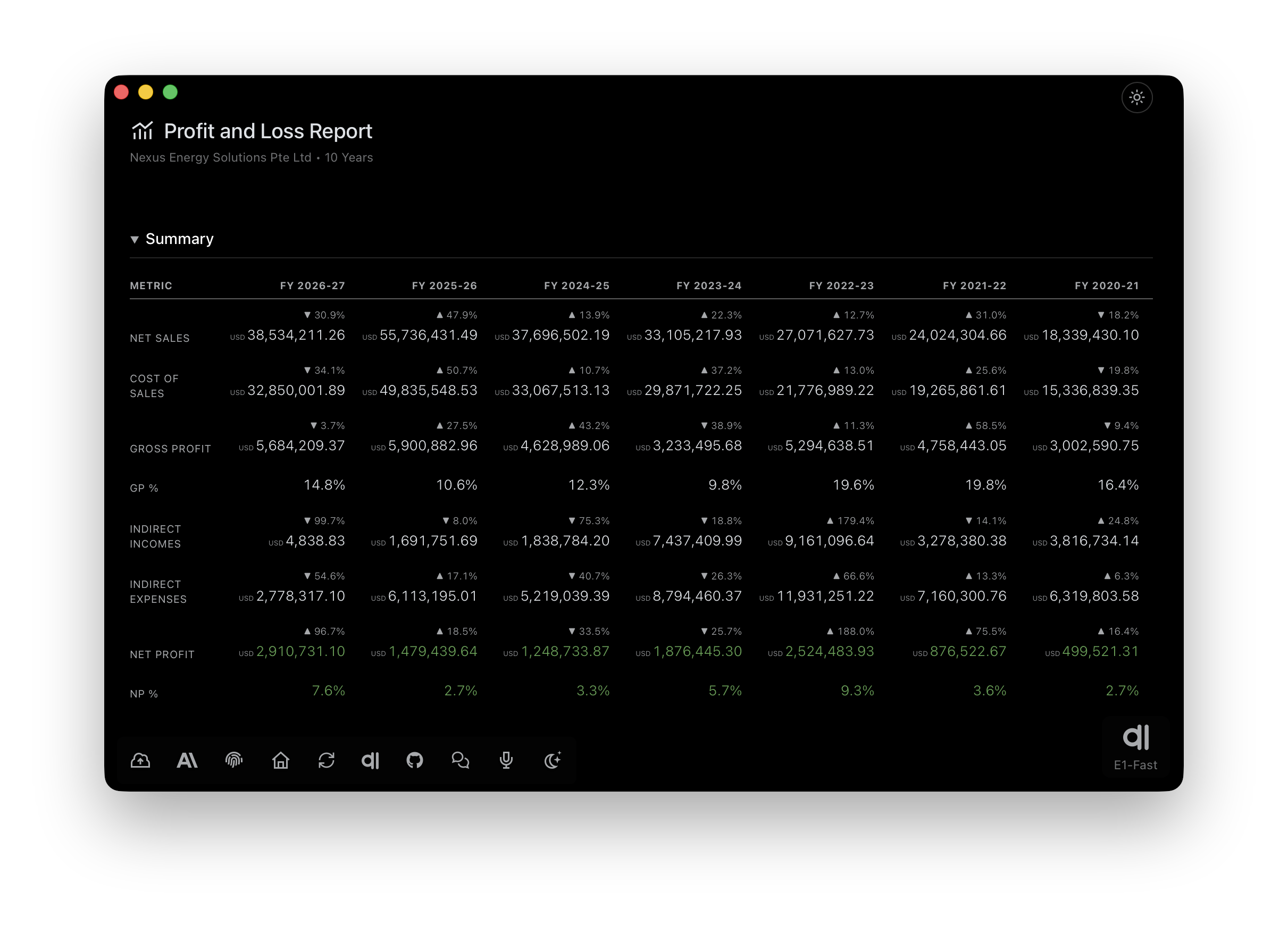
E1pi desktop window showing a 10-year Profit and Loss report — Net Sales, Cost of Sales, Gross Profit, GP%, indirect incomes and expenses, and Net Profit with NP%, each year with its movement against the year before

Axis Bank Statement

Upload the statement PDF and every row comes back as a ready Tally voucher — with the original statement line, the matched ledgers and the proof attached — right in the browser.

Open the app →
The statement row rides on the card. Each voucher carries the actual line extracted from the PDF — page, row and image — so the source is never out of sight.
Ledgers matched, Dr/Cr aligned. Party ledger and bank account with debit, credit, total and the running balance — the whole entry readable at a glance.
Invoices open in place. The sales invoices named in the narration sit as chips on the card — tap one and the commercial invoice PDF opens right there, zoomable.
Send to Tally, then see it standing. One tap posts the voucher natively; View Day Book shows it in the books seconds later.
All of it in Safari. No install, no export — the whole review happens on e1pi.com, on whatever screen is in front of you.
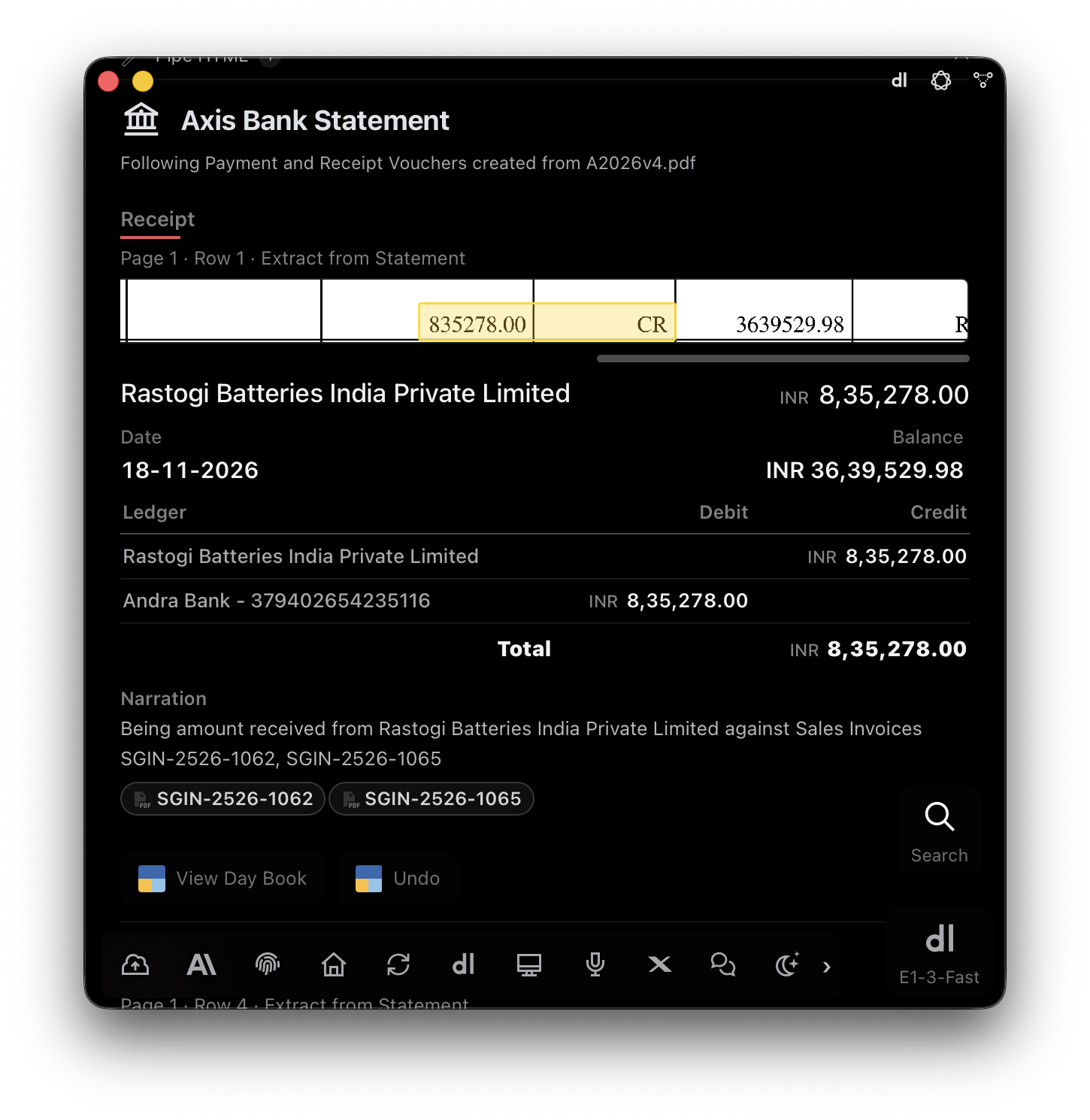
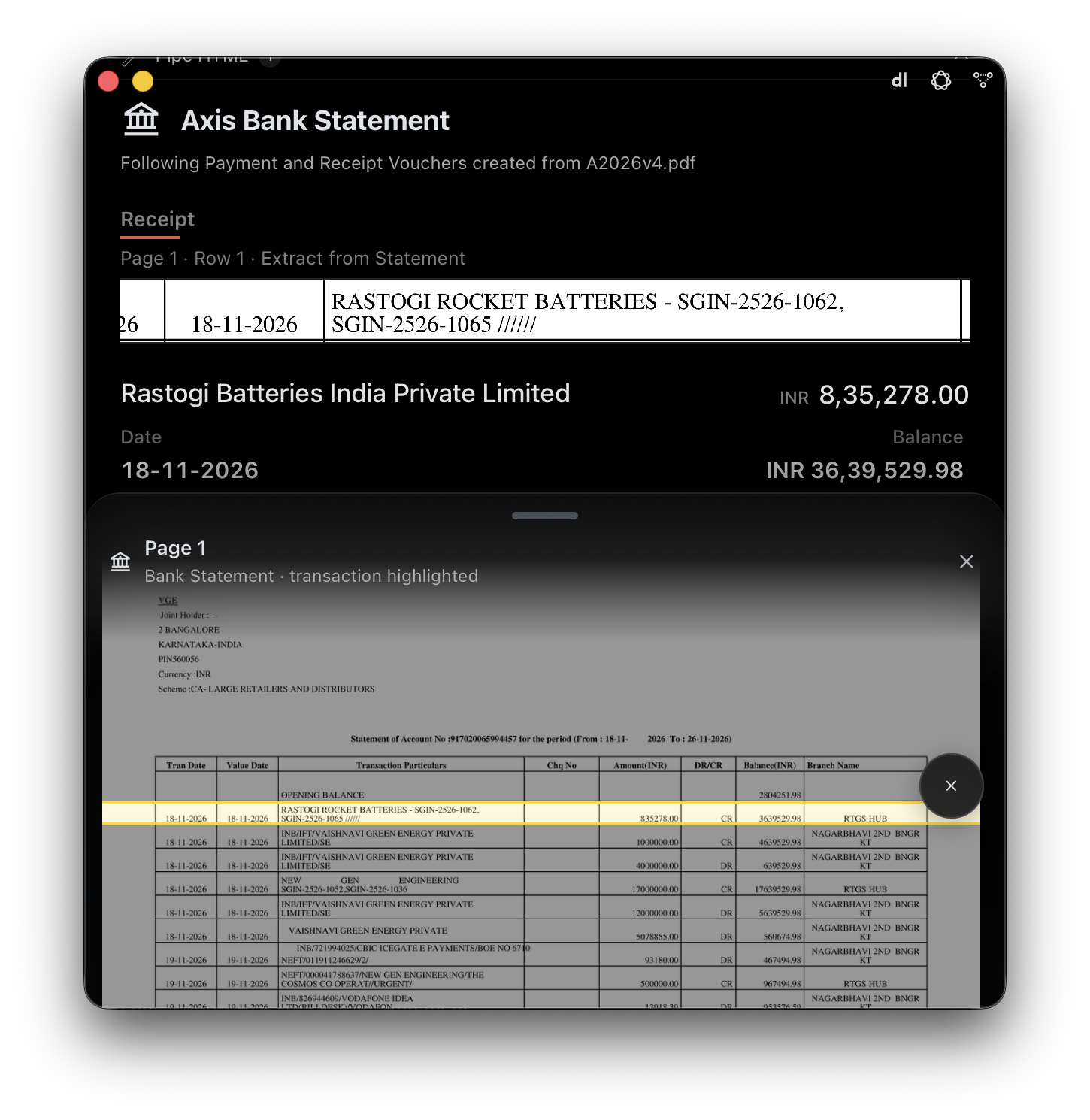
E1pi Mac app — Axis Bank Statement, Receipt voucher card: Page 1 Row 1 extract with 835278.00 CR highlighted, Rastogi Batteries India Private Limited INR 8,35,278.00, date 18-11-2026, balance INR 36,39,529.98, ledger table Rastogi Batteries credit and Andra Bank debit, narration against sales invoices SGIN-2526-1062 and SGIN-2526-1065 shown as PDF chips, View Day Book and Undo buttons
One voucher per statement row. Party ledger and bank account with debit, credit and total, the narration written out, the sales invoices it names as chips — and the extracted statement line riding on top. Hover a value and it lights up in the source row.
The same Receipt card with the statement sheet pulled up: Page 1, Bank Statement, transaction highlighted — the Axis statement table with the Rastogi Rocket Batteries row of 18-11-2026 marked in yellow among the other rows
Verify against the statement itself. Tap the extract and the statement page slides up with that transaction highlighted — page, row and image, so the source is never out of sight.
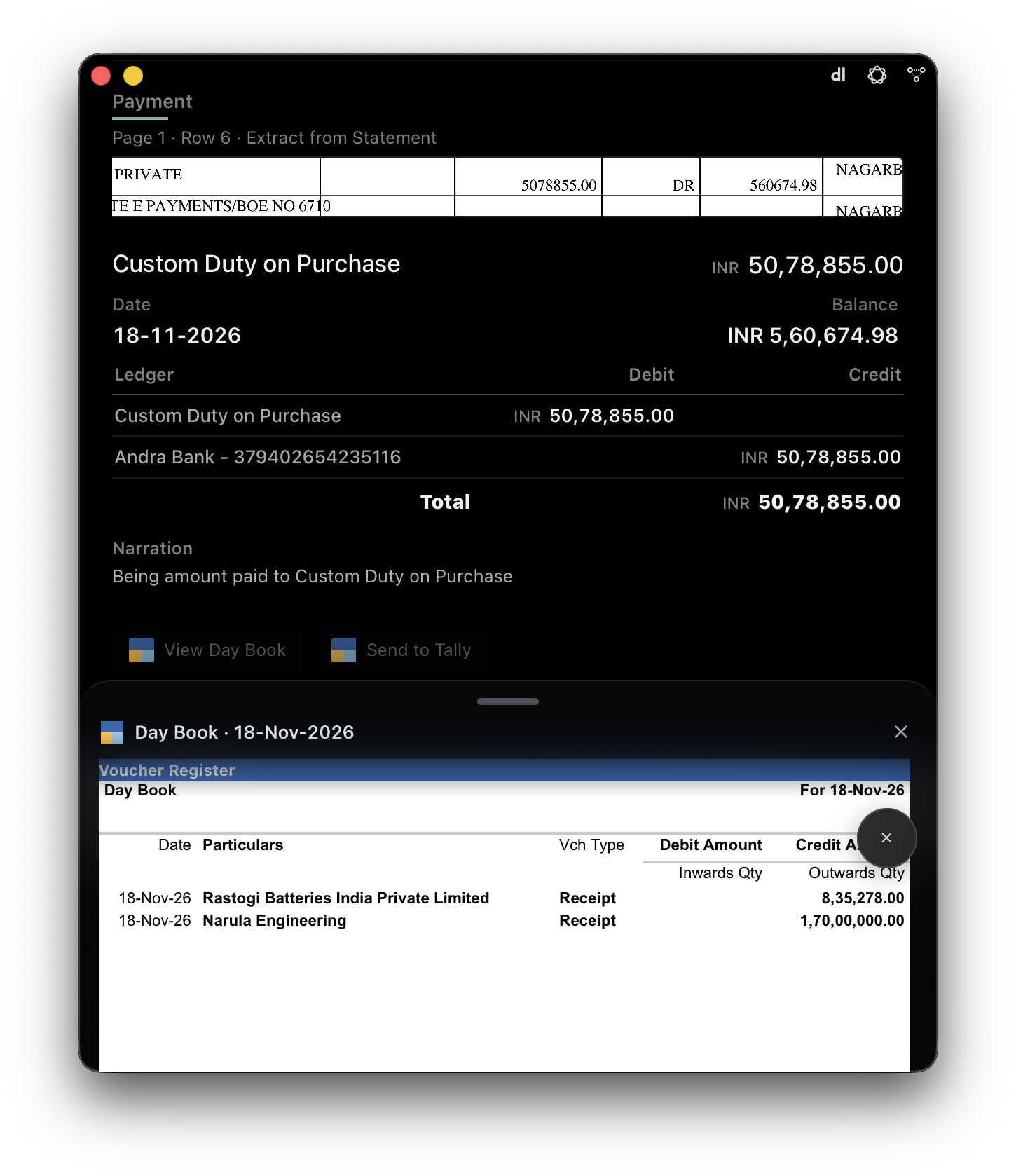
Payment voucher card — Custom Duty on Purchase INR 50,78,855.00, 18-11-2026, ledger table Custom Duty on Purchase debit and Andra Bank credit, narration Being amount paid to Custom Duty on Purchase, View Day Book and Send to Tally buttons, with the Tally Day Book sheet for 18-Nov-2026 open showing Receipt vouchers for Rastogi Batteries India Private Limited 8,35,278.00 and Narula Engineering 1,70,00,000.00
Send to Tally, then see it standing. One tap posts the voucher natively; View Day Book opens Tally’s Day Book for that date with the entry already in it. Posted the wrong one? Undo pulls it back.
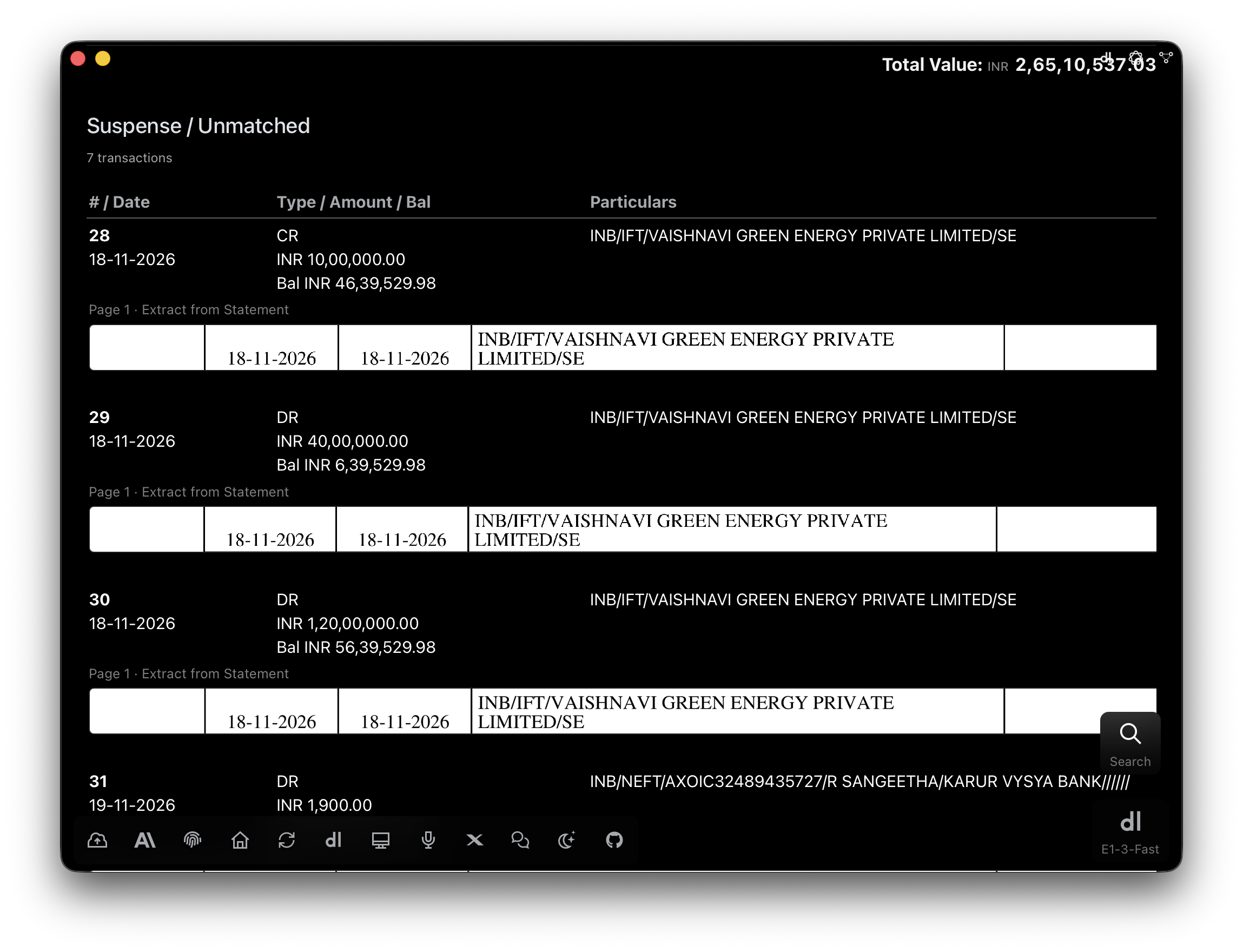
Suspense / Unmatched list — 7 transactions, total value INR 2,65,10,537.03: rows 28 to 31 dated 18 and 19-11-2026, own-account IFT transfers to Vaishnavi Green Energy Private Limited of INR 10,00,000, 40,00,000 and 1,20,00,000 and a NEFT to R Sangeetha of INR 1,900, each with its Page 1 extract from the statement
Unmatched goes to Suspense, not into the books. Seven rows the AI would not guess — own-account transfers, an unknown NEFT — listed with their statement extracts and running balances, waiting for your ledger call.
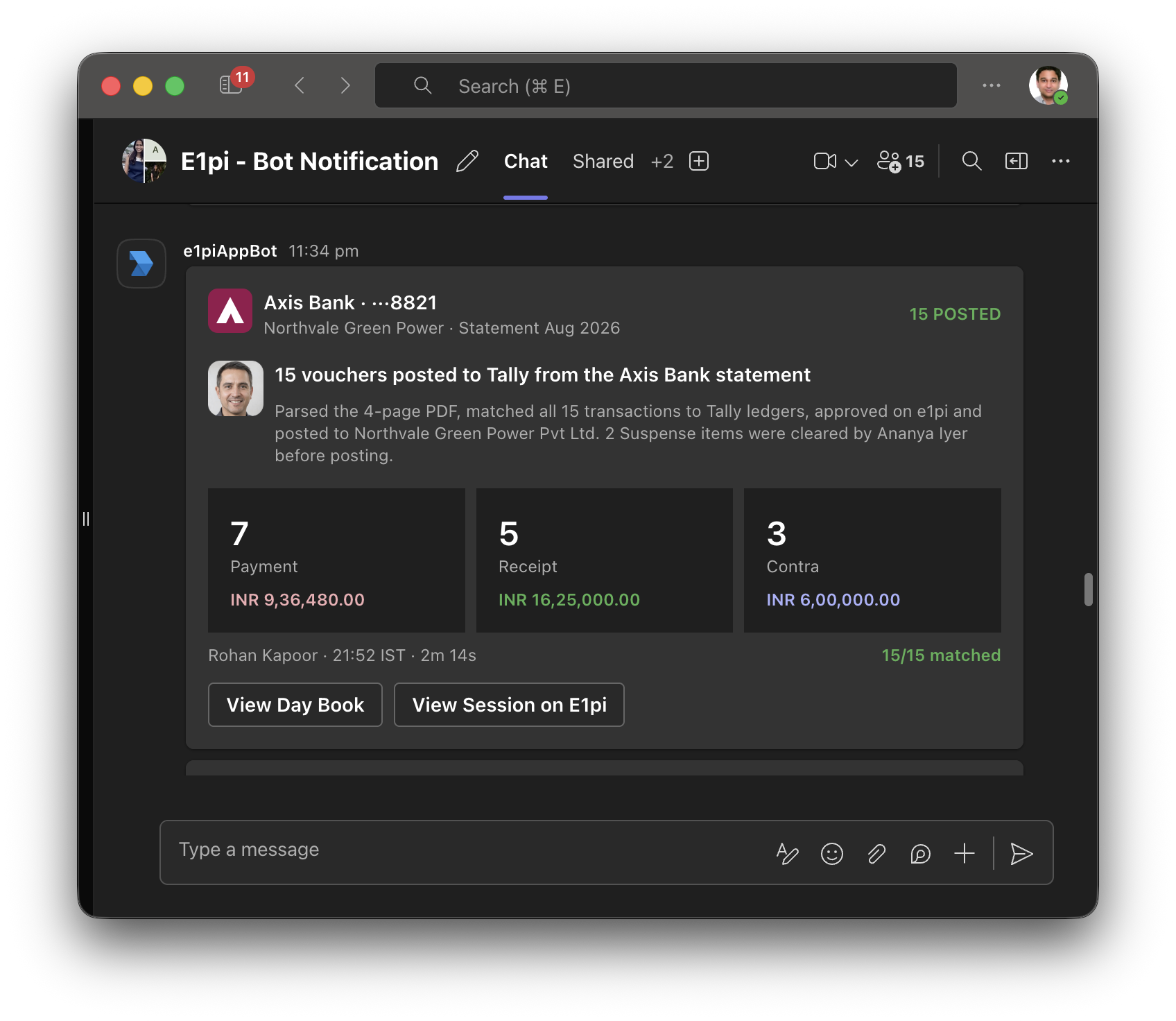
Microsoft Teams group chat 'E1pi - Bot Notification' — e1piAppBot card: Axis Bank ···8821, Northvale Green Power, Statement Aug 2026, 15 vouchers posted to Tally from the Axis Bank statement, 7 Payment INR 9,36,480.00, 5 Receipt INR 16,25,000.00, 3 Contra INR 6,00,000.00, 15 of 15 matched, with View Day Book and View Session on E1pi buttons

Work done, team told — automatically.

The moment the last voucher is posted, E1pi drops a status card into the Microsoft Teams group chat. Nobody asks whether the statement is done — the whole team already knows.

Straight into the group chat. Bank, account and company up top — 15 posted, 15 of 15 matched — where the team is already talking.
Counts and totals by voucher type. Payment, Receipt, Contra — how many entries and how much, in the books’ own currency.
Who ran it, who cleared what. The person who posted, the colleague who resolved the suspense items, and how long it took.
Two buttons back to the source. View Day Book opens the entries standing in Tally Prime; View Session opens the E1pi thread behind them.