
One source: the books
A dashboard usually means another system. An export every Monday, a connector, a copy of the books in someone else's cloud, and a designer to lay out the tiles. By the time it is built, the question has changed.
The Sales and Finance dashboards in E1pi are drawn from the vouchers themselves: the sales, purchases, receipts, payments and journals your accounts team posts every day. Nothing is re-keyed and nothing leaves the office. Post a voucher, refresh, and the dashboard moves. They read whatever E1pi reads, so the same two dashboards, in the same layout, come out of Tally Prime, Zoho, QuickBooks or SAP.
Every picture in this post is the E1pi Mac app in Fake Mode: a real set of books with the names and figures swapped for fictional ones. That is the only edit.
The Sales dashboard
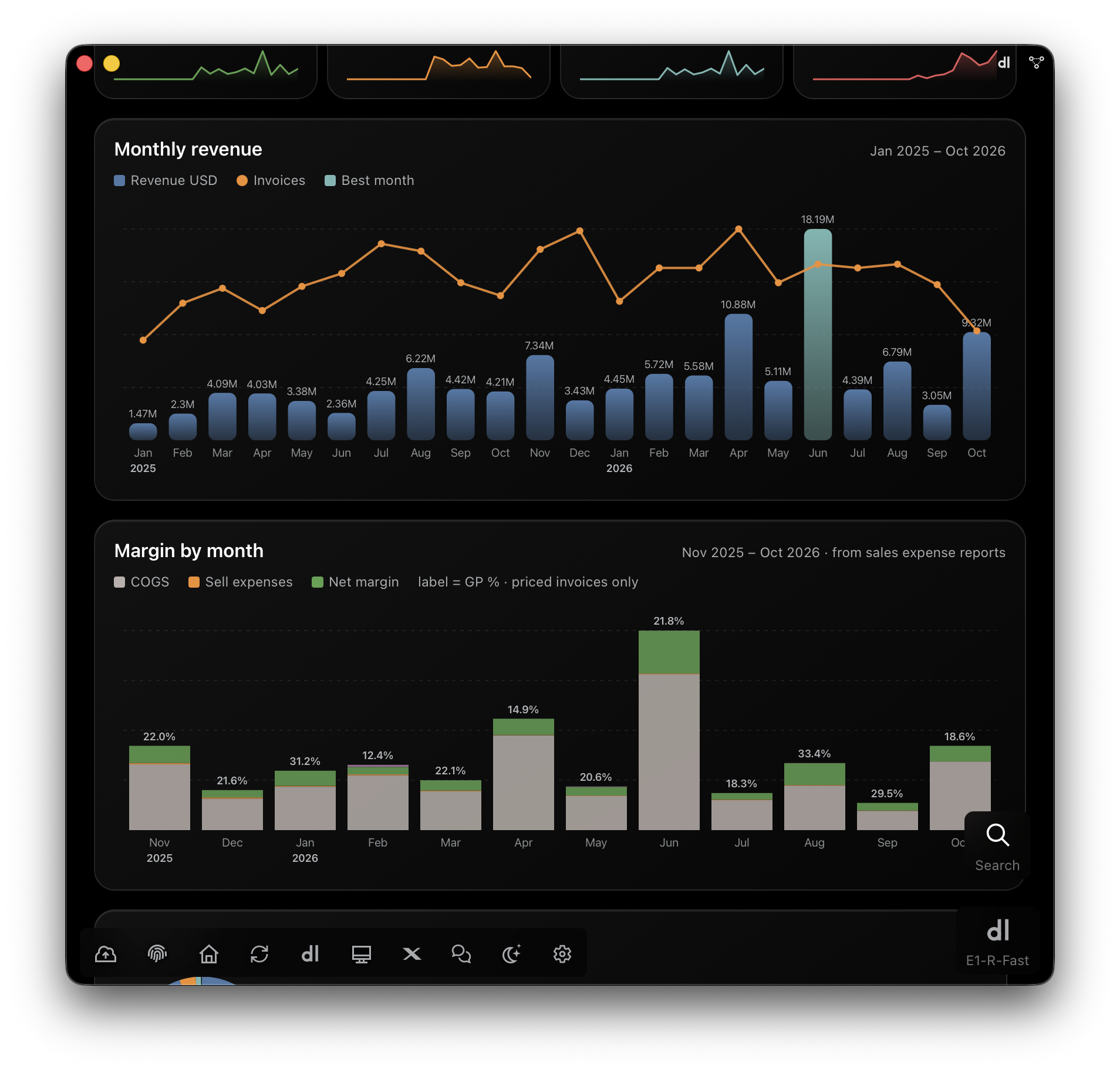
The first tab is the year at a glance. Revenue by month with the best month marked. Margin by month, stacked as cost of goods, sell expenses and what is left, with the GP percentage on each bar. Sales mix, highlights, and the top customers, items, business units and destinations. Each tile carries its own sparkline, so the trend is read before the number.
Then one tab per month, and this is where it stops being a chart. Every invoice is a card: value, GP, due date or days overdue, the documents attached, the business unit. Open it and the whole story of that sale is there. The customer's PO and its date. Terms, payment and destination. Each item with the quantity, the sell rate and the purchase rate it was bought at. The sell expenses, the forwarder's bill or the BL fee, matched to the Tally voucher that booked them. A margin bar from sales through cost of goods, gross profit and sell expenses to net margin. The trade documents, Customer PO, PI, Invoice, Packing List, COO and DO, open in the app.
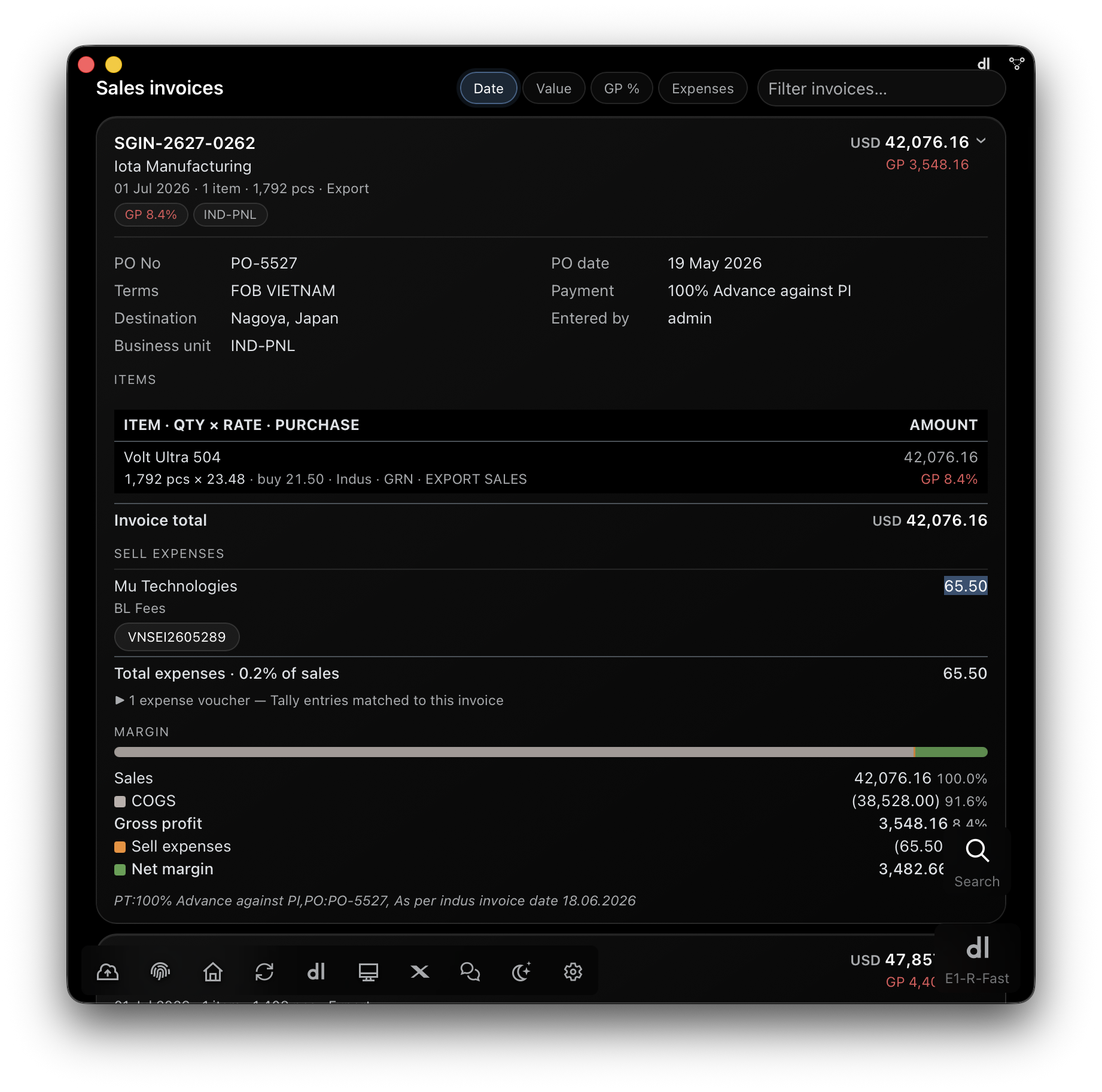
GP is worked out on invoices that have a purchase price behind them; the count of those that do not is shown, not hidden. Paid, due and overdue come from the receipts, so the sales team and the accounts team are looking at the same bill.
The Finance dashboard
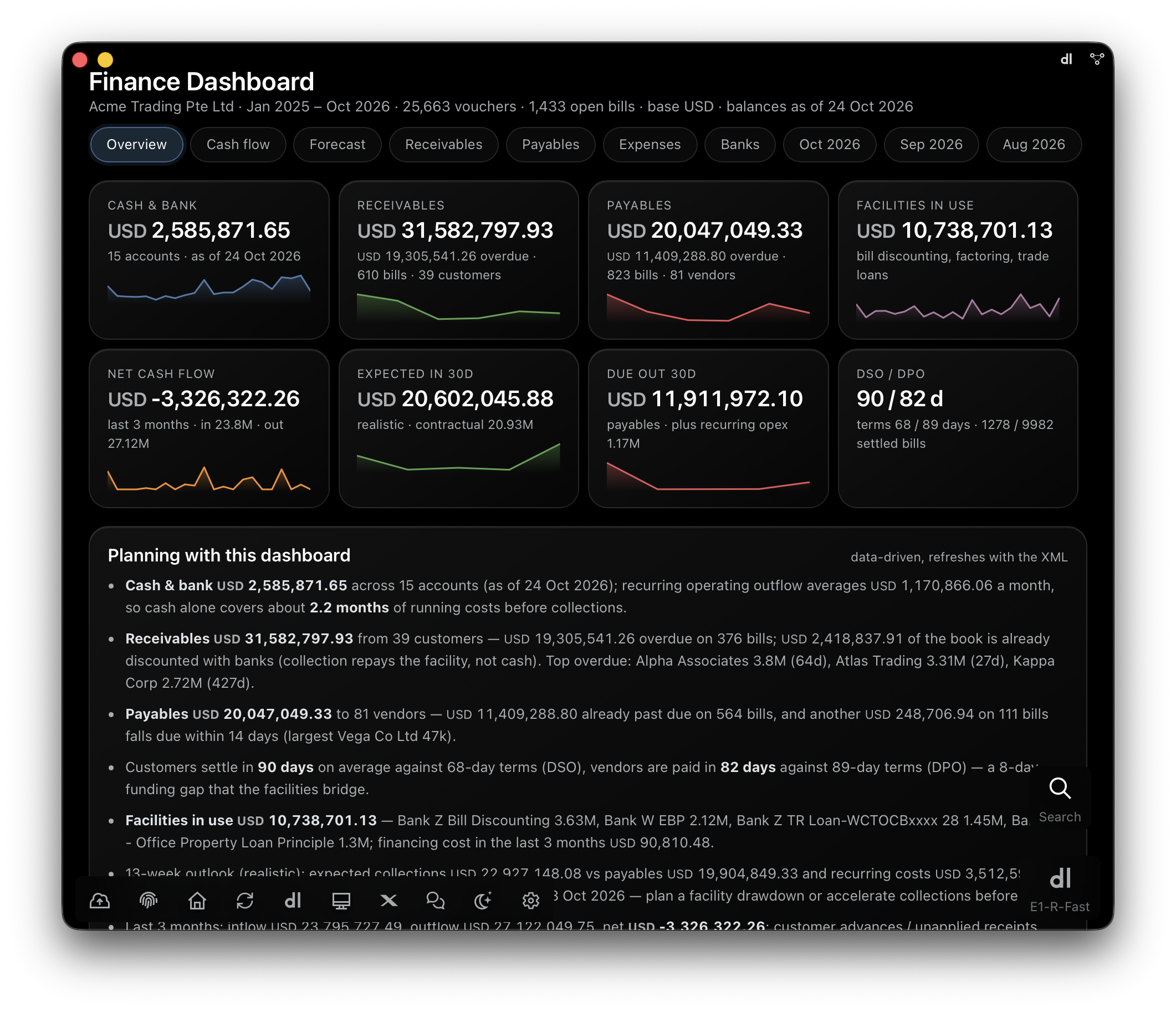
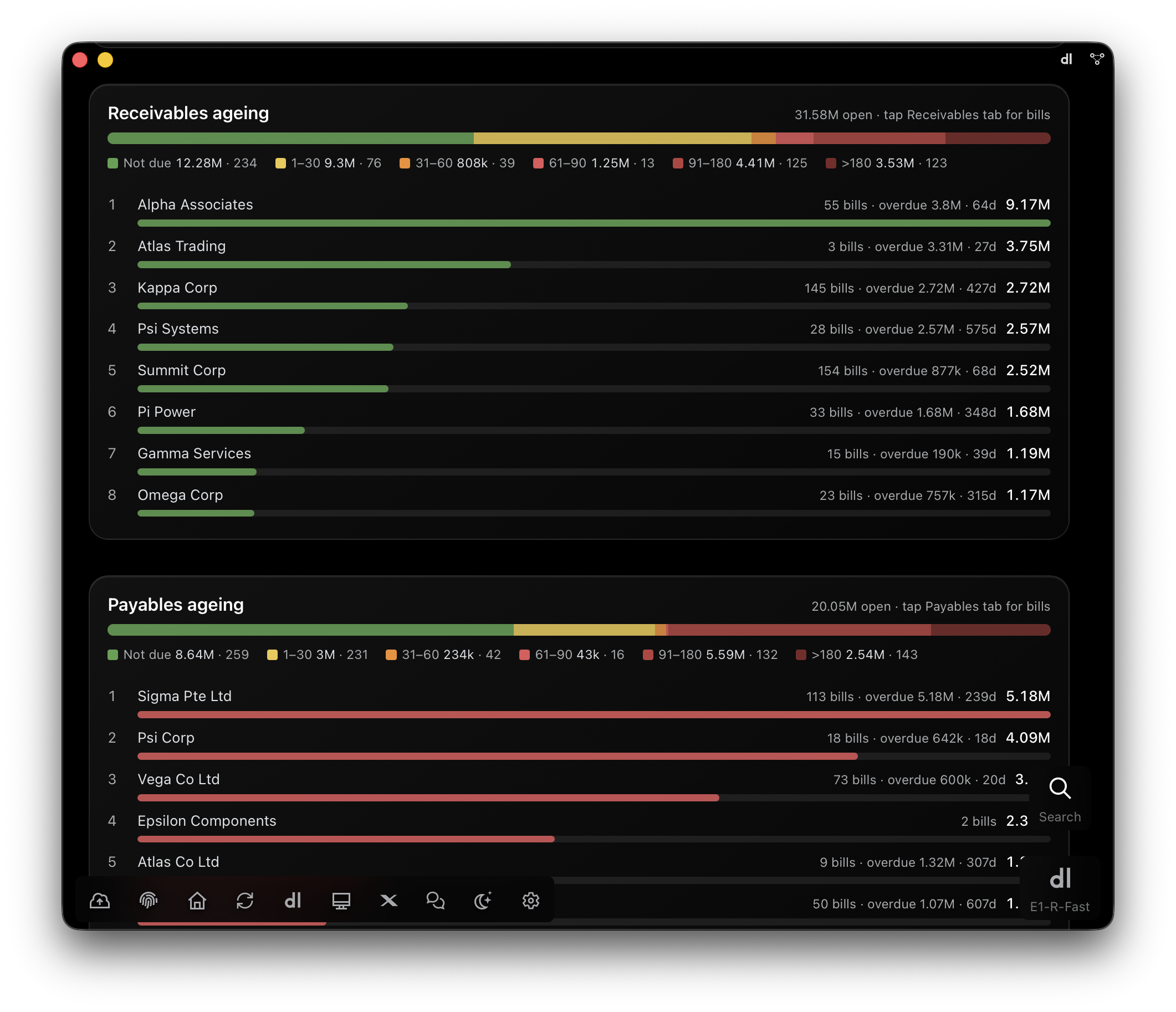
The overview is eight tiles and a paragraph. Cash and bank across every account. Receivables and payables, each with the overdue share and the number of bills and parties behind it. Facilities in use: bill discounting, factoring, trade loans. Net cash flow for the last three months, what is expected in the next thirty days, what is due out, and DSO against DPO next to the terms you actually agreed.
Under the tiles, Planning with this dashboard is written out in sentences, from the data: how many months of running costs the cash covers, who the top overdue customers are and for how long, what falls due within fourteen days, and the funding gap the facilities are bridging. It is the note a finance head would write after reading the numbers, written for you before you read them.
- Cash flow. Inflow against outflow by month with the net line, transfers between your own accounts left out. Where the cash came from, collections against facilities. Outflow by category. The bank balance, month-end by month-end.
- Receivables and payables. Bill by bill, with ageing buckets from not due to over 180 days, filters for overdue, not due and discounted, and the top names with their bills, overdue amount and days.
- Expenses. Heads by month, the top ledgers inside each, the monthly average, and the financing cost on its own: discounting, factoring, interest.
- Banks. Accounts, facilities and loans, deposits, cards, and the invoices already discounted with a bank.
- One tab per month. Every bank and cash transaction with its category, counterpart, bank and references.
Thirteen weeks ahead
The forecast tab draws two lines. Contractual puts every open bill on its due date. Realistic shifts each customer's bills by that customer's own average delay, measured from the bills they have already settled, with anything already overdue assumed within thirty days. Recurring costs are the six-month average of salaries, operating expenses, taxes, bank charges and card settlements. Invoices already discounted with a bank are left out of the inflow, because their collection repays the facility, not the account.
No new sales, purchases or drawdowns are assumed. The forecast is the committed position from the bills already in the books, which is exactly the gap that new business or financing has to cover. The lowest point, and the week it lands, sit on a tile above the chart. The assumptions are written under it, so nobody has to ask what the line means.
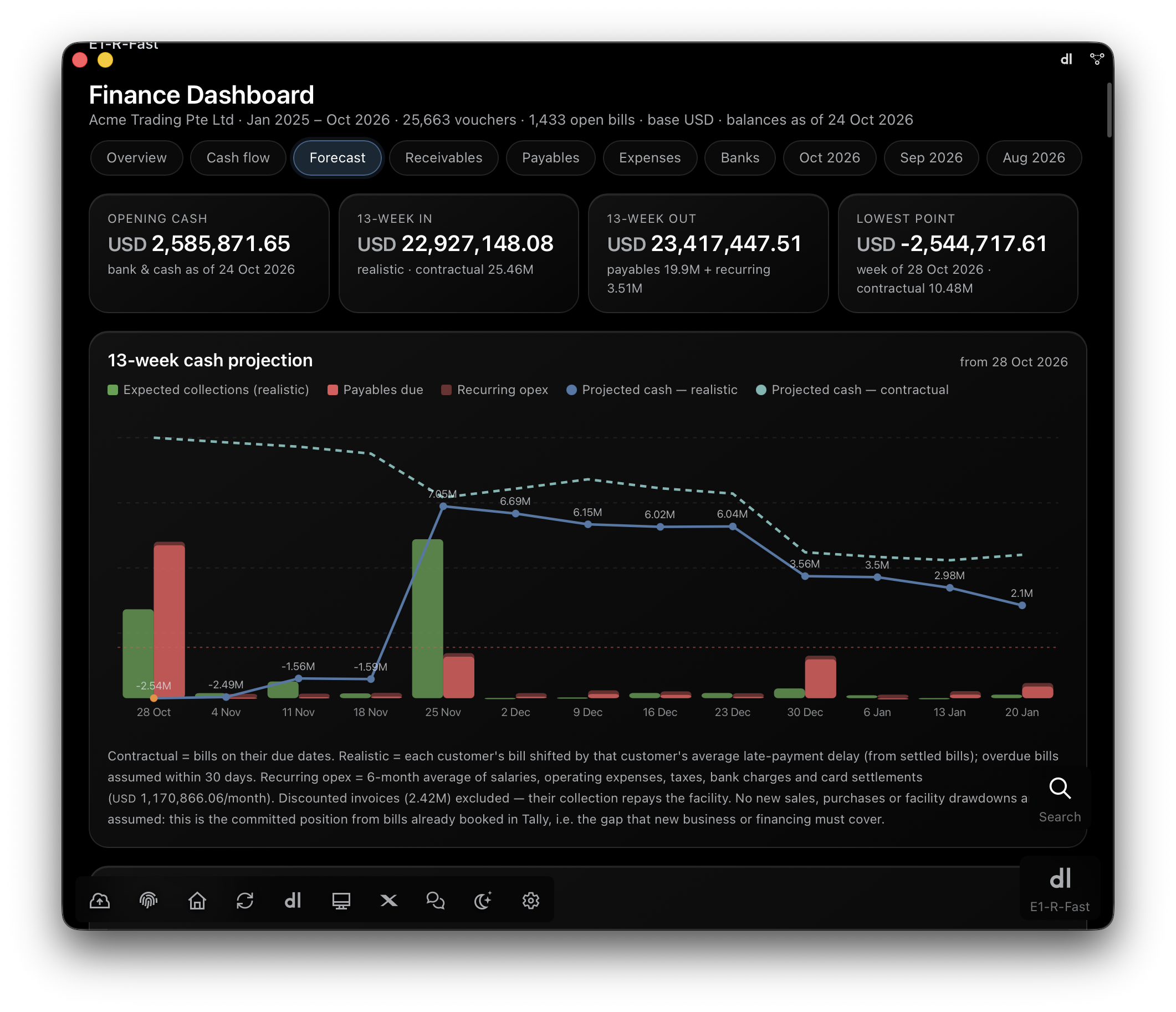
The forecast says what is already committed. What to do about it is the next question.
Ask the next question
A dashboard in E1pi is not the end of the conversation; it is the context for it. With the Finance dashboard open, ask: "Which customers slipped this quarter?" "What happens to the lowest point if Atlas pays thirty days late?" "Which expense head grew fastest since April?" "Draft a reminder for everyone over ninety days." The AI answers from the same vouchers the dashboard was drawn from, and the reminders it drafts go out when a person taps Send.
Because the dashboard and the answer come from one source, there is no "the report says one thing and the system says another". It is the same bill, the same voucher, the same number.
Make it yours by talking
There is no dashboard designer. You say what you want and the AI redraws it. "Group sales by business unit." "Add a tile for export against local." "Show margin in INR." "Put the five largest overdue bills at the top of the overview." "Compare this October with last." The change is kept as part of the dashboard's instructions, so it holds on the next refresh and for everyone who opens it.
The two dashboards shipped today are the ones a trading business needs on day one. A manufacturer, a distributor or a services firm shapes them to its own business units, product lines and the tile its board keeps asking for, in the same way: by saying so. The person who runs E1pi for your company decides who sees which dashboard, as with every report.
Where the numbers live
E1pi is self-hosted on your own Mac or Windows machine, and the dashboards are drawn there, from the books where they are. Nothing is copied to a cloud, and nothing is sent anywhere on its own. They open in the E1pi app on Mac, Windows and iPhone, and every call the AI makes to build one is on the admin's timeline, as with everything else E1pi does.
Getting it
The Sales and Finance dashboards are part of E1pi today, with nothing extra to install. Ask for the sales dashboard or the finance dashboard, and it is drawn from your books. To see them on your own numbers, register at e1pi.com/register and pick a demo slot.
Run the business. Let E1pi run the back office. Read more at e1pi.com or open the app at ai.e1pi.com.