
The office already lives in a chat
Nobody wants another place to work. Your team spends the day in Microsoft Teams. Your suppliers and transporters live on WhatsApp. So E1pi meets both where they are. We call these Channels, and from today both run in two directions: messages come in and become work, and work goes out as replies, cards and documents.
Both run through the official APIs, Microsoft's for Teams and Meta's Cloud API for WhatsApp, and both are handled by the E1pi installed in your office. Nothing routes through E1pi's servers.
Teams, inbound: ask, assign, approve
In the chat you already have open, you can:
- Ask for any of the twelve reports in plain words, profit and loss for the last six months, bills receivable with ageing, stock in hand, and get it back in the chat, live from the books.
- Assign a task in one sentence. E1pi tracks it, reminds the owner and reports back when it is done.
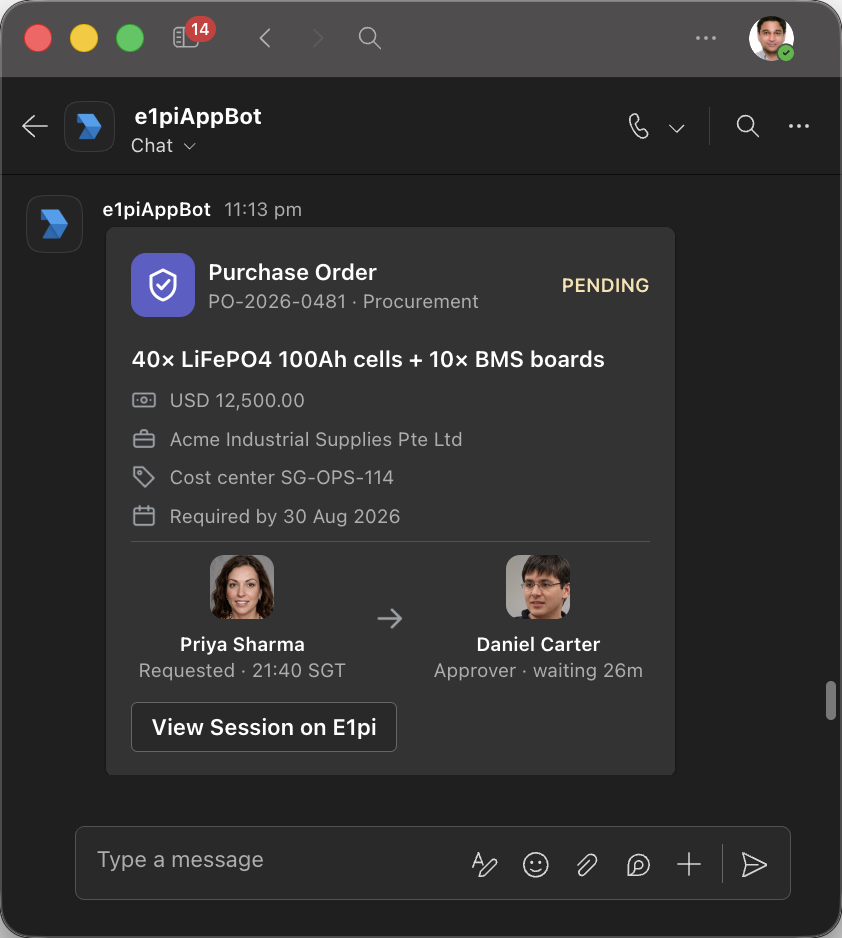
- Approve from the card. A purchase order, a supplier invoice, a leave request, with who requested it and who is waiting, approved where you read it.
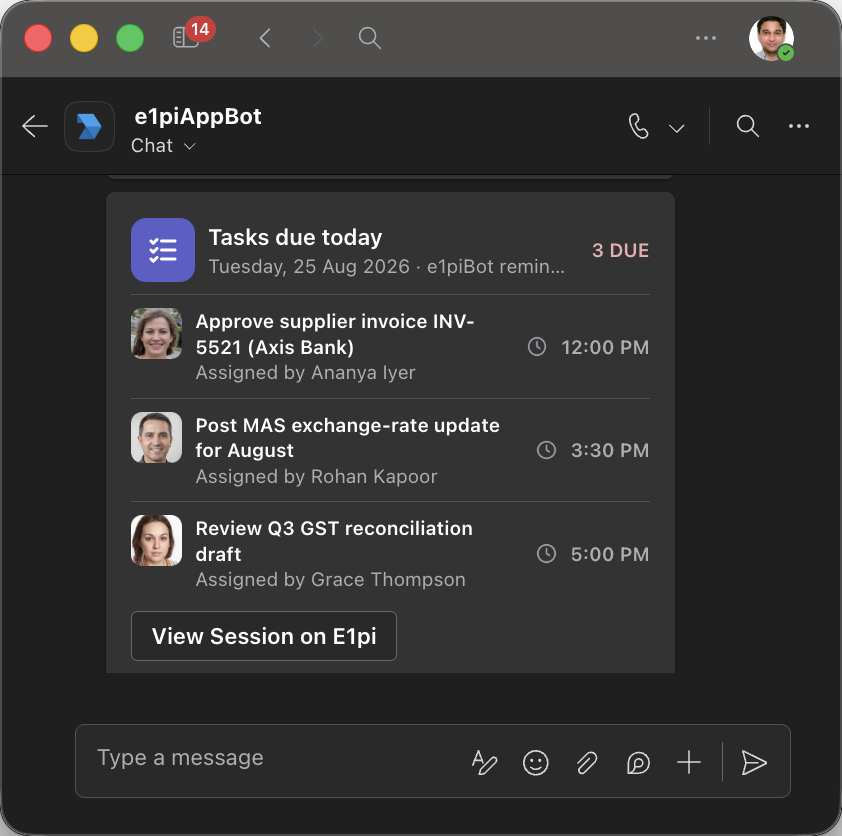
- Get the day's tasks every morning, a digest of what is due today, in the group chat.
Teams, outbound: what E1pi posts back
Workflow notifications go to the people your admin names: a status card after the work is done, an approval request to the next approver in line, a reminder when a task is overdue, a notice to the business head when a condition you set is met. Each card carries a link to the E1pi session behind it, so anyone can open the session, see every step, and ask for the next.
We run on this ourselves. Every change to E1pi is committed by the AI and announced in our Teams group chat during working hours, linked to its session. Anyone on the team can open that session with all the context present and request the next change.
When the AI drafts a message to a person, a group or a channel, it does not post it. A compose sheet opens in the app with the recipient, the text and any attachments. You read it, edit it, and press Send or Cancel. It posts through Microsoft Graph as you, the signed-in user.
WhatsApp, inbound: suppliers send, E1pi reads
WhatsApp is kept for suppliers and vendors. They send their bills to your WhatsApp Business number the way they already do: a PDF, a photo, a handwritten note. E1pi reads each one, checks it against the contract and the quote, verifies a transport bill's distance against the real route, matches it to the sales or purchase order, books it under the correct expense head, and routes it to the business head for approval, on Teams or on WhatsApp, as you configure.
The supplier gets an acknowledgement on the same chat. Nothing is paid until the approval is given and the payment voucher is created.
WhatsApp, outbound: who presses Send
Outbound WhatsApp is drafted by AI and sent by a person. An acknowledgement, a document set with the PDFs attached, a payment advice, a reminder to a transporter: each opens in the WhatsApp compose sheet with the number, the name and the text ready to edit. One draft per recipient, drafts stack, and attached PDFs can be tapped to preview. Press Send, and it goes out from your E1pi business number through Meta's Cloud API. Press Cancel, and nothing happens.
The AI never sends on its own. Not on Teams, not on WhatsApp, not by email.
One bill, both channels
Here is the chain for a single supplier bill, with where each step happens and who sends it.




| Step | Channel | Sent by |
|---|---|---|
| Supplier sends the bill, as a PDF, a photo or a handwritten note | The supplier | |
| Bill read and checked: contract, quote, route distance, order match, GST | E1pi, in your office | Nobody, it is a check |
| Approval request with the bill and the checks attached | Teams, or WhatsApp | E1pi, as your workflow is configured |
| Approve on the card | Teams | The approver |
| Payment voucher in the ERP, acknowledgement to the supplier | ERP, then WhatsApp | A person, from the compose sheet |
| Status card: paid, by whom, when | Teams group chat | E1pi, as configured |
Every step lands in one timeline, one per user, stitched in order, that your admin can read in full.
Your tokens and your messages stay home
Both bots run on the E1pi installed in your office. The Microsoft 365 tokens that let E1pi read Teams stay on that machine and never go to the model. Only minimal chunks of text, around 500 words, go to the model, never a whole file, never a token. The admin sees, and can record, each and every call the AI makes.
Your Teams tenant and your WhatsApp Business number are registered to your E1pi alone, through the official Microsoft and Meta APIs.
Getting connected
Microsoft 365 already provides your users and roles, so Teams is a matter of adding the E1pi bot to your tenant. WhatsApp needs a WhatsApp Business number linked through Meta; we run the setup with you. Both channels are included in the one fixed monthly subscription, and the trial runs on your live data for one month, cancel anytime.
Run the business. Let E1pi run the back office. Read more at e1pi.com or open the app at ai.e1pi.com.