 e1pi
E1pi for Chartered AccountantsIndia first
Every client’s Tally.
One desk. One sentence.
E1pi reads each client’s Tally Prime live, runs your audit programme on every one of them, drafts the confirmations and the working papers — and waits for a CA to sign.
Self-hosted in your own office. Client books never leave. One fixed monthly fee for the practice — not tokens, not seats.
- Every client in one viewEach client’s Tally Prime company, side by side. Switch by name; compare all of them for one period.
- Live from Tally, no backup shuffleReads the books as they stand. A voucher passed a minute ago is in the report now.
- Your audit programme, run on every clientWrite a check once, in plain words. Run it on all of them, identically, every year.
- Client data stays in your officeRuns on your own Mac or Windows PC. The model sees a few hundred words at a time — never a file, never a backup.
- A CA holds the penNothing posts to a client’s books, and nothing leaves for a client or a bank, without a partner’s yes.
- One fixed fee for the practicePartners, managers, article assistants — unlimited users, unlimited AI. First month free.
Audit season, the way it runs today.
Twenty clients, twenty Tally backups, one deadline. The checks are the same for each client. The hours are not.
Dates as usually notified; extensions vary by year.
Every client, one sentence.
Load the client’s data in your Tally Prime, or link the client’s own PC. From then on you ask in plain words — for one client, or for all of them.
You say
Trial balance for Sharma Textiles, FY 2025-26, grouped by account type.
Opening, debit, credit and closing for every ledger, under its group. Tap a figure for the ledger, then the voucher.
All vouchers on the Cash ledger above 10,000 for FY 2025-26, with narration.
Day Book by ledger, by date, by type. Name the ledger, the limit and the period; the register comes back filtered.
Balance sheet as at 31 March for the last three years, side by side.
As at any date, year-on-year or month-on-month — up to twelve financial years in one frame.
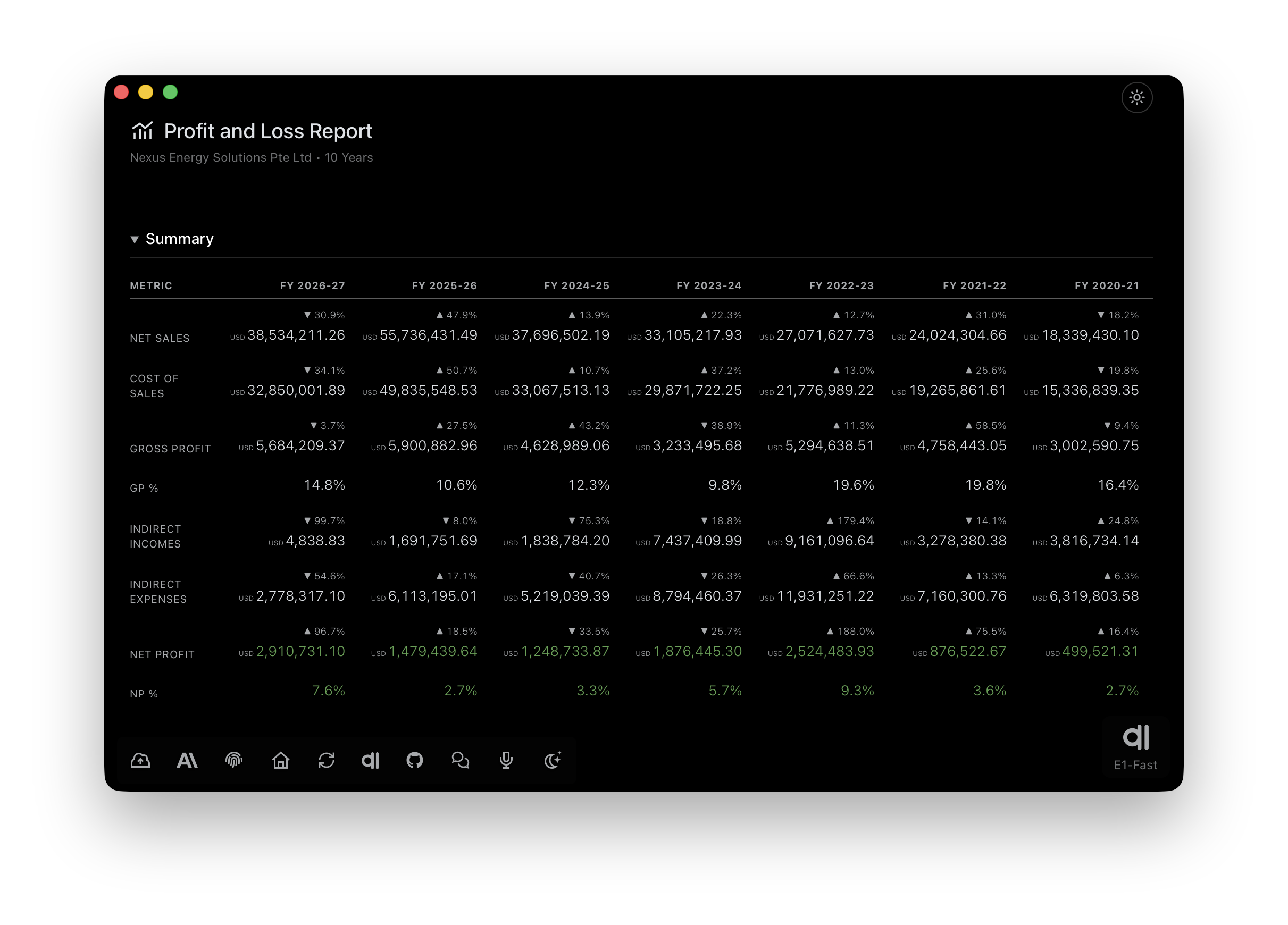
P&L for all my clients, FY 2025-26, in INR.
Every company side by side for one period. GP% and NP% per client, so the outlier shows before the fieldwork starts.
Bank balance confirmation letter for Sharma Textiles as at 31 March 2026.
An A4 letter listing every bank ledger with its closing balance on that date, from Tally, in INR — ready for the bank’s seal.
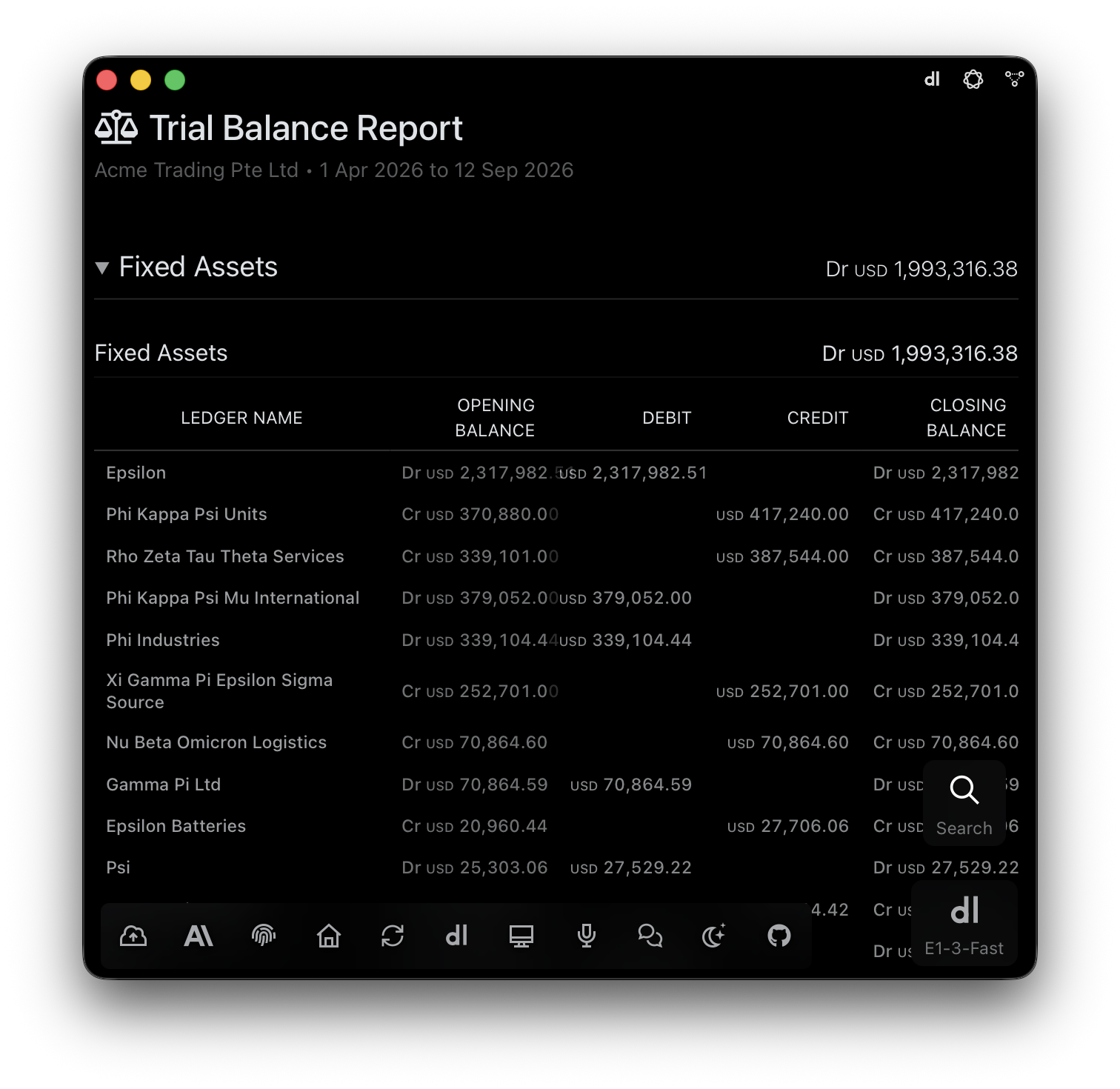
E1pi Mac app · Trial Balance, grouped by account type, read live
The twelve reports, for every client.
The same twelve, whichever client, in one layout. Live, drillable to the voucher, any span — a month, twelve months across, up to twelve financial years — and all clients side by side for one period.
The twelve reports, explained →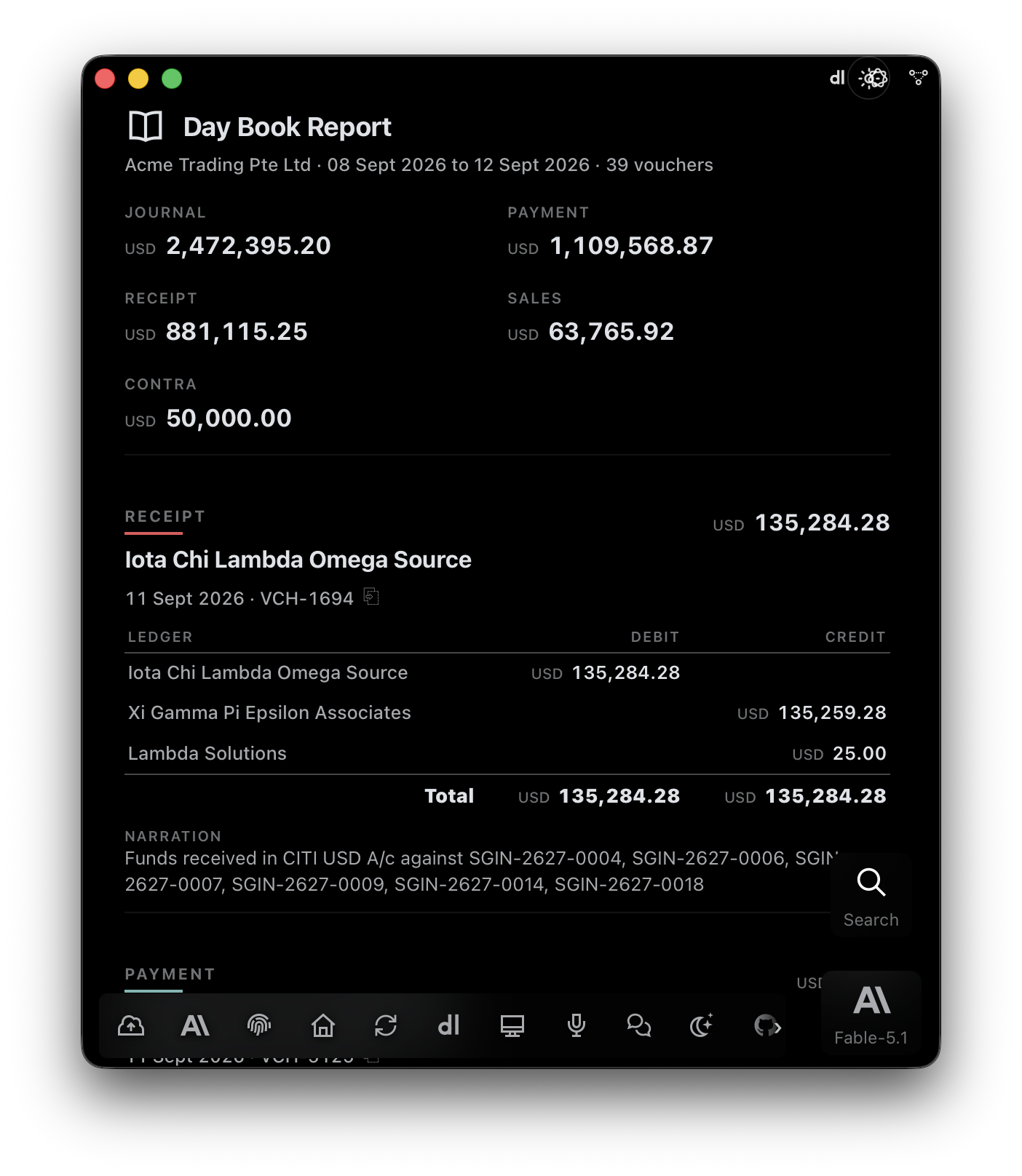
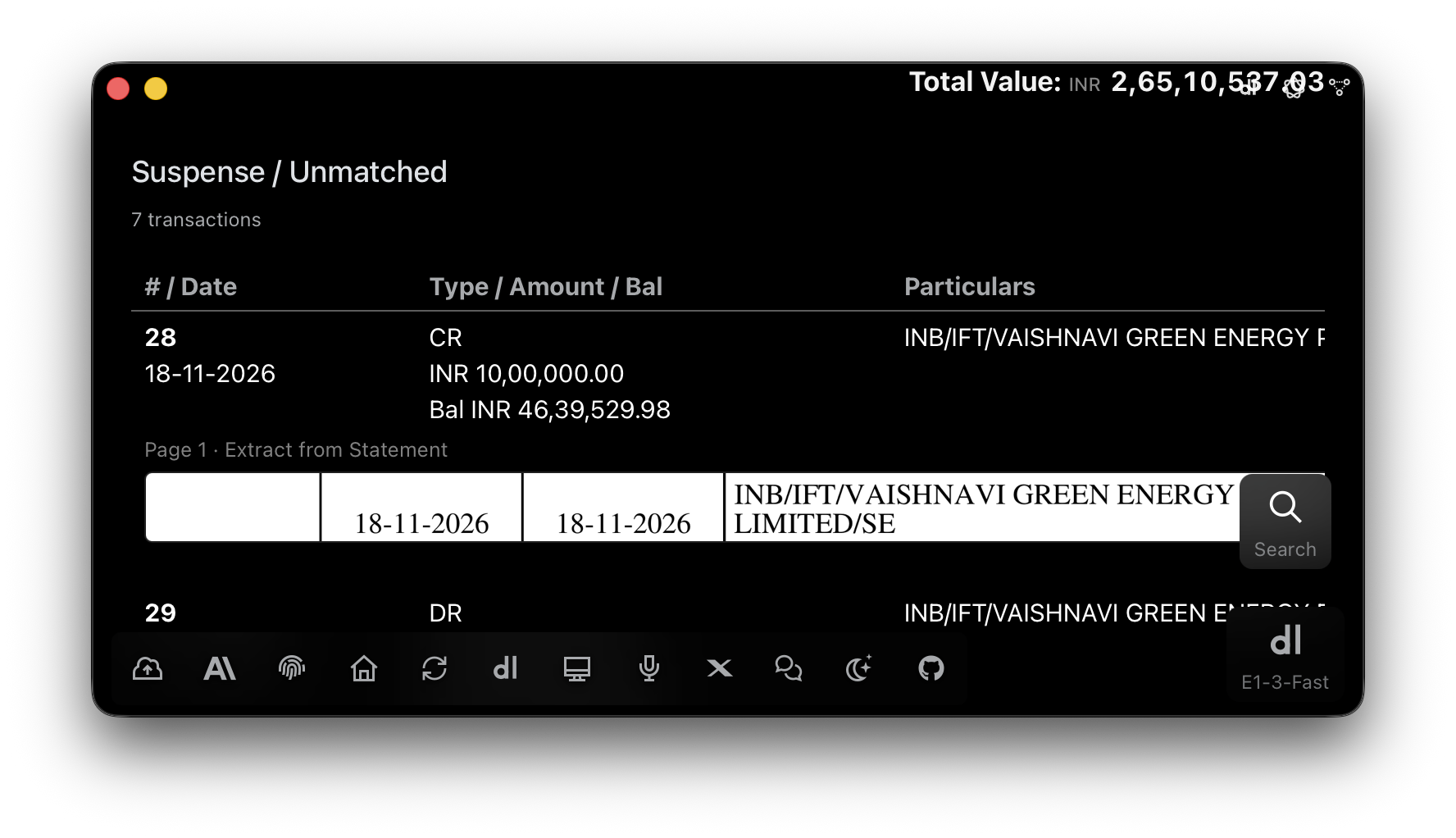
Bank reconciliation, from the statement itself.
Drop the client’s bank statement PDF. E1pi reads every line, matches each one to the Tally ledger, and shows the statement row highlighted beside the voucher it proposes. What it cannot match goes to a Suspense list for your call — not into the books.
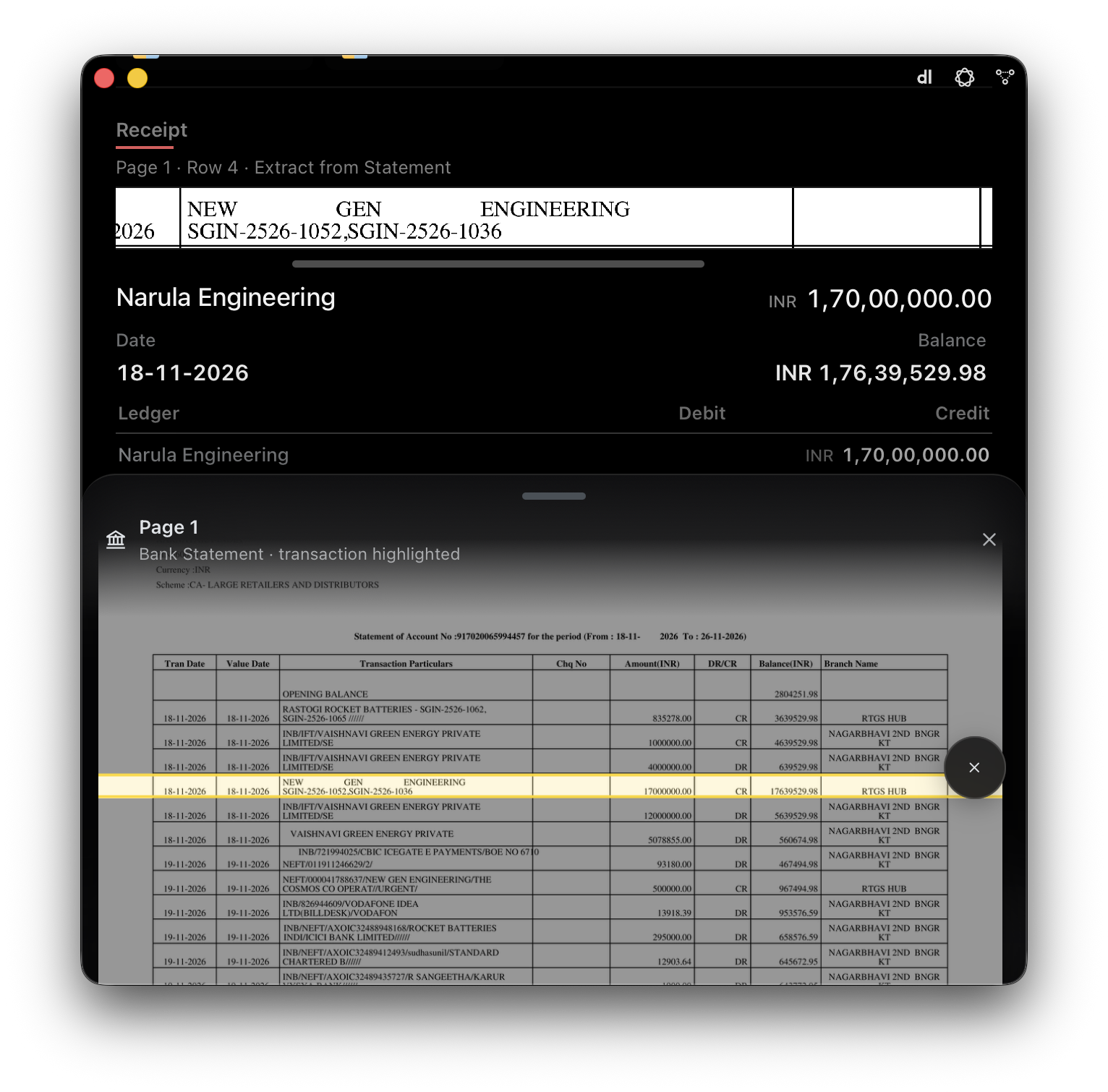
An Indian bank statement in INR · the proposed receipt and its source row, highlighted
- The statement line, in sight.Hover a value and the source row lights up on the statement page. Evidence and entry, never apart.
- Unmatched stays unmatched.Own-account transfers, an unknown NEFT — listed with their extracts and running balances, waiting for a ledger call. The reconciling items write themselves.
- Vouchers by ledger, by date, by narration.Cash above a limit, journals in the last week of March, every entry naming a related party — one sentence each.
- Search the whole year.Party, narration, amount, invoice or PO number — across every month of a client’s books, in under a second.
- If the books are yours to keep.For clients whose accounts you also write, one tap posts the voucher to Tally natively — after the sign-off you configure. Undo pulls it back.
Your audit programme, written once. Run on every client.
A skill is a check written in plain words — your thresholds, your wording. Share it with the firm or keep it to a partner. Article assistants run it on every client; the exceptions come back; a partner reviews.
Checks a firm writes once
- Cash payments above the limitEvery payment voucher on Cash above your threshold, with narration and party, for the year — the 40A(3) list.
- Cash receipts near the 269ST lineReceipts from one party, one day, one event — grouped, so the split ones show.
- TDS where it was dueContractor and professional payments against the TDS ledgers — 194C, 194J — and the ones with none.
- Statutory dues paid lateGST, PF, ESI and TDS ledgers: what was due, what was paid, when — the 43B and CARO list.
- Related parties, every entryName the parties once. Every voucher that touches them, with the balance at year end.
- Last-week journalsJournal vouchers in the last ten days of March, by amount, with who passed them.
- Round sums and duplicatesRound-figure payments, the same amount twice to one party, the same invoice number twice.
- Negative cash, negative stockAny day the cash ledger or a stock item went below zero, and the vouchers that took it there.
- ITC claimed, not in 2BThe purchase register’s GST against the 2B the client drops in — the gap, by supplier.
- Fixed assets and depreciationAdditions in the year with their bills; the schedule recomputed at the rates you name.
Run the year-end programme on Sharma Textiles for FY 2025-26 and list the exceptions.
Then: Same for every client. One list per client, exceptions only, each with the voucher behind it.
Country- and state-specific checking skills for known fraud and compliance issues are published continuously — inland transport bills with GST, e-Way Bill, RCM and TDS checks already. Download the skill, check the bills.
The admin decides which skills and tools each person can use. A partner’s private skill stays private; the firm’s programme is shared with everyone. Every run is logged under the person who ran it.
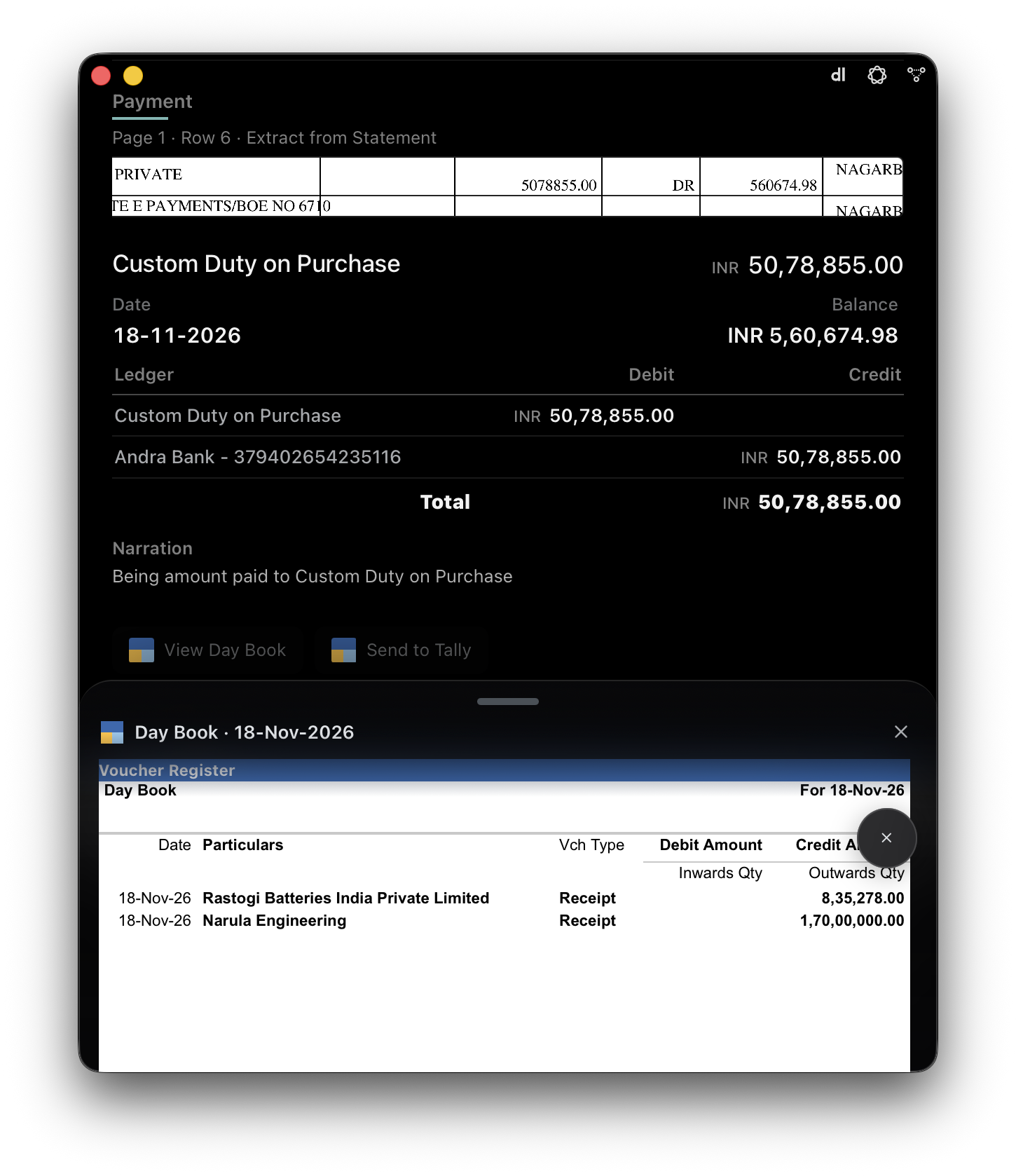
Every exception opens to its voucher · Tally’s own Day Book a tap away
Confirmations and working papers — drafted, not typed.
The letters come from the books. The record comes from the work. A CA reads, then presses Send.
- Bank balance confirmation letter.One sentence. An A4 letter listing every bank ledger of the client with its closing balance as at the date, read from Tally, in INR with Indian grouping. Ready for the bank’s seal.
- Debtor and creditor confirmations.The ageing picks the parties. E1pi drafts one email per party with the balance and the period; the drafts stack, you review each, press Send as yourself. Replies land in the same thread.
- Audit queries to the client.Questions from the exceptions list, drafted per client, sent on WhatsApp or email after your review. The answers and the documents come back into the same conversation, filed under that client.
- Working papers that keep themselves.Every call the AI makes is logged — one timeline per user, stitched in order. What was checked, on which client, by whom, when. Export any user’s month.
- Nothing signs itself.Filing, posting and sending wait for a person. You decide who, and how many — one partner, or two in sequence, with reminders until done.
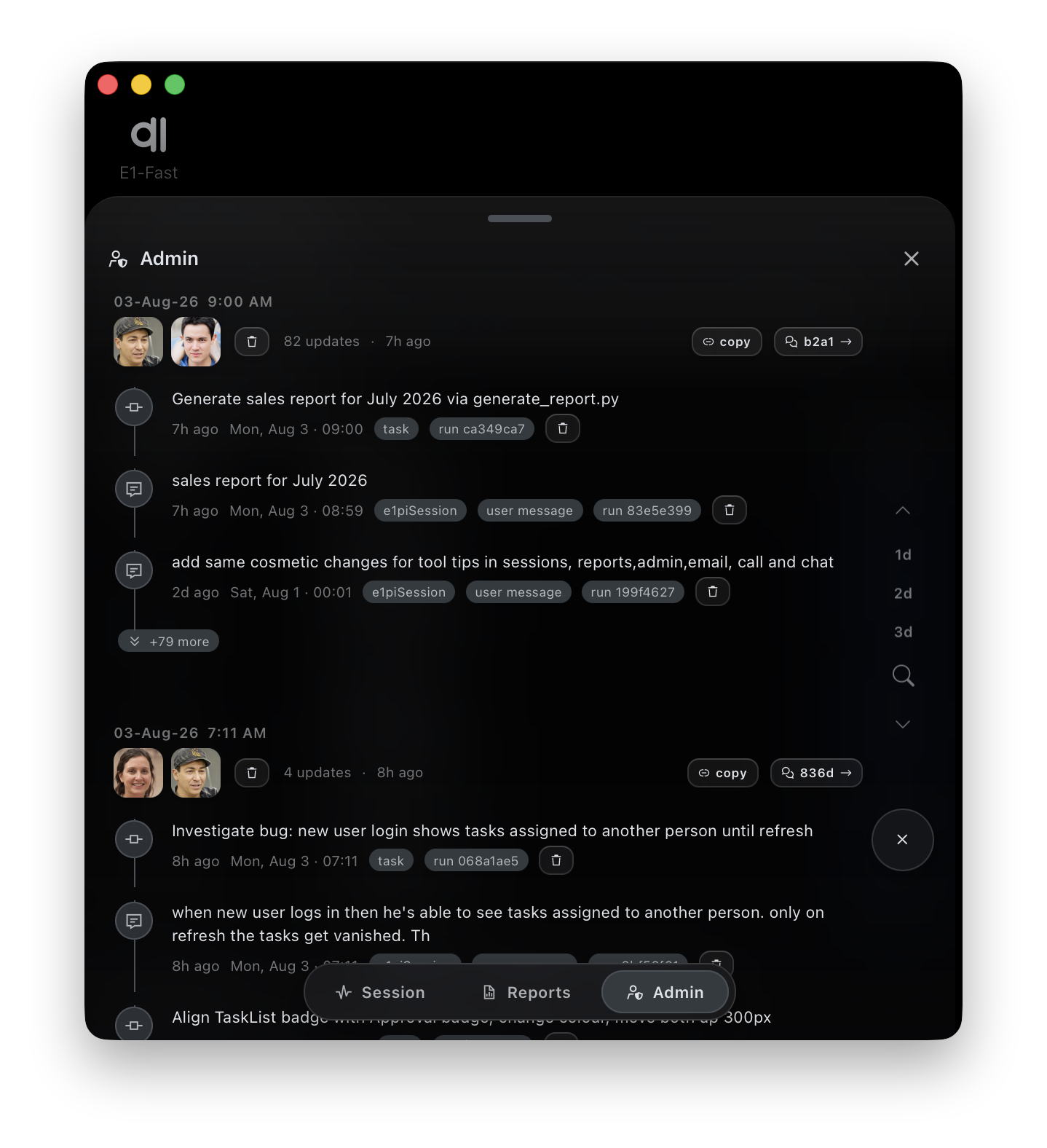
Admin view · one timeline per user, every AI call in order, the session a tap away
It is not AI versus people. It is your articles with E1pi versus the other firm’s articles without it.The E1pi stance: humans start, steer and approve. No autonomous filings, no agent swarms.
Clients on WhatsApp. Team on Teams. Partners on the phone.
Three ways to operate one E1pi — each one where that person already is. Official Microsoft and Meta APIs; nothing sends without a person.
Every client, every approval, in one hand.
Browser, iPhone and Mac. Reports, approvals, tasks, every client’s conversation — approvals from the lock screen when a partner is out at a client.
- Approve a voucher or a letter from the phone
- Admin sees every call the AI made, per user
- iOS notifications for the urgent ones
 Microsoft Teams
Assign a client’s checklist in one sentence.
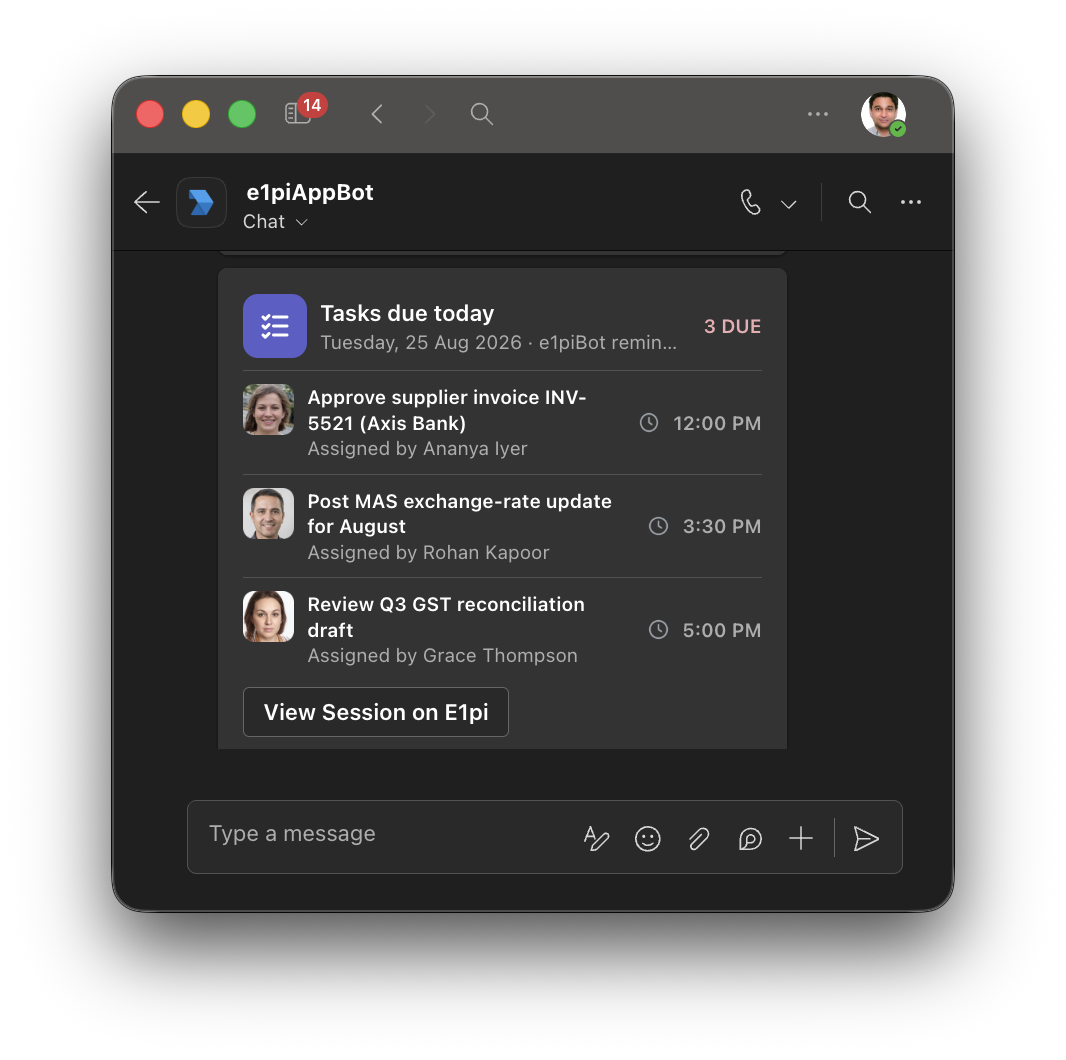
Article assistants and managers work from the chat the firm already lives in. Due-task digests every morning; a status card when a run is done; the session one tap away.
- “Run the programme on Sharma Textiles by Friday”
- Reminders until done; a permanent record of who did what
- Export a person’s month for appraisals and timesheets
 WhatsApp
They send it the way they already do.
The bank statement, the bills, the answer to a query — PDF, photo, handwritten. E1pi reads it, files it under that client, acknowledges, and routes it to the article on the job.
- Statements and bills read on arrival
- Filed under the client, linked to the voucher
- Replies drafted, sent after your review
Tasks due today, in Teams
The reminder card the team sees each morning — who, what, by when — with the E1pi session one tap away. Assign in a sentence; E1pi monitors, reminds and keeps the record.
Confidentiality, by construction.
A client’s books are a client’s books. E1pi runs on a computer in your office. Nothing sits on our servers — not the books, not the documents, not the conversations.
A public AI chat
- Files — and Microsoft 365 tokens — saved on the vendor’s servers
- Whole documents uploaded to the model
- No record of what the AI did, for whom, when
- No connection to the client’s Tally; copy, paste, retype
- Per-seat pricing, usage caps
- A knowledge cut-off; a rule that changed last month is still wrong
E1pi, in your office
- Books, documents, conversations and logs stay on your premises
- The model sees a few hundred words at a time — never a file, never a backup
- Admin sees, and can record, every call the AI makes — one timeline per user
- Reads Tally Prime live — no export, no retyping
- Unlimited users and AI, one fixed fee for the practice
- Model kept current on the notification text as it releases — or installed fully in-house, so nothing leaves at all
- No passwords.Passkey sign-in with end-to-end device encryption. On the office network: Face ID or fingerprint. From outside: biometric plus a device certificate issued by E1pi’s own CA server, with a schedule window you set.
- Not open source, not a black box.The code sits readable on your own disk. Your IT can read every line; your admin can see every AI call.
- Roles from Microsoft 365.Partners, managers and articles sign in with the accounts they have. The admin decides which tools and skills each person may run, and where old conversations are kept.
- Any recent Mac or Windows PC.Ideally the one where your Tally runs. Download the app, sign in; E1pi installs what it needs and starts, showing every command. Updates arrive the same way, when you choose.
What it costs a practice.
Charged by the work done — not tokens, not seats. One fixed monthly subscription; everything included.
- One fixed monthly subscription. No per-token bills, no credits, no caps.
- Unlimited users. Partners, managers, article assistants — everyone in the firm.
- Unlimited AI. Run the programme on every client, every day of audit season.
- Everything included. All twelve reports, every checklist skill, confirmations, the Teams and WhatsApp channels, self-install and continuous updates.
- 1 month free on live data. Cancel anytime, no questions asked.
- No upfront licence, no year-long contract, no migration. E1pi reads from Tally Prime as it is — the ERP your clients already trust, plus AI workflows.
Tell us how many clients you serve. We come back with one figure.
The fee follows the work the practice puts through E1pi, not the number of people who use it or the words the model reads. Most firms start on one client’s books in the free month and add the rest as audit season approaches.
Questions CAs ask us
Plain answers. If yours is not here, ask us on WhatsApp.
Do I need the client’s data on my own PC?
Either way works. Load the client’s data in the Tally Prime on your office PC, or link the client’s own PC to your E1pi over an encrypted tunnel so you read the books where they live. Each client is a company; you switch by name.
Which accounting software does it read?
Tally Prime natively today, along with SAP and QuickBooks. Zoho and Xero within a month. Clients on a custom or SQL system can be wired the same way, and they all land in the same twelve reports.
Will it change a client’s books?
Only when a person says so. Reports and scrutiny are read-only. Posting a voucher is a separate tap, after a sign-off you configure — one partner, or two in sequence.
Can my article assistants use it?
Yes — unlimited users. Microsoft 365 provides the sign-in and the roles; the admin decides which skills and tools each person may run, and sees every call they made, in order.
Is client data sent to the AI?
Only a few hundred words at a time — never a file, never a backup. Search and every tool run happen on your own machine. If nothing may leave at all, we install the model on your premises.
How many clients can one E1pi hold?
We run fifteen companies on one E1pi, in one view, every day — that is how E1pi was built. A practice works the same way: one company per client, all of them side by side for a period.
Does it file GST or sign anything?
No. It prepares — the GST report per document, the reconciliation, the draft letter, the adjustment entry. Filing and signing wait for a CA.
Does it know this year’s rules?
E1pi’s business model is kept current on the actual notification text as it releases — not a summary scraped from a random site. For a task that calls for it, a frontier model can be switched in. Your own thresholds live in your skills, where you can read and change them.
Which computer do I need?
Any recent Mac or Windows PC in the office, ideally the one where your Tally runs. The team reaches it from a browser, an iPhone or a Mac, on the office network or from outside with a device certificate.
How is it installed?
Download the Mac or Windows app and sign in. E1pi checks for Node.js, installs what it needs, downloads itself and starts — you watch every command. No consultant, no migration.
Can I try it today?
E1pi is in private preview until the general release in the last week of October 2026. Register for preview access and we set you up on your own clients’ books — nothing to import.
What does it cost?
One fixed monthly subscription for the practice. Unlimited users and unlimited AI — no tokens, no seats, no caps. First month free, cancel anytime. Talk to us for the figure for your number of clients.
Twenty clients. One desk.
A CA still holds the pen.
Join the private preview, or see a demo on one client’s Tally first. Either way, we set you up on your own books — nothing to import.
Or email demo@e1pi.com