Run the business.
Let E1pi run the back office.

AI for your books, bills, documents and approvals — inside the ERP you already use. Live from Day 0.

One fixed monthly price. You pay for the work done and not tokens.

Private preview now · general release in the last week of October 2026. One form for a demo or preview access — or email demo@e1pi.com

  • Data-Aware Integration with 12 ERPs
  • No Data Import or conversion. Live on your books from Day 0
  • 1B AI model, LoRA-tuned for business, running on our own hardware under a zero data retention policy — self-host option available
  • Windows/Mac on-premise harness — every tool run happens locally; files, conversations and search index never leave your premises
  • Model and harness tuned together to spend fewer tokens per task — one fixed monthly fee, no token limits
  • Use or customise any predefined AI workflow
  • Add 2-way Microsoft Teams & WhatsApp integration to any workflow — plus iOS notifications for urgent matters

Preview customers only. The installers below are for customers we have set up on the private preview. Not on it yet? Register here.

iPhone and iPad TestFlight · 1.0 (69) TestFlight
Mac DMG · 1.0 (73) · 920 KB Download
Windows 1.0.17 · x64 · 42.6 MB Download

The E1pi app,
running on macOS.

Reads the purchase order, generates all the shipping documents, books the vessel schedule and monitors the transit. All from a single app.
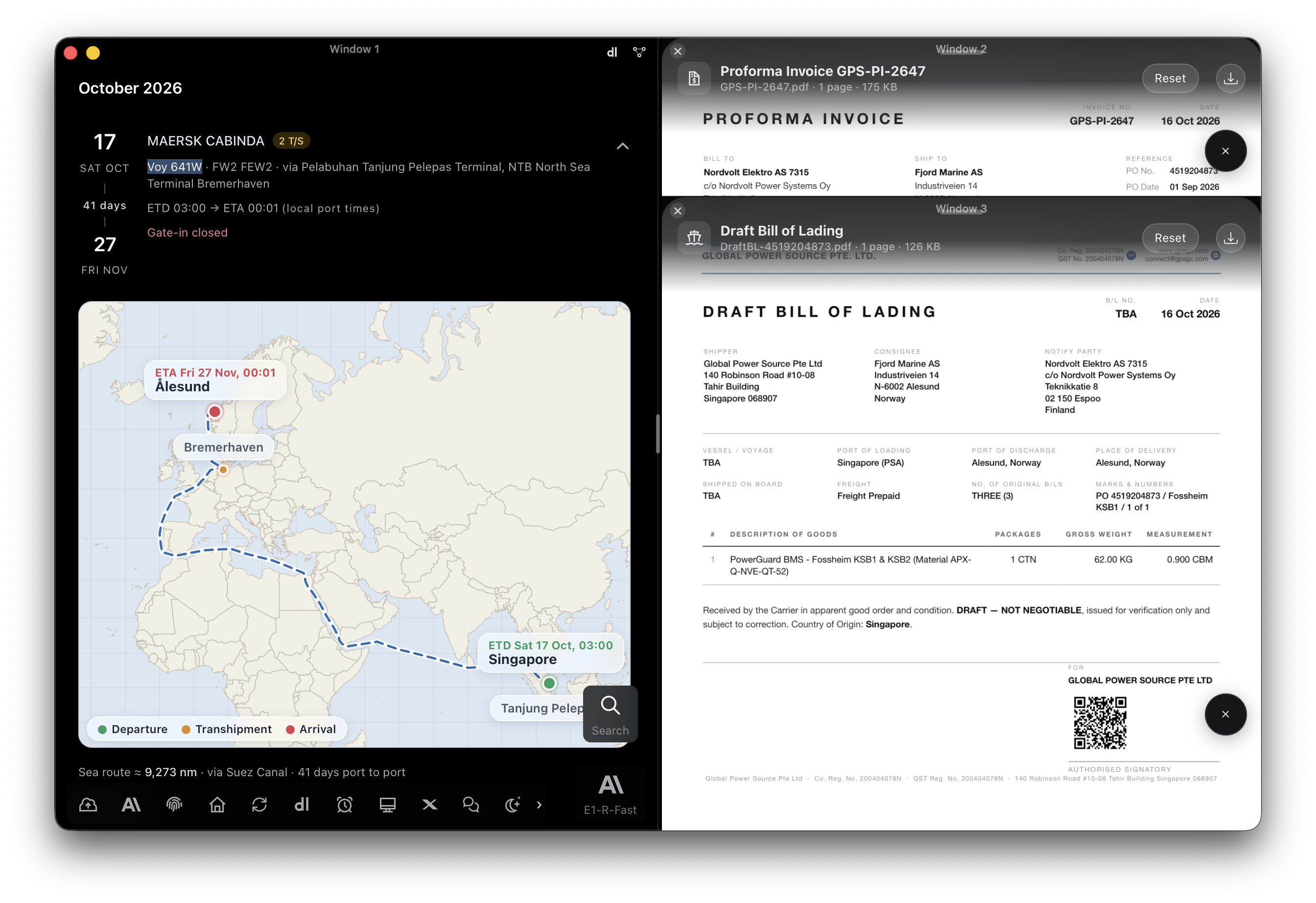
E1pi Mac app, three windows side by side: a Maersk sailing from Singapore to Ålesund — MAERSK CABINDA voyage 641W, ETD 17 Oct, ETA 27 Nov, 41 days via Suez, the route drawn on a map with departure, transhipment and arrival — and beside it the Proforma Invoice GPS-PI-2647 and the Draft Bill of Lading for the same order, ready to download

E1pi Mac app · a Maersk sailing, the Proforma Invoice and the Draft Bill of Lading, side by side

Runs at your place. Reads your books live.

A PC in your office runs E1pi beside your accounts software. Your data never leaves. The model sees a few hundred words at a time — never a file, never your books. Nothing posts or sends without a person’s yes.

Runs at your place · Reads your ERP live · One fixed monthly price

Every video here is a real screen recording. Nothing staged, nothing generated. Fake Mode swaps real names and figures for fictional ones — that is the only edit.

Twelve reports. Any ERP. One layout.

Tally Prime, SAP, QuickBooks or your own system. Ask in plain words — the report is drawn live from the books.

Profit & Loss Are we making money, and where? Any span, any companies. GP% and NP%. See it in action →
Balance Sheet What we own, what we owe — as at any date. YoY and MoM. See it in action →
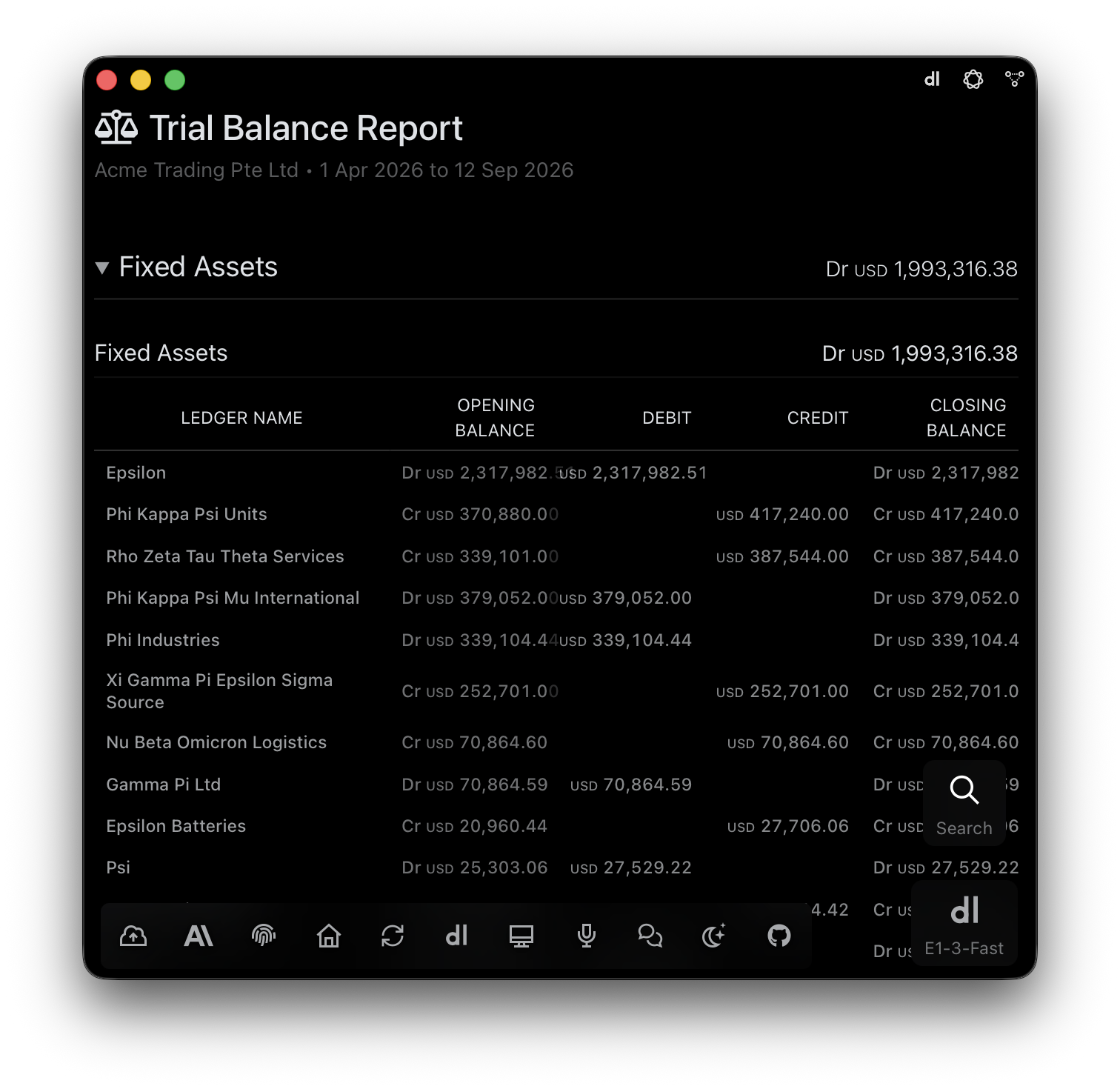
Trial Balance Every account, always tying out. Drill to ledger and voucher. See it in action →
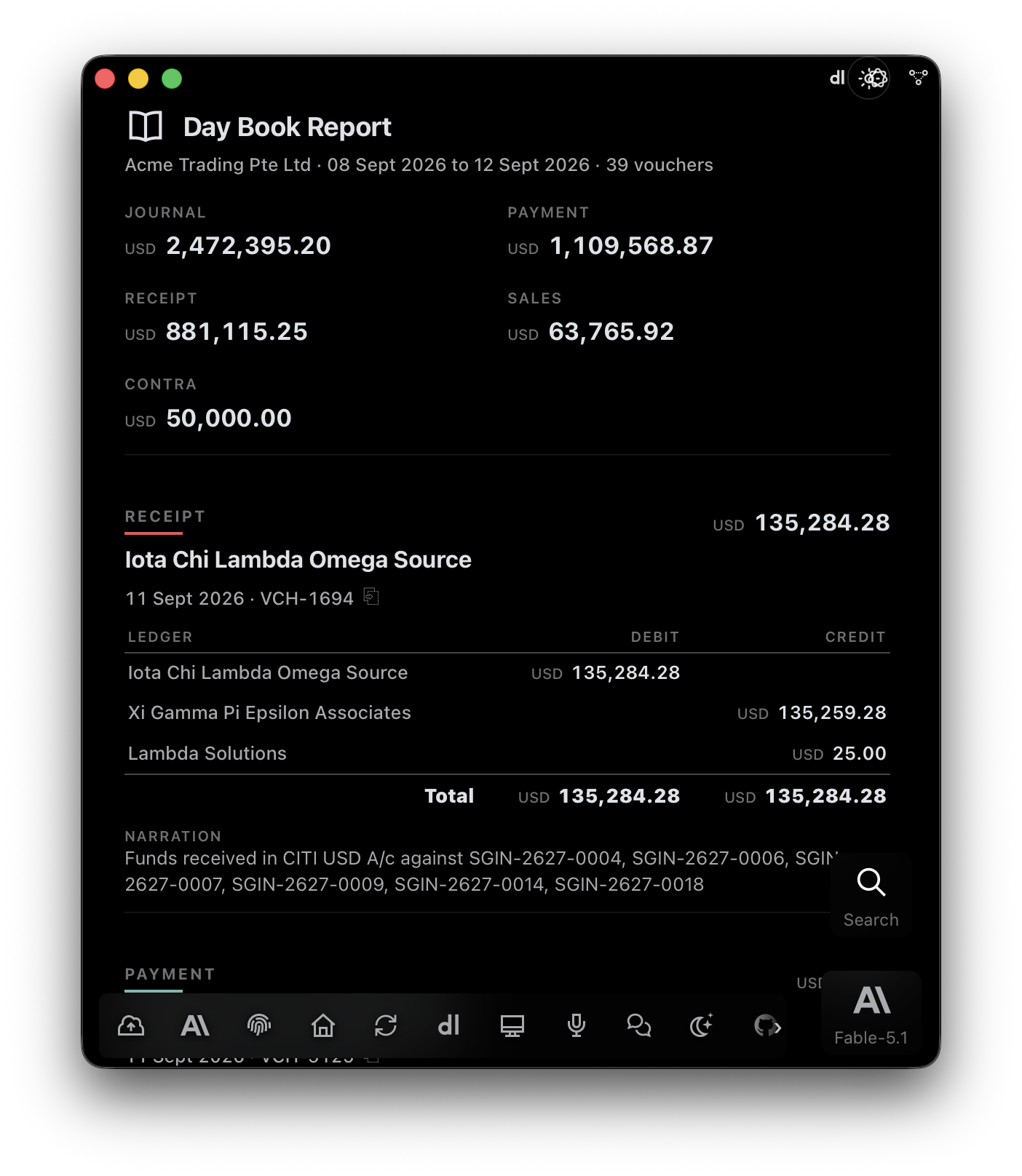
Day Book Everything that happened, any range — with the why in every narration. See it in action →
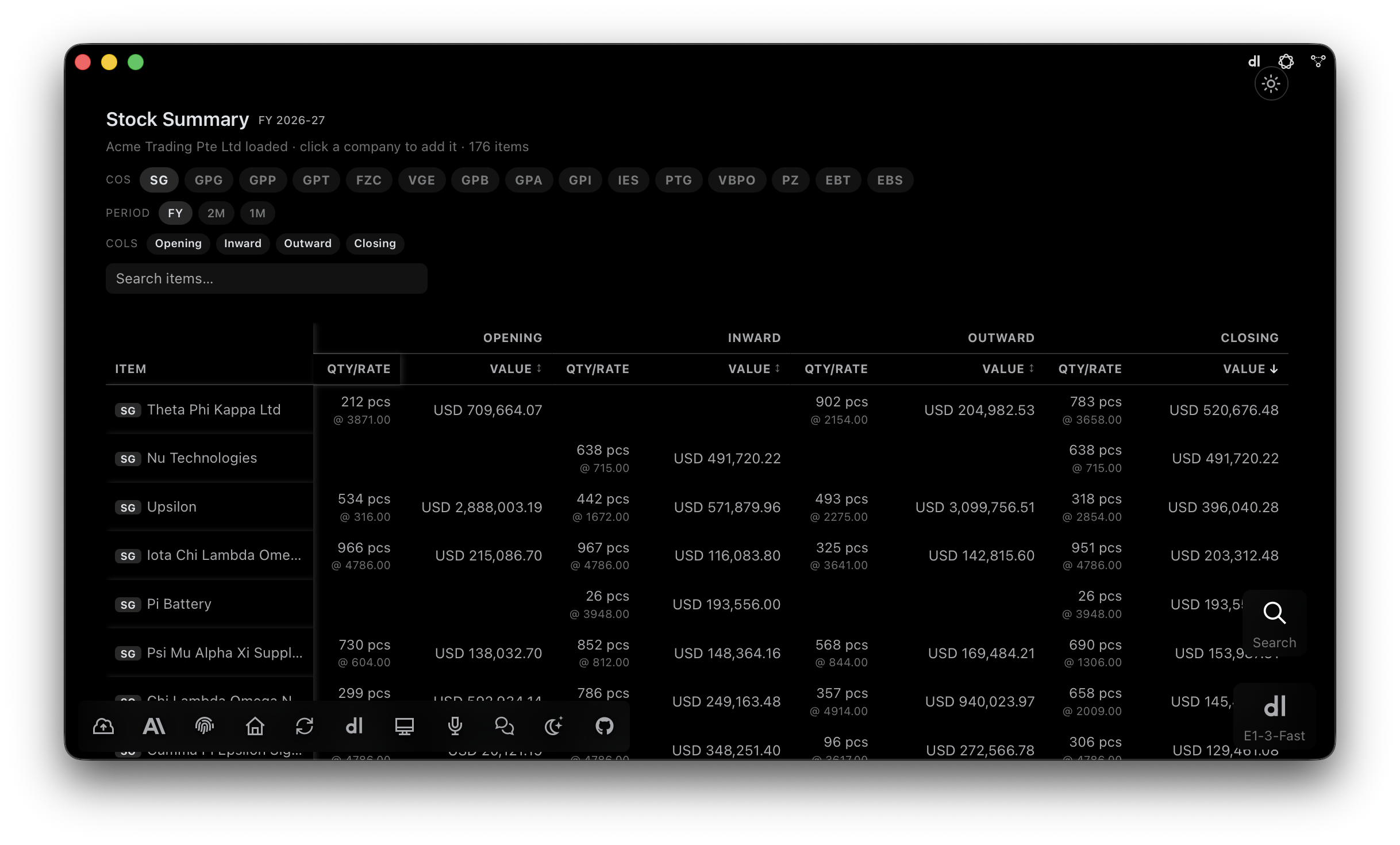
Stock Summary What is in the warehouse and what it is worth — every company at once. See it in action →
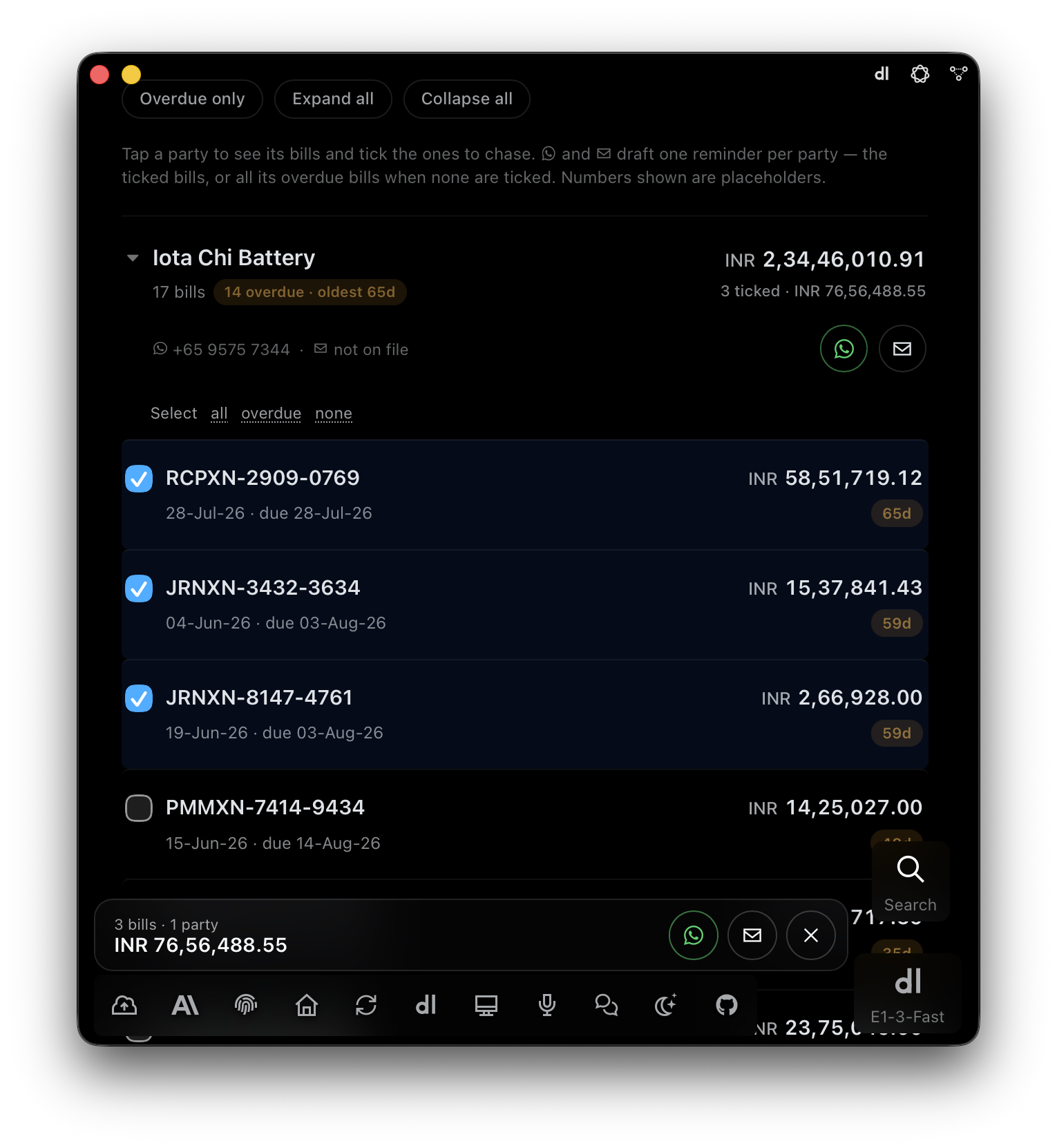
EmailWhatsAppMicrosoft Teams Bills Receivable Who owes us, and for how long. Send reminders from the report. See it in action →
EmailWhatsAppMicrosoft Teams Bills Payable Whom we owe, by due date. Payment advice in one tap. See it in action →
Sales Report Every invoice, every customer, every month. One workbook. See it in action →
Purchase Report Every bill, shipment and permit — reconciled. See it in action →
GST / Tax Report Due, filed, pending — official exchange rate on every row. See it in action →
Sales Expense with GP Every cost on its invoice. The true profit of every sale. See it in action →
EmailWhatsAppMicrosoft Teams Vendor Report Where the money goes — spend, contracts, rates, volumes. See it in action →
Live, not cached. Read from the books the moment you ask. No export, no month-end wait.
Any span. Fifteen days, six months, ten years — side by side.
Every company in one frame. Two entities or fifteen. One ask.
Tap any figure. Down to the account, the entry, the document.

Six months of P&L, on the phone. Net Sales to Net Profit, every figure with its change on the month before.

Receivables, chased from the phone. Tick the invoices, tap WhatsApp or email. E1pi drafts the reminder.
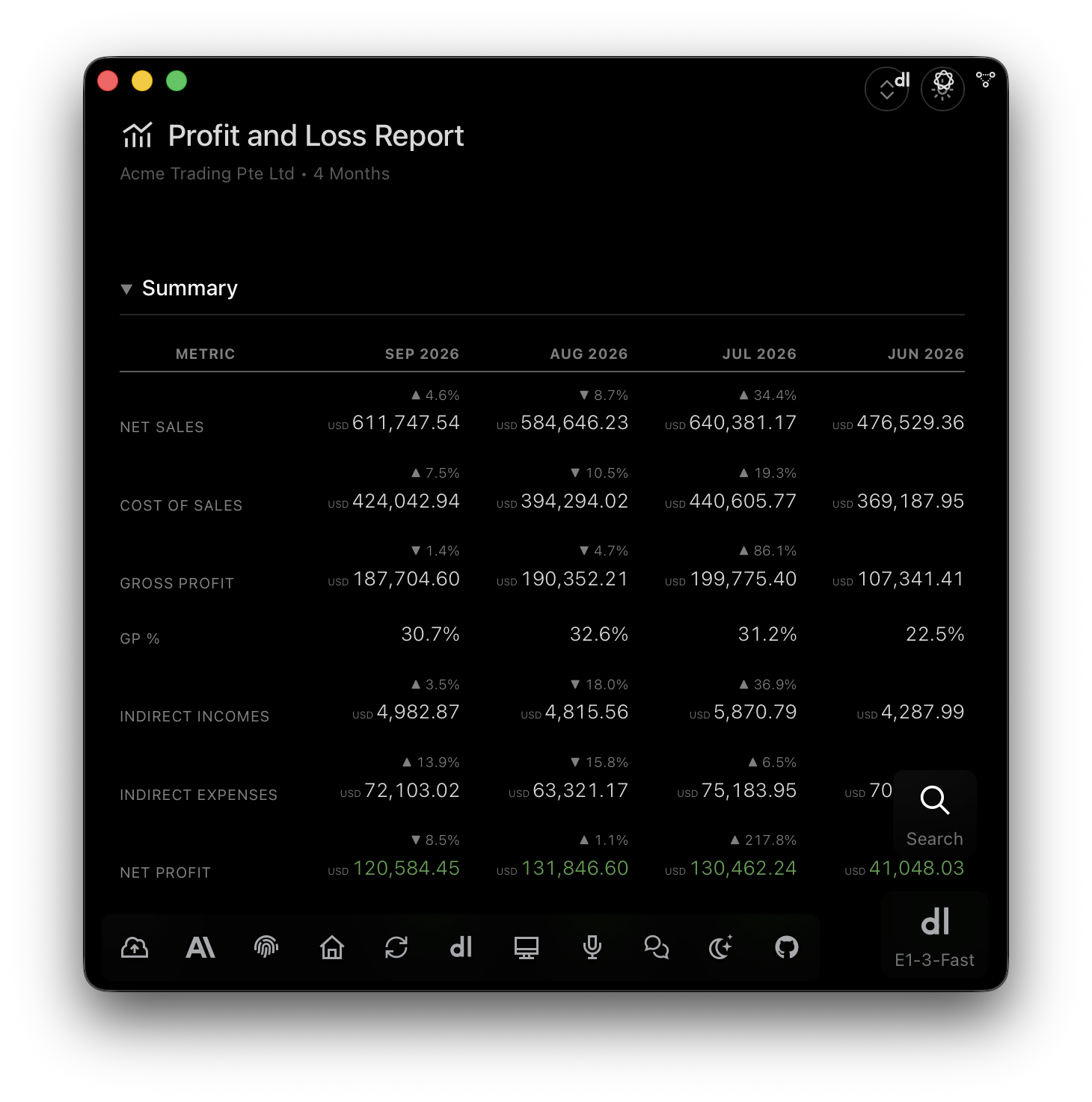
E1pi Mac app — Profit and Loss report, four months side by side: Net Sales, Cost of Sales, Gross Profit, GP%, Indirect Incomes, Indirect Expenses and Net Profit, each with its change against the previous month
Profit & Loss, month by month. Four months side by side. Every figure with its movement.
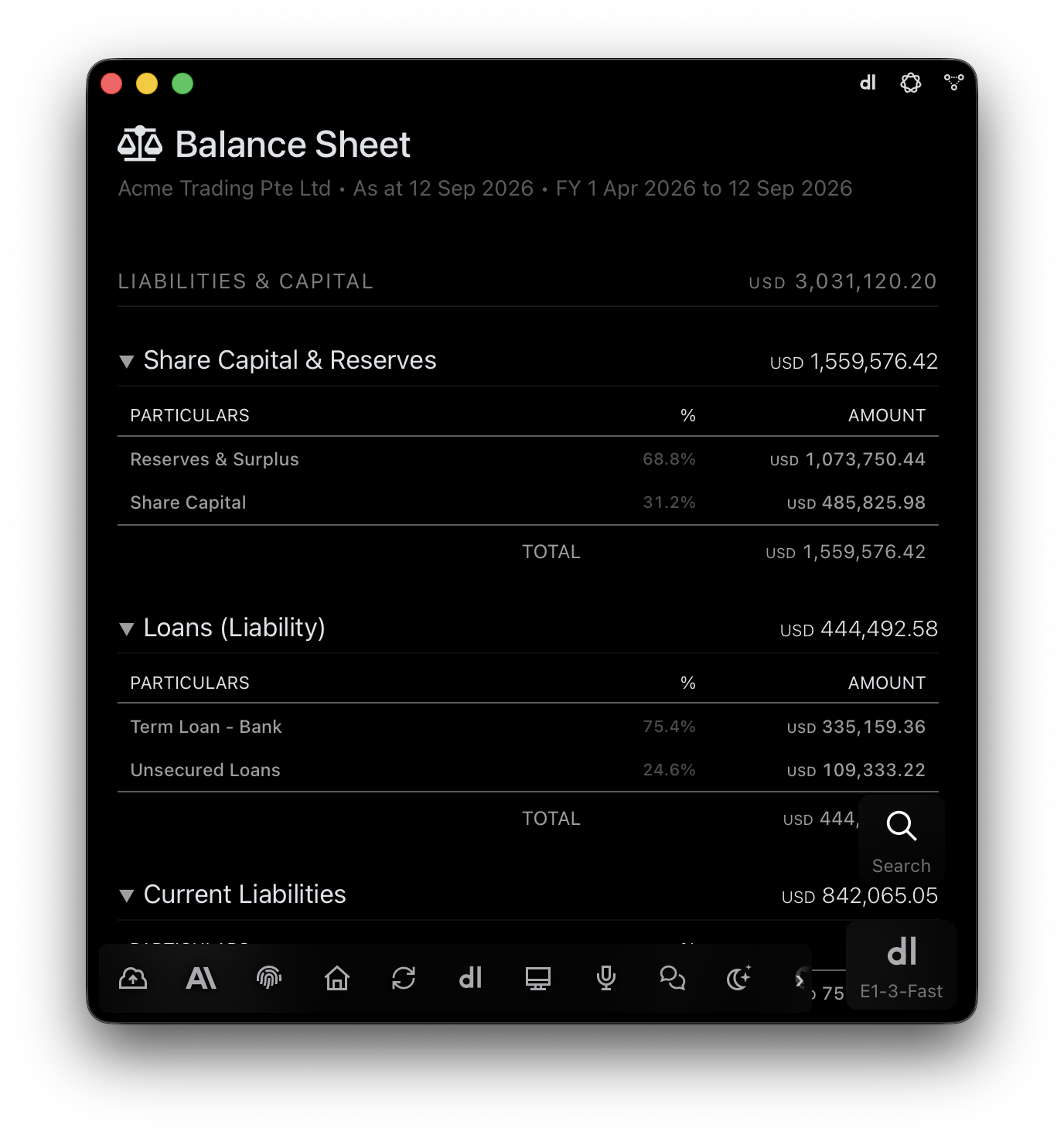
E1pi Mac app — Balance Sheet as at 12 Sep 2026: Liabilities and Capital opened into Share Capital and Reserves, Loans and Current Liabilities, each line with its percentage share and amount
Balance Sheet, as at any date. Every head opened. Every total tied.
E1pi Mac app — Trial Balance grouped by account type: Fixed Assets ledgers with opening balance, debit, credit and closing balance, Dr and Cr aligned
Trial Balance, the way auditors read it. Every ledger under its group — opening, debit, credit, closing.
E1pi Mac app — Day Book for one week: totals by voucher type (journal, payment, receipt, sales, contra) followed by each voucher with its ledgers, debit, credit and narration
Day Book, with the why. Totals by voucher type, then every voucher in full.
E1pi Mac app — Stock Summary for FY 2026-27 with company chips, period and column toggles, and per-item opening, inward, outward and closing quantity, rate and value
Stock Summary, across every company. Opening, inward, outward, closing — one company or fifteen.
E1pi Mac app — Bills Receivable, one customer expanded: 17 bills, 14 overdue, oldest 65 days; three bills ticked with their total, WhatsApp and email reminder buttons for the party, and a floating bar summing the ticked bills
Bills Receivable, ready to chase. Tick the bills. E1pi drafts one reminder per party.
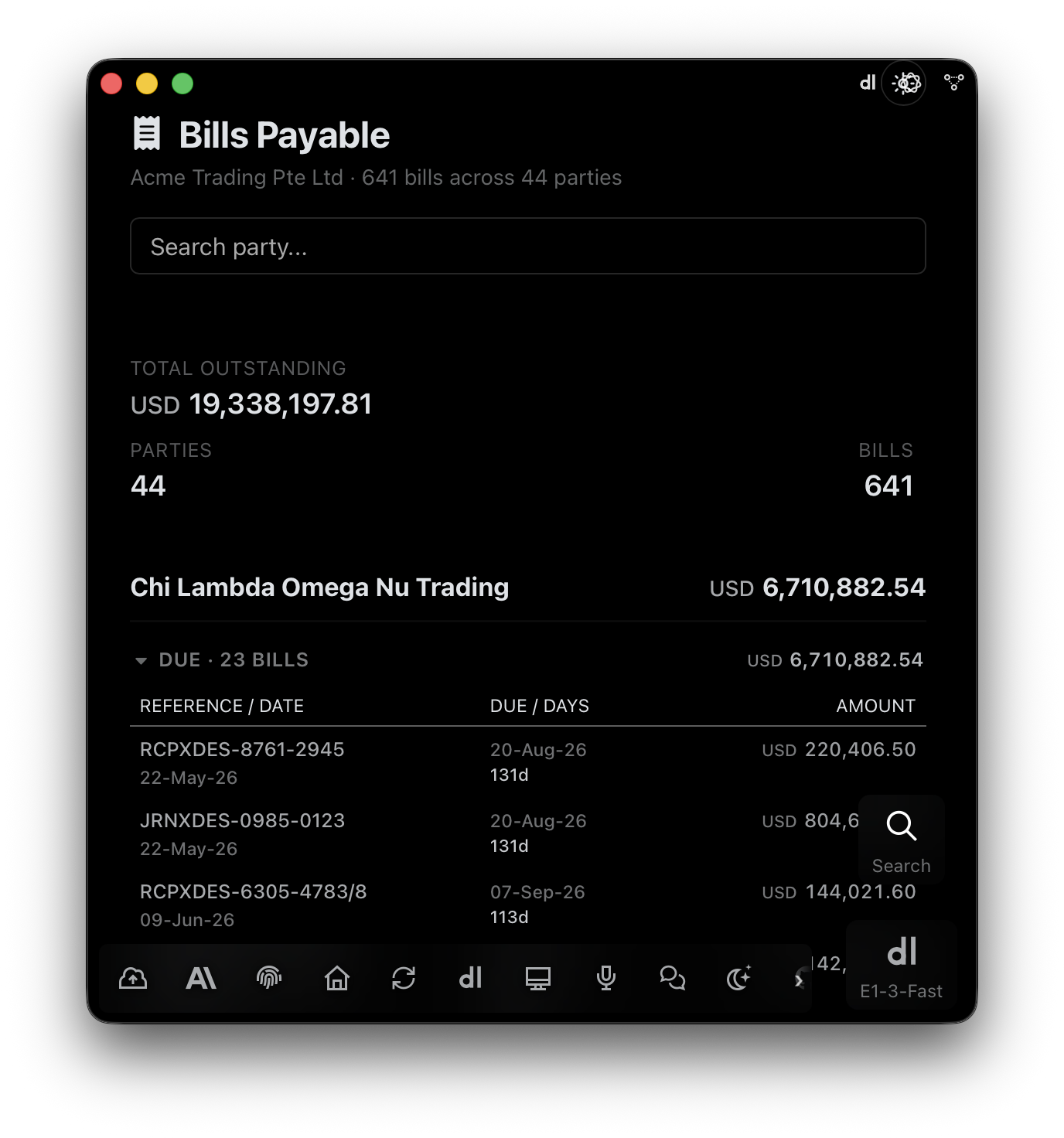
E1pi Mac app — Bills Payable: total outstanding, parties and bill count, then each supplier's due bills with reference, bill date, due date, days overdue and amount
Bills Payable, by due date. What to pay next. Payment advice one tap away.

Works inside the software you already run

Tally Prime SAP QuickBooks Zohoin 30 days Xeroin 30 days Microsoft 365 Microsoft Teams WhatsApp

Every bill checked, before it is paid

The smallest bill and the largest get the same scrutiny — against a checklist that stays current with the rules. Just say: check the bills.

Against the quote. Rate, quantity, terms — match, or flagged.
Distance actually travelled. Kilometres charged, checked against the route on the map.
Vehicle against load. The truck on the bill must be able to carry the shipment.
Has the supplier filed their tax? Checked before your payment goes out.
Before a work order is released. Budget, approvals, vendor standing — one pass.
Checklists for your country and state. New checks for known frauds keep coming — freight, transport, customs, e-filing.
The real value. Free your team from monotony. Put that energy into compliance.

Screen by screen

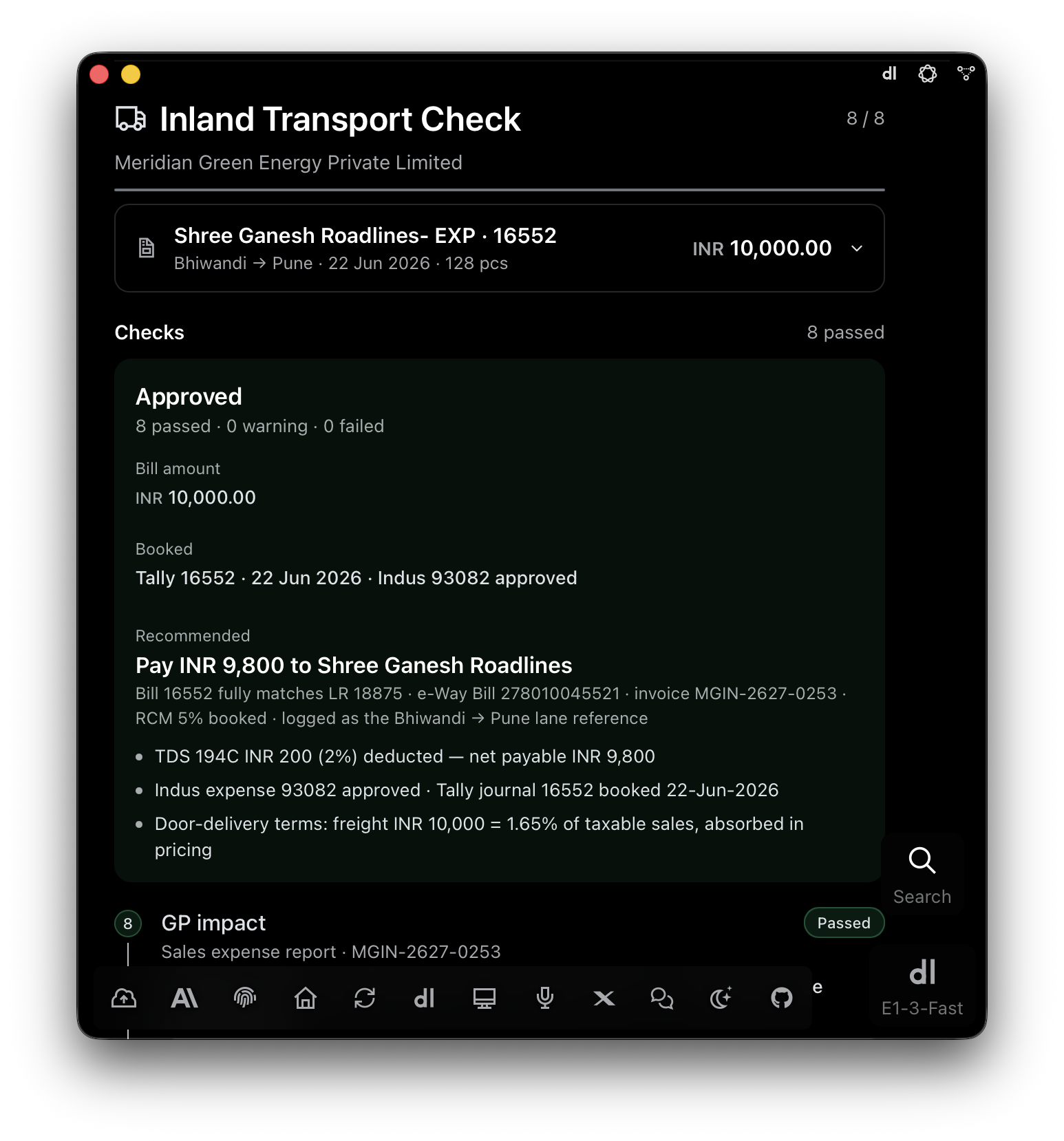
E1pi Mac app — Inland Transport Check 8 of 8, Approved: 8 passed, 0 warning, 0 failed. Bill INR 10,000.00 booked in Tally 16552 and Indus 93082; recommended pay INR 9,800 to Shree Ganesh Roadlines after TDS 194C
Approved, 8 of 8. Booked in Tally and the ERP. Pay INR 9,800 after TDS.
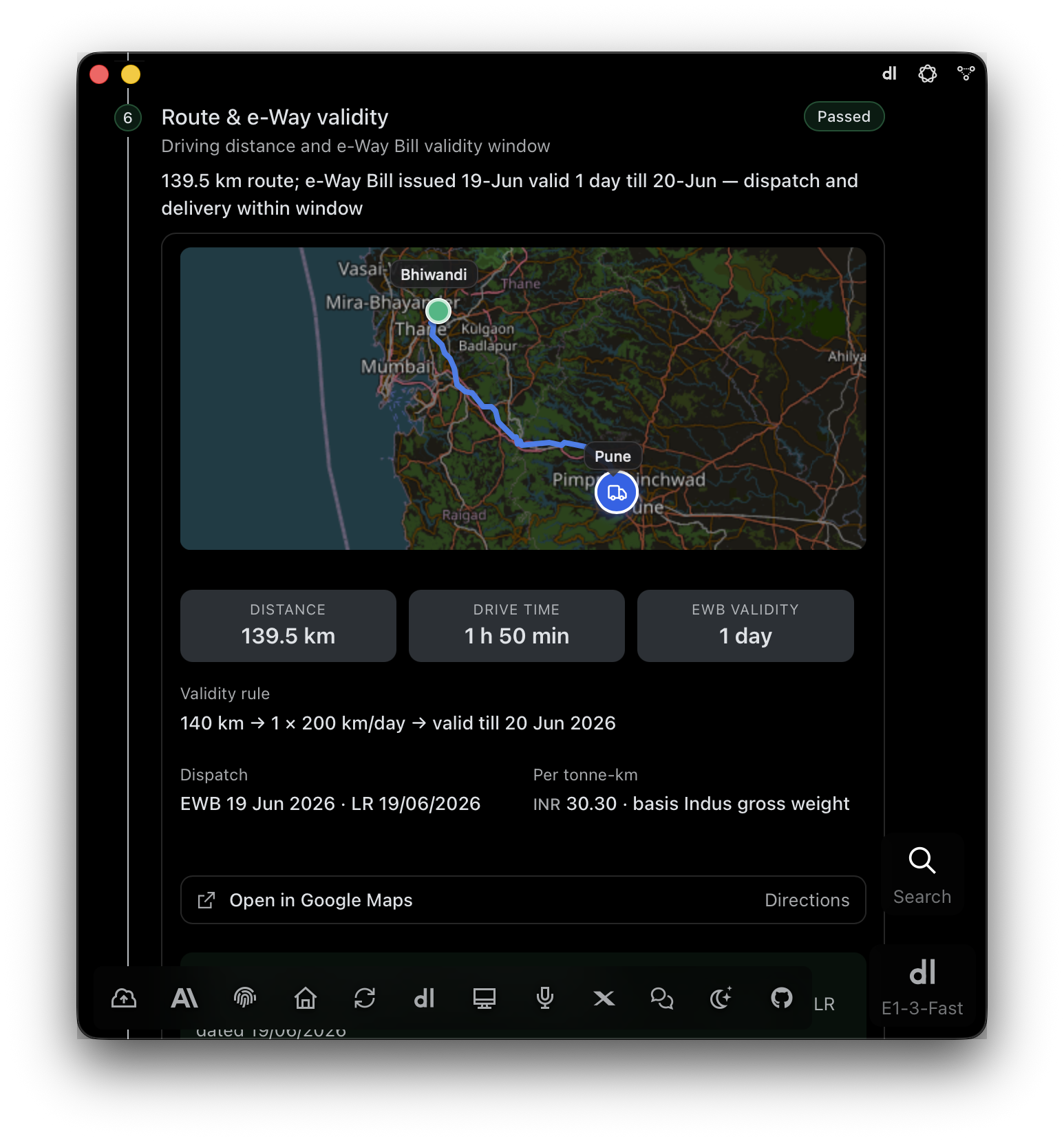
Check 6 — Route and e-Way validity: 139.5 km Bhiwandi to Pune on the map, drive time 1 h 50 min, e-Way Bill valid 1 day under the 200 km-a-day rule, dispatch and delivery within window
Route and e‑Way validity. 139.5 km on the map. The e‑Way Bill was valid, and the truck moved inside it.
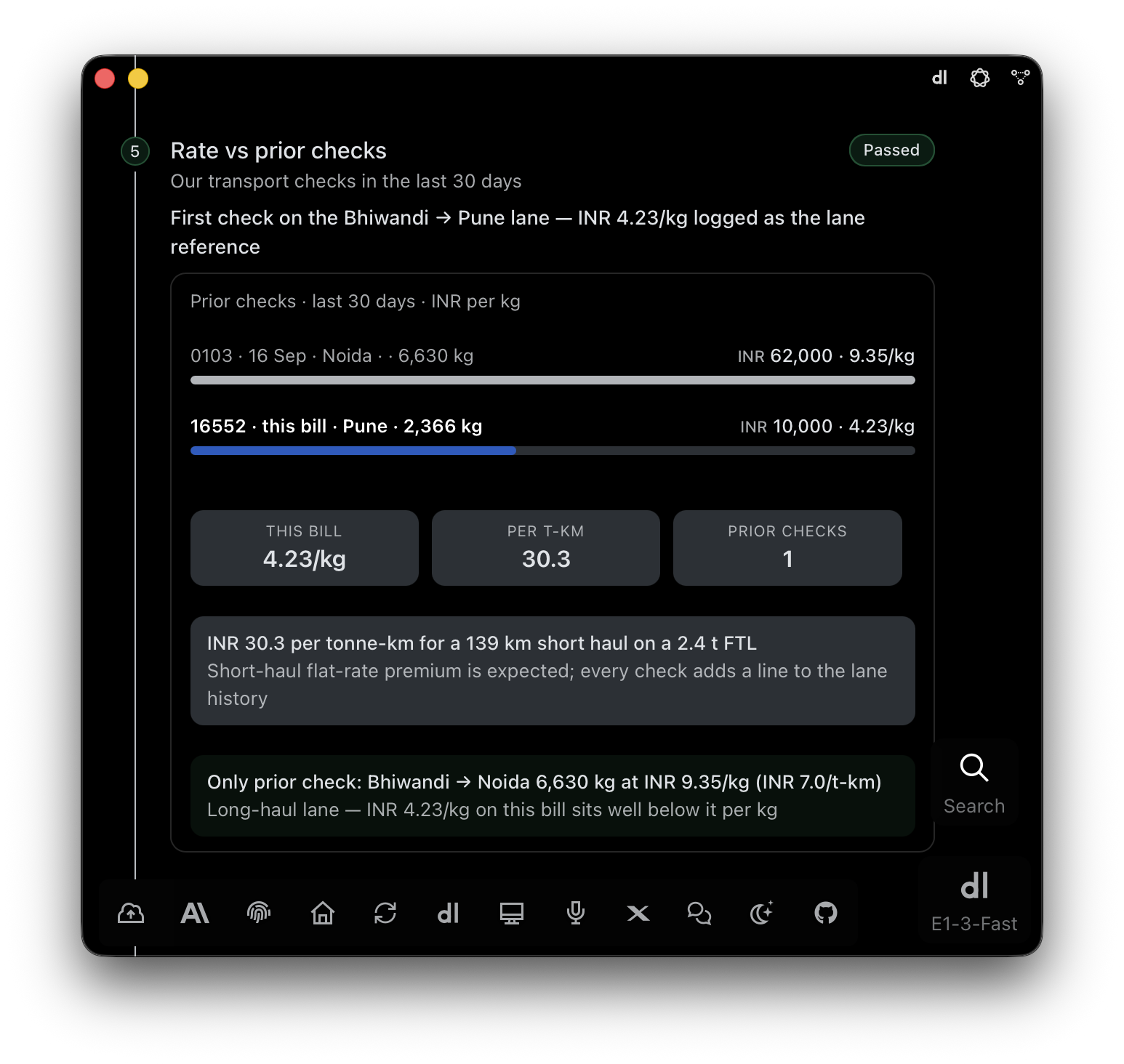
Check 5 — Rate vs prior checks: INR 4.23 per kg on this bill against our transport checks in the last 30 days, INR 30.3 per tonne-km, logged as the Bhiwandi to Pune lane reference
Rate against the lane. INR 4.23 a kg, against 30 days of your own checks.
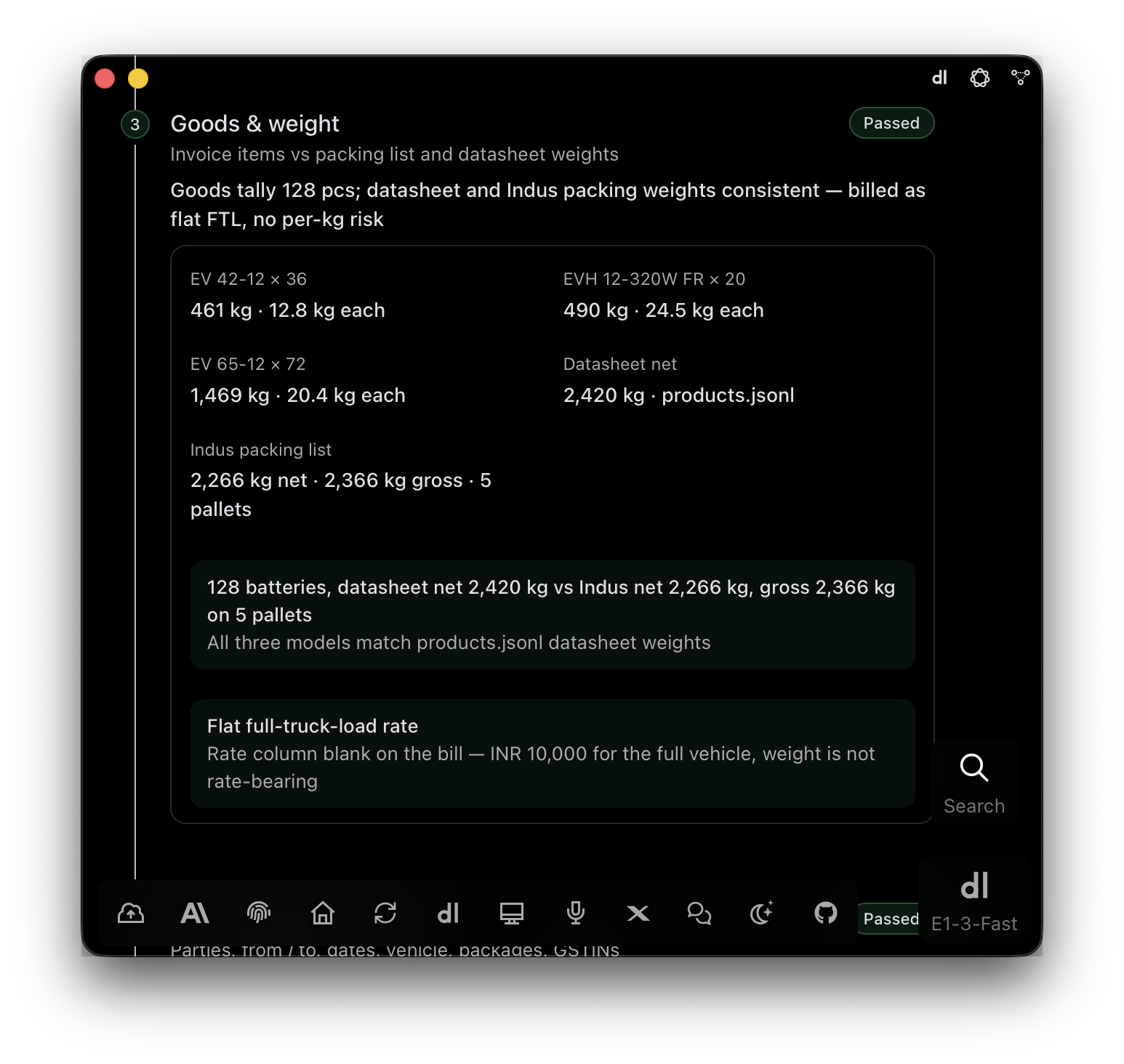
Check 3 — Goods and weight: 128 batteries across three models, datasheet net 2,420 kg vs Indus packing list 2,266 kg net and 2,366 kg gross on 5 pallets, billed as flat full-truck-load
Goods and weight. 128 batteries. Datasheet weight against the packing list.
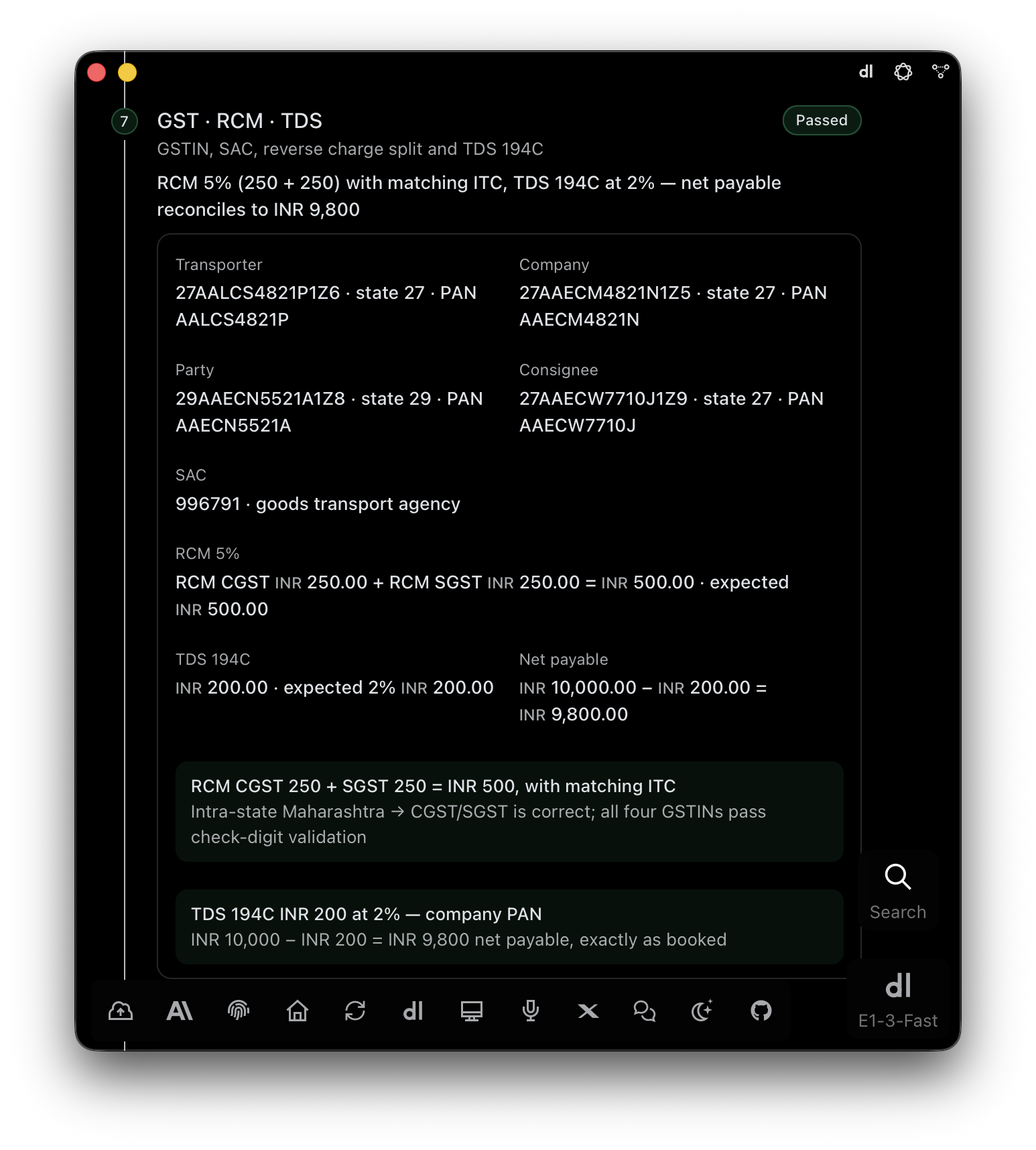
Check 7 — GST, RCM and TDS: four GSTINs pass check-digit validation, SAC 996791, RCM 5% split CGST 250 + SGST 250 with matching ITC, TDS 194C INR 200 at 2%, net payable INR 9,800
GST, RCM and TDS. Four GSTINs verified. Reverse charge, TDS, net payable — worked out.

Drop in a bank statement.
Get vouchers.

E1pi reads every line, matches the ledger and drafts the voucher with the statement row pinned to it. You post the ones you approve.

E1pi iPhone app · iPhone 17 Pro Max · 1 min 43 s · spoken walkthrough, tap the speaker
Any bank, one PDF. Every line matched to a ledger — 2,454 of them here. Narration written.
The line travels with the voucher. Tap a figure; the source row lights up.
Send to Tally. Undo if you like. Posted, confirmed in the Day Book, reversible in one tap.
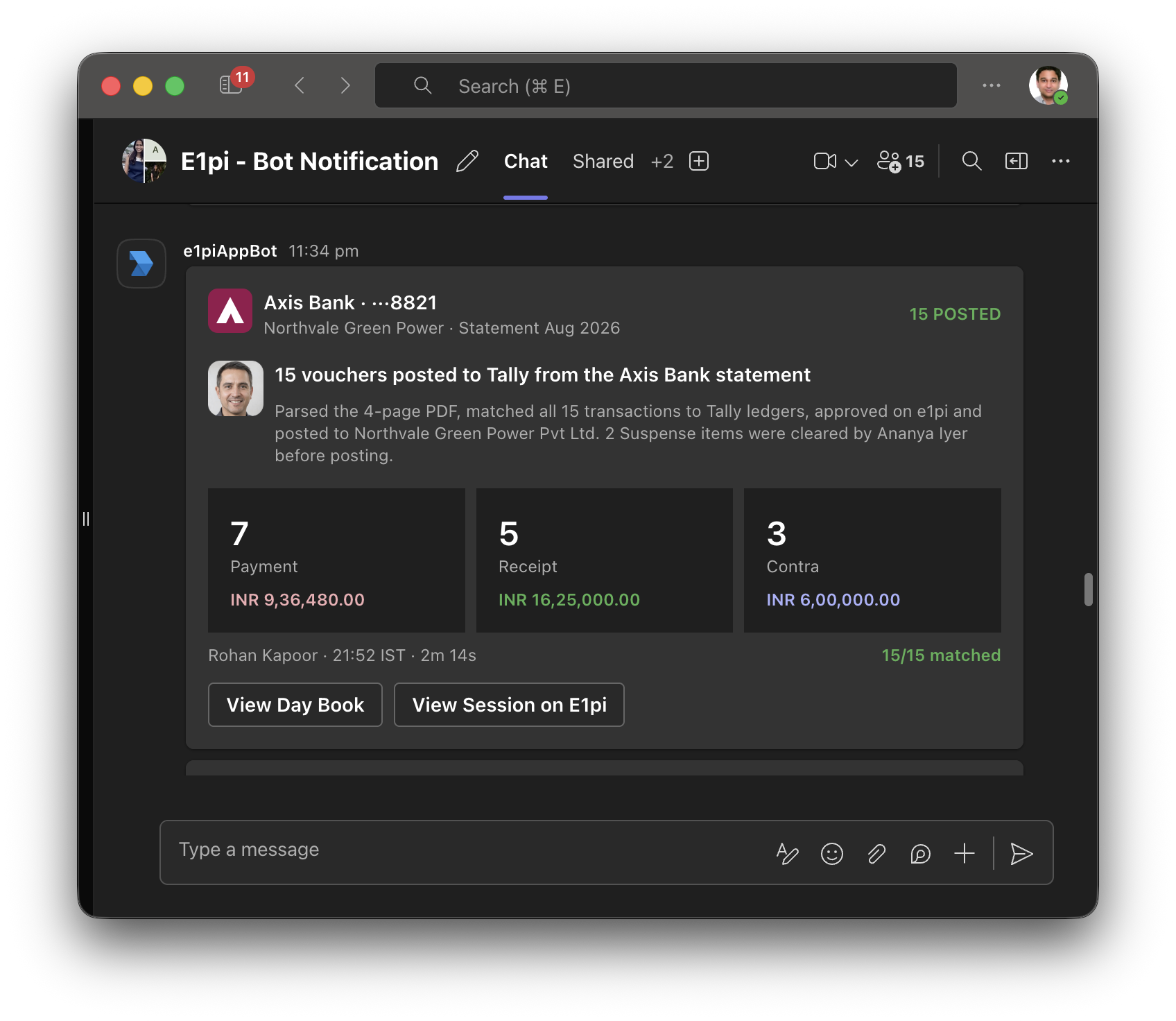
Announced in Teams. What was posted, by whom, how many matched.
Microsoft Teams — E1pi Bot Notification: 15 vouchers posted to Tally from the Axis Bank statement for Aug 2026; 7 payments INR 9,36,480.00, 5 receipts INR 16,25,000.00, 3 contras INR 6,00,000.00; 15 of 15 matched, 2 suspense items cleared before posting; View Day Book and View Session on E1pi buttons

Microsoft Teams · finance chat

Posted, and everyone who should know, knows.

A card in the finance chat: bank, month, totals, who approved, a button to the Day Book.

An audit log, filed with every posting.

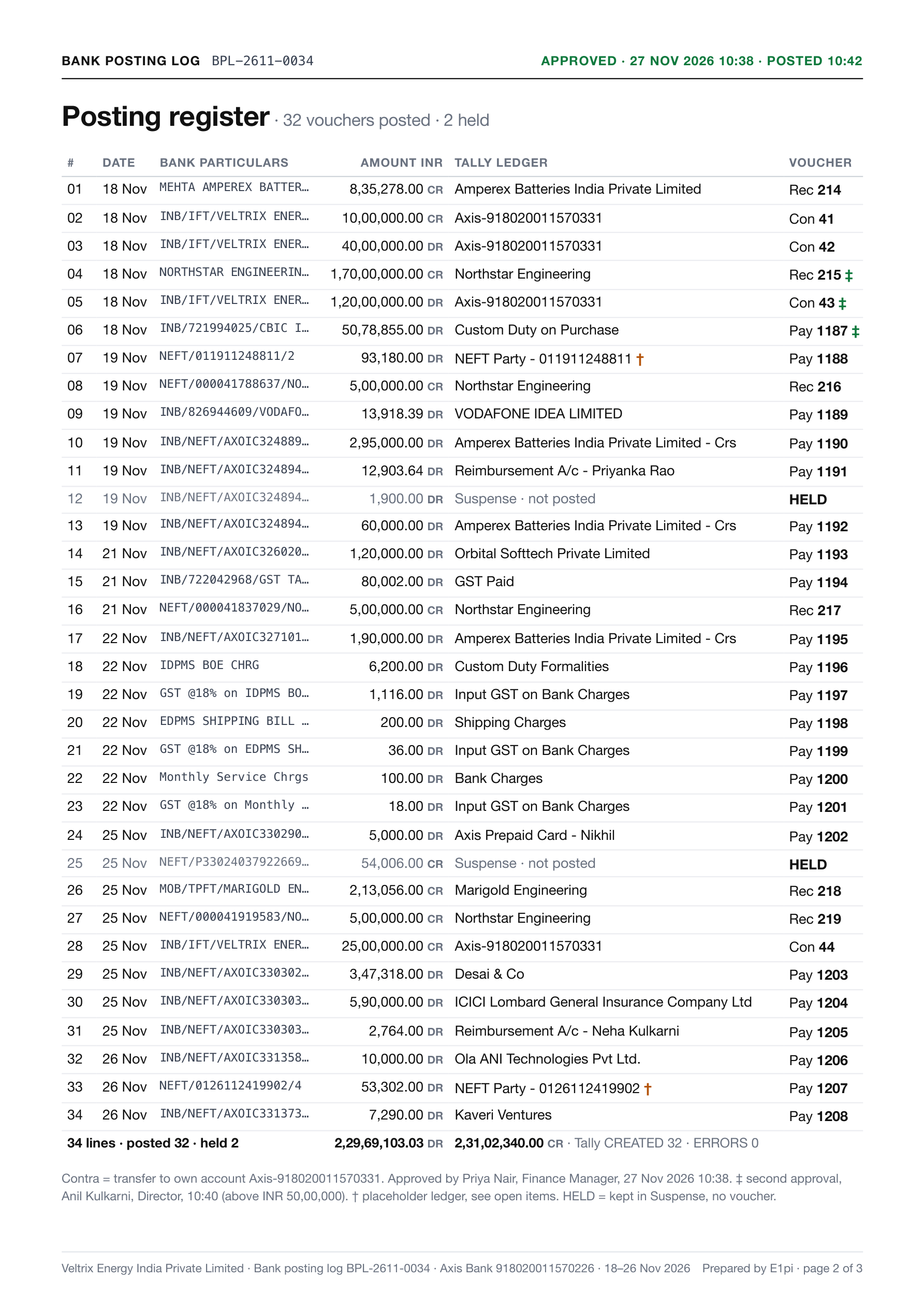
Reconciliation and sign-off, the posting register, evidence with SHA-256 fingerprints. Everything an auditor asks for.
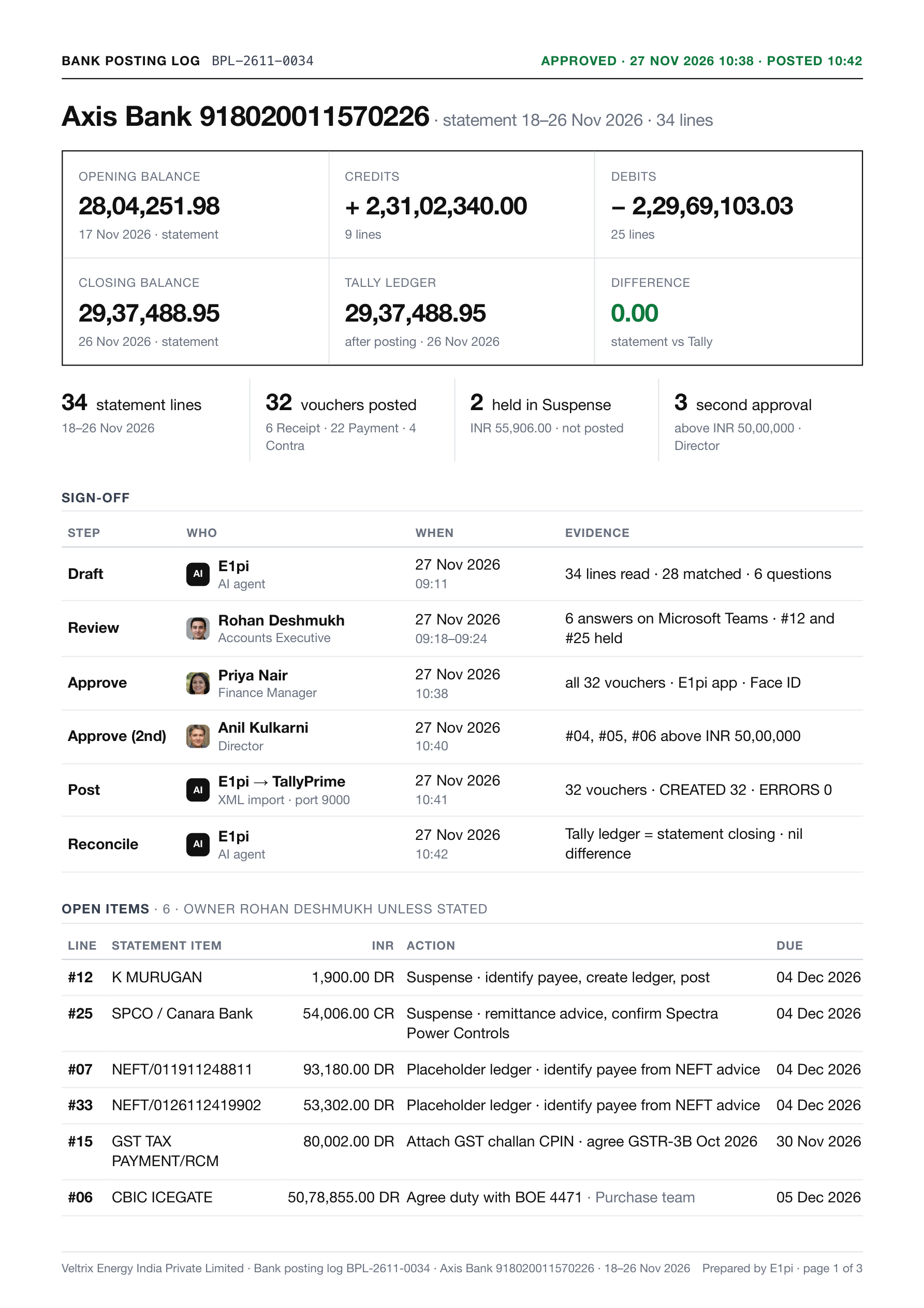
Reconciliation and sign-off.
Reconciliation and sign-off. Balances agreed with the ledger. Who drafted, reviewed, approved, posted.
Posting register.
Posting register. One line per entry, with its Tally voucher number.
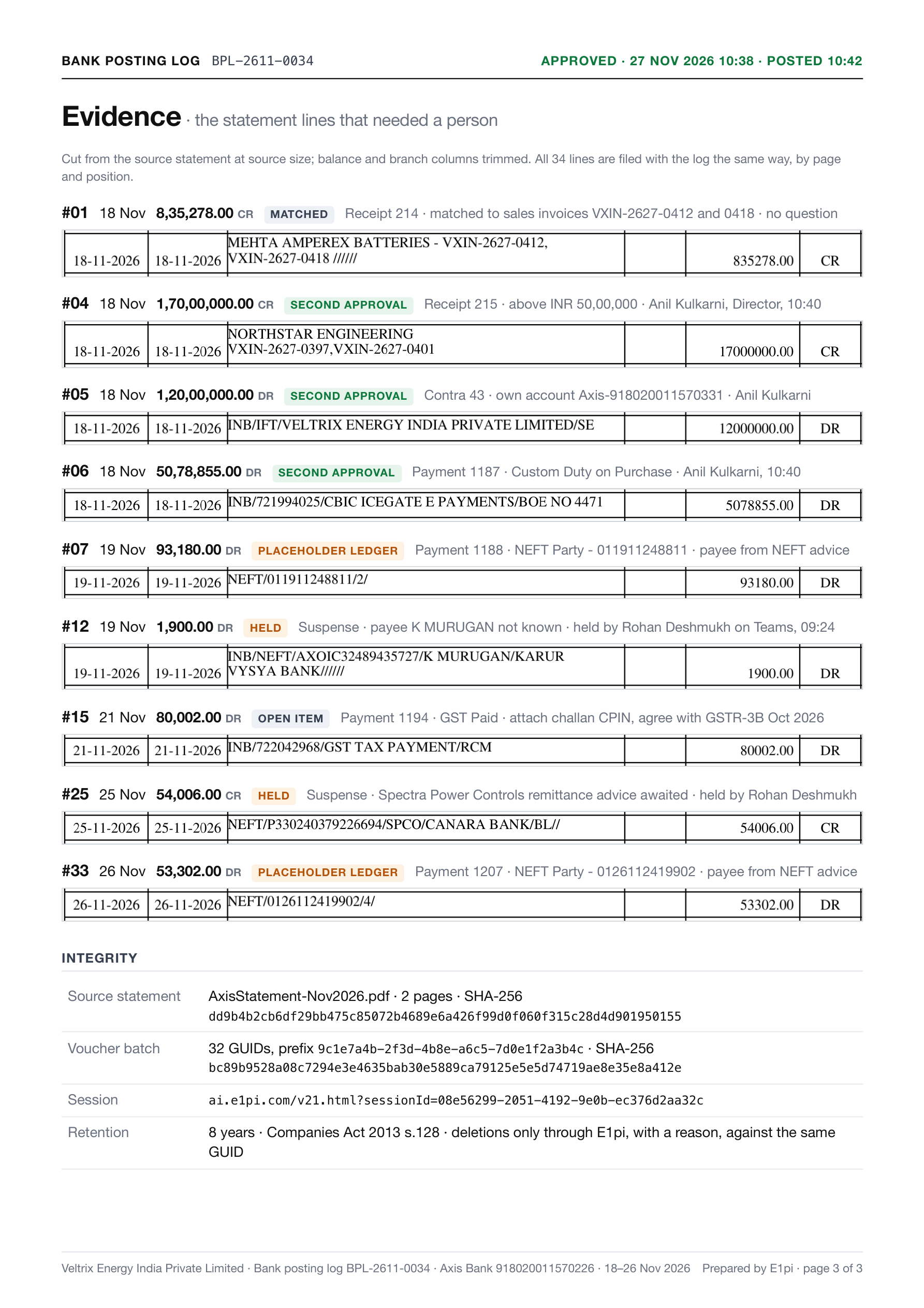
Evidence and integrity.
Evidence and integrity. The lines a person decided, cut from the PDF. SHA-256 fingerprints.

Three ways in.
One office.

No new app to learn. E1pi meets your team — and your suppliers — where they already are.

For you and your managers

Browser, iPhone, Mac — Android on the way. Reports, approvals, tasks, conversations.

  • Fingerprint or face sign-in, no passwords
  • Every report, live, one tap apart
  • Approvals from the lock screen

For your team

Assign, approve and ask — inside the chat your people already use all day.

  • Ask for any report in plain words
  • Approvals & notifications in group chats
  • Assign and track tasks from Teams

For suppliers and vendors

They send bills the way they always have. E1pi reads, checks and acknowledges. Nobody retypes.

  • PDF, images, even handwritten bills
  • Checked against contract & quote
  • Routed to the right head for approval

Reminders the team actually sees.

Each morning, the day’s due tasks in the chat — owner, deadline. Complete one, and the next reminder knows.
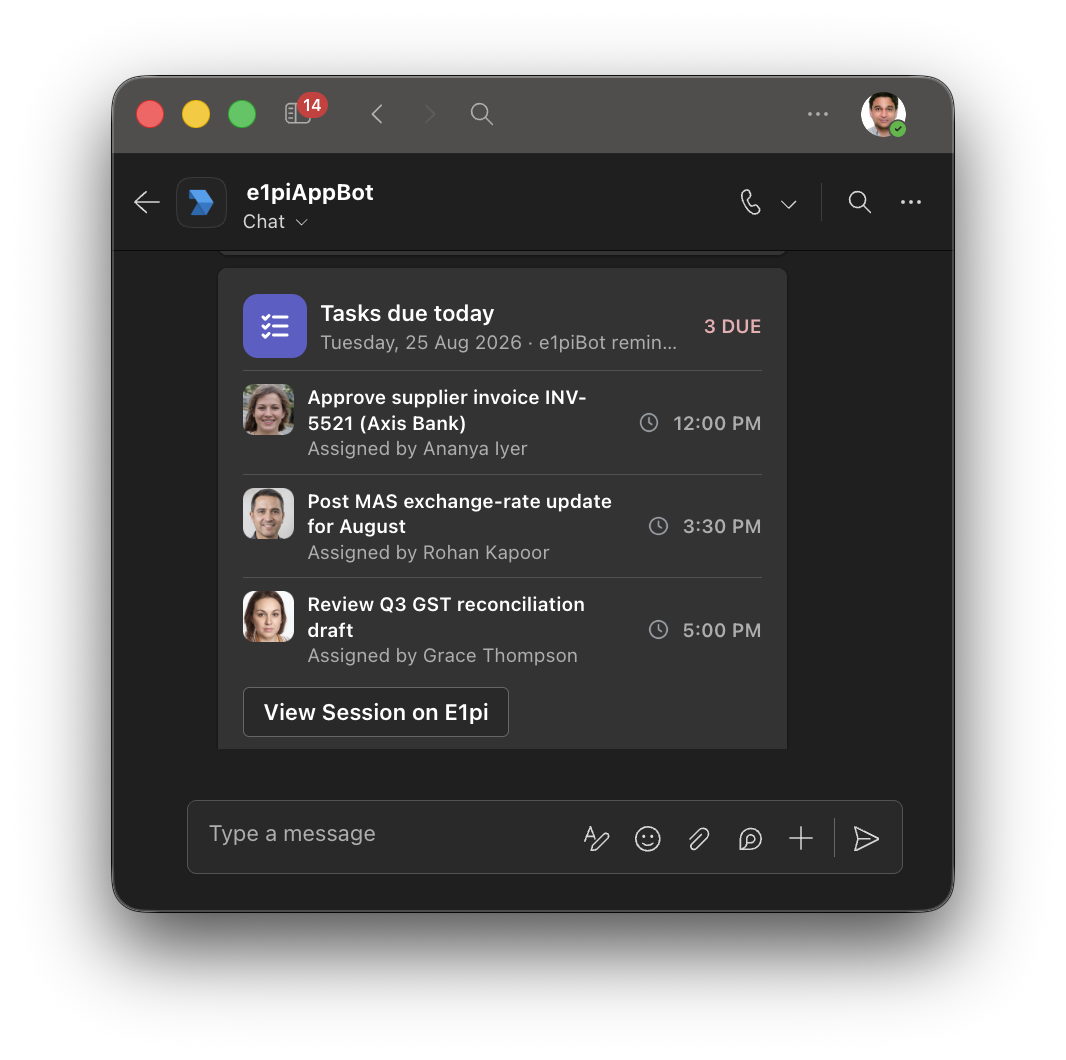
Microsoft Teams chat with the E1pi bot — Tasks due today card listing three tasks, each with who assigned it and when it is due, and a View Session on E1pi button

Fifty receipts in Teams. One claim for finance.

Staff drop receipts into Teams — photos, PDFs, a handwritten slip. E1pi reads them, asks only what it cannot work out, and returns one PDF for approval. Below: the real report for a three-day trip.

The same checks on a vendor’s bill →
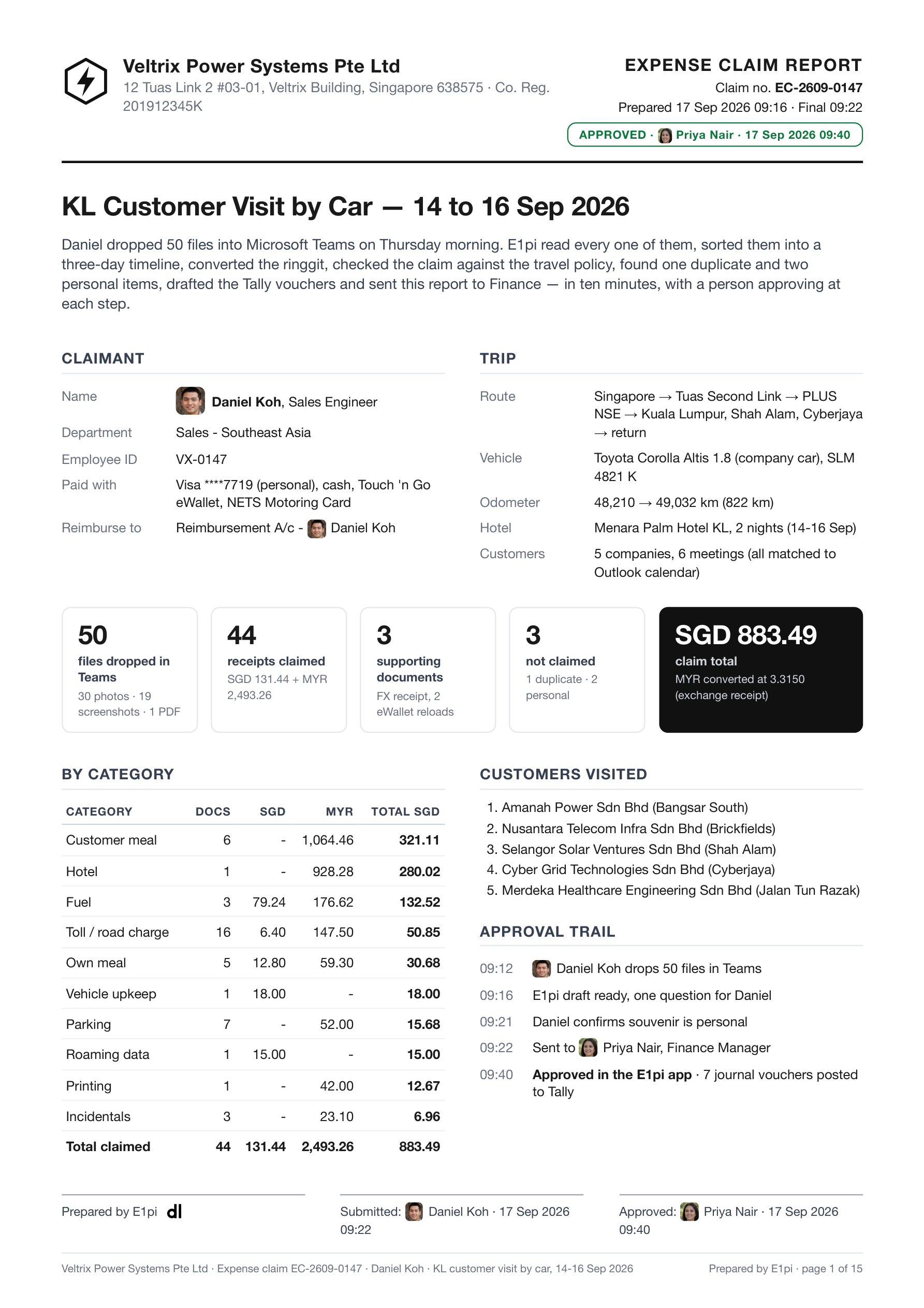
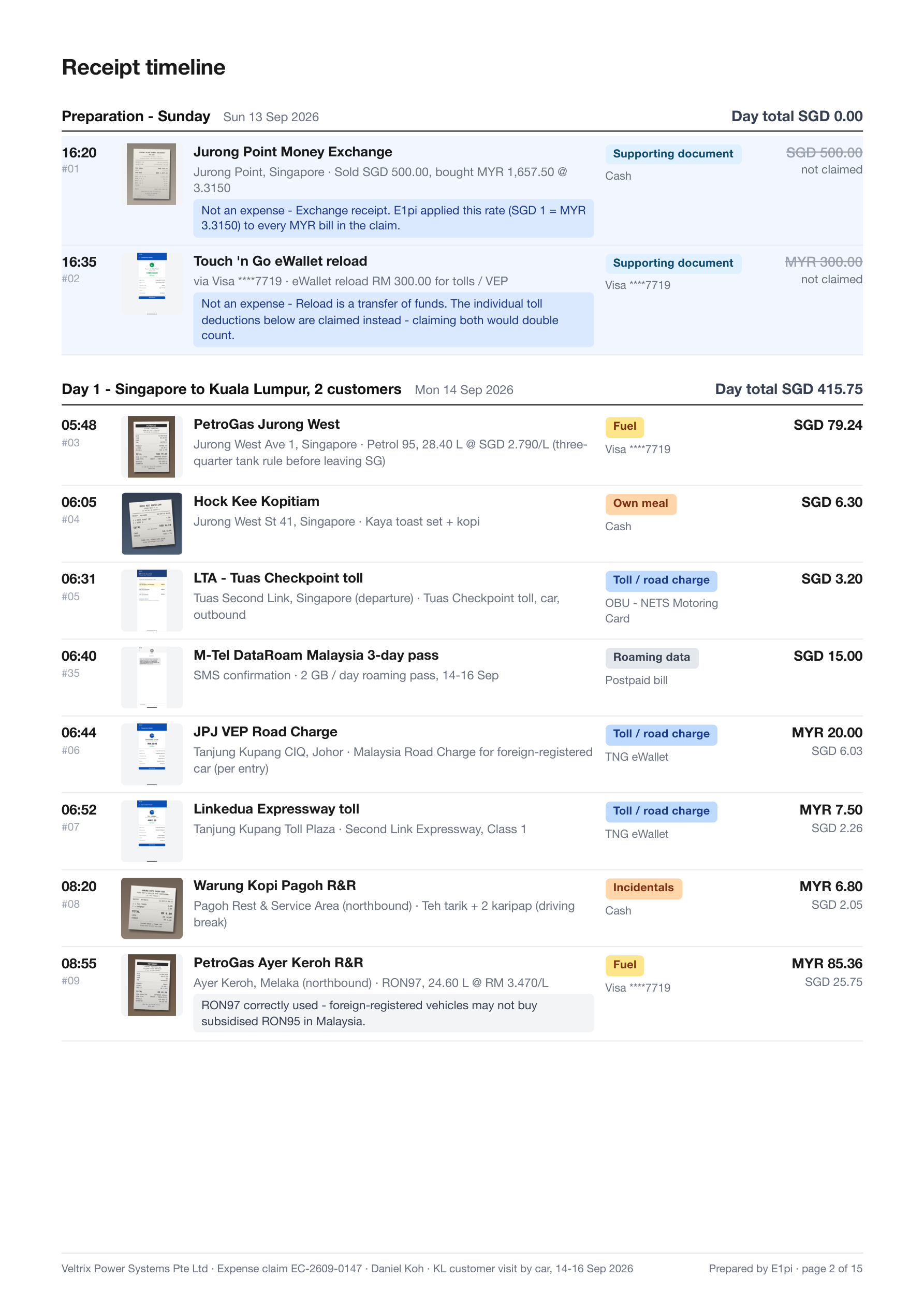
Any format, any order. Photos, PDFs, SMS, handwritten — read, dated, sequenced.
Exchange rate from the receipt. Taken from the money-changer’s slip. Printed on the cover.
Checked against your policy. Each item passes or is held, with the clause named.
Duplicates and personal items kept out. Same bill twice, a pharmacy receipt, a souvenir — listed with reasons.
Meals matched to the calendar. Six meals, six Outlook entries, every attendee named.
Asks only when it must. One question on fifty documents. Working shown.
A person approves first. Vouchers post only after finance says yes. Who and when, on the cover.
Cover.
Cover. Claimant, trip, totals, approval trail.
Receipt timeline.
Receipt timeline. Day by day, every receipt with its thumbnail.
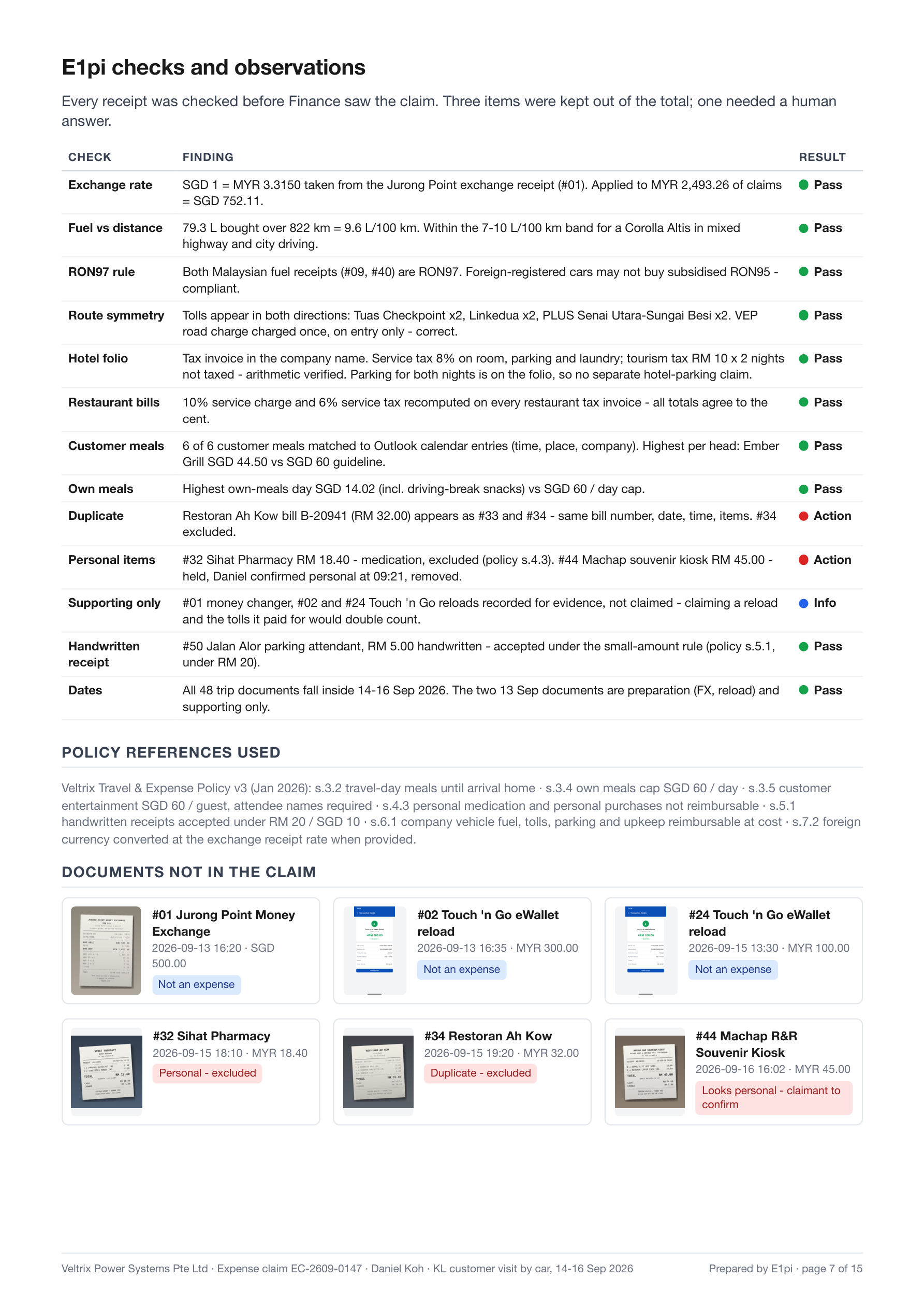
E1pi checks.
E1pi checks. Exchange rate, fuel against distance, policy clauses, duplicates.
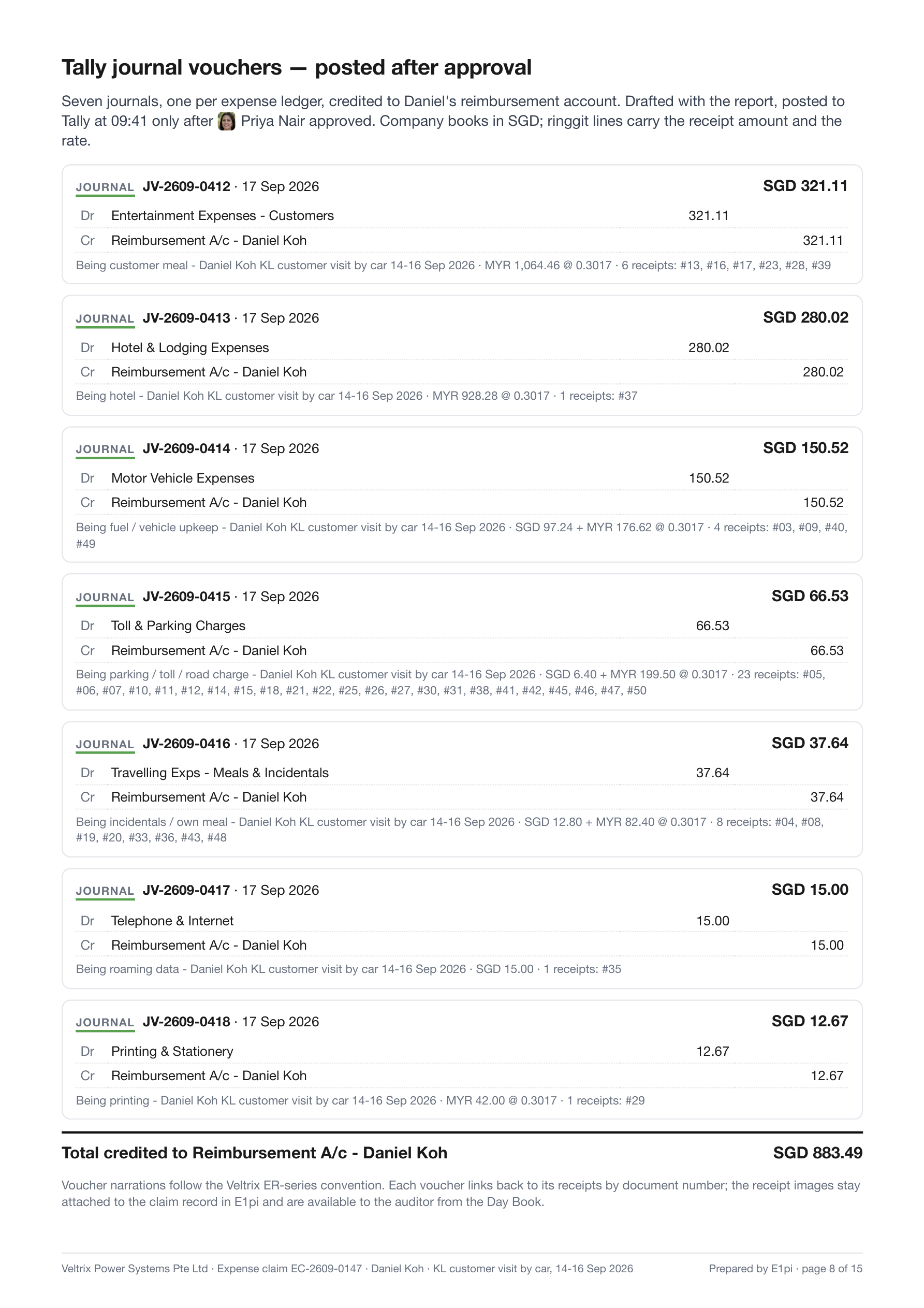
Tally journal vouchers.
Tally journal vouchers. One per ledger. Posted after approval.
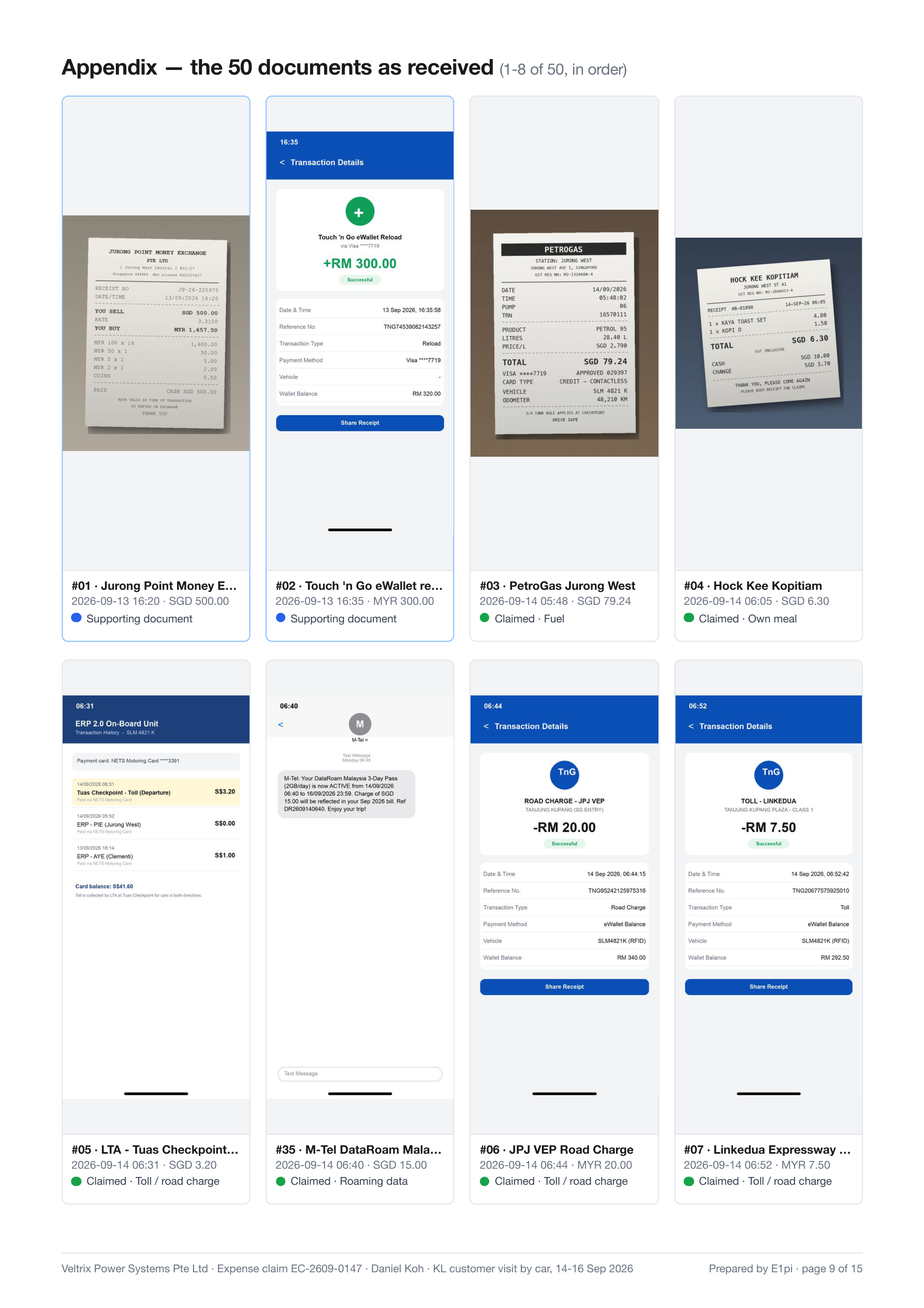
Appendix.
Appendix. The 50 documents as received, eight per page.

Document generation. Quote to bill of lading.

Quote, order check, export set, sailing — drafted from live prices and stock, on your letterhead, sent from the thread you are in. You approve every send.

01

A quote in a minute.

Reference the enquiry, type one line. Priced from live stock, data sheets attached, reply drafted in the same thread.

Priced live, margin shown. GP worked out as the deal is made — not at month end.
Data sheets and drawings appended. Every quoted product, in the same PDF.
Custom pre-sale documents. “Draft this like the last ten we sent.” It does.
Sent as a reply in the customer’s thread. Email or WhatsApp, cover note drafted. You press Send.
02

The customer PO, checked against the quote

The PO arrives by email, WhatsApp or PDF. E1pi reads it against the quote and flags every difference before you accept.

Prices and quantities, line by line Delivery and payment terms GP margin on the order as accepted Every difference flagged before you accept
03

One customer PO. Every trade document.

Drop the PO in, ask in one line. The full export set prints as A4 PDFs on your letterhead.

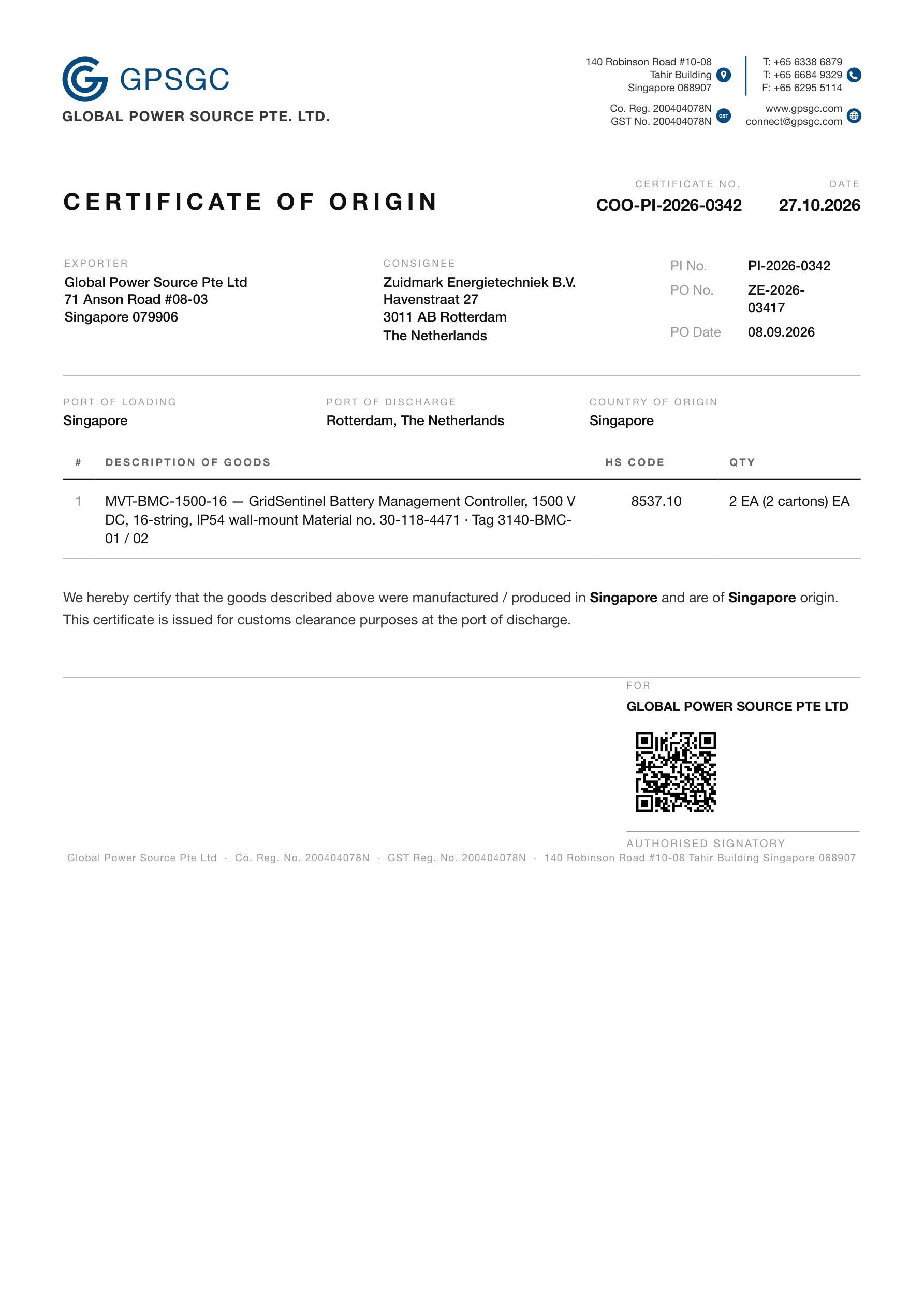
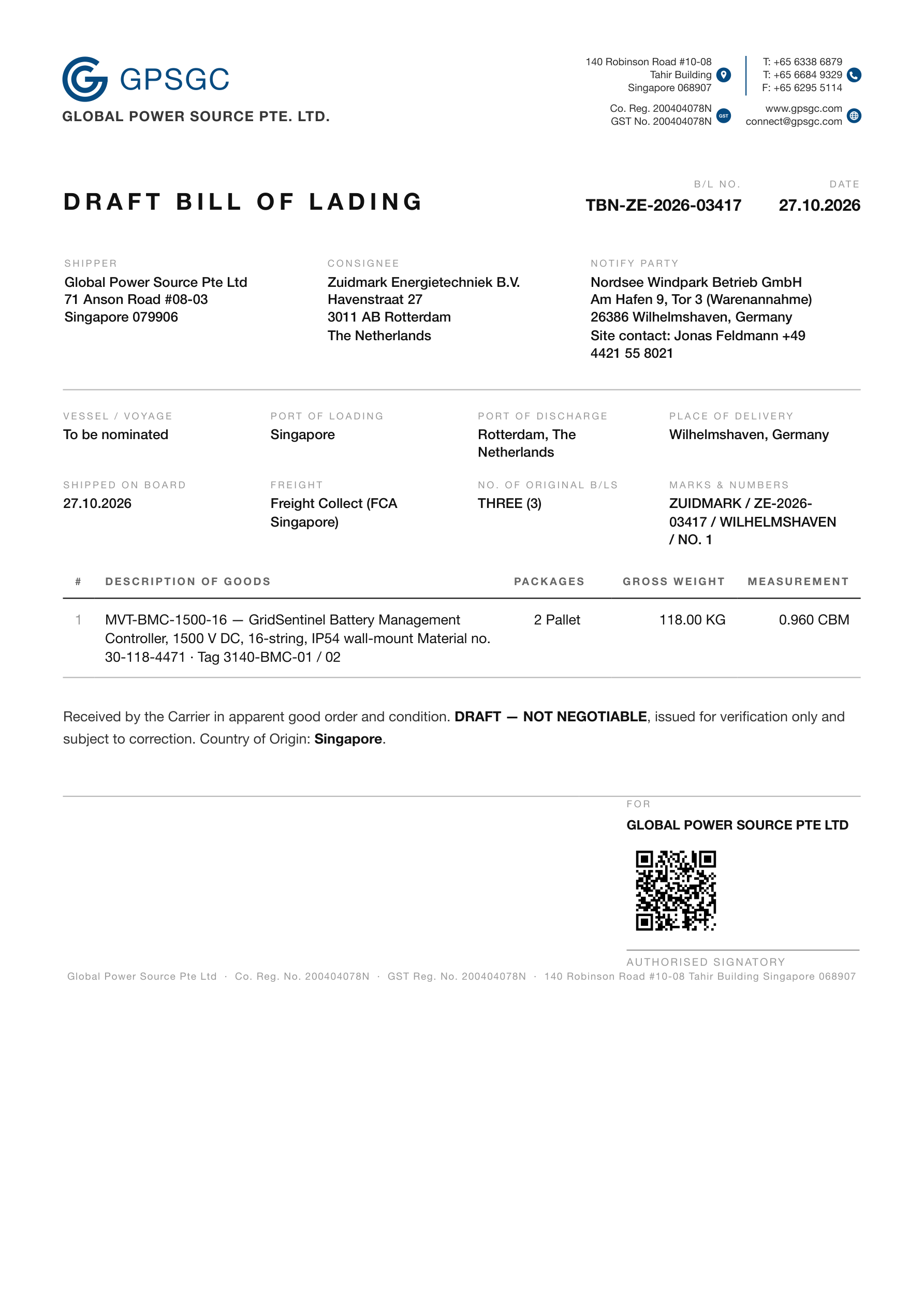
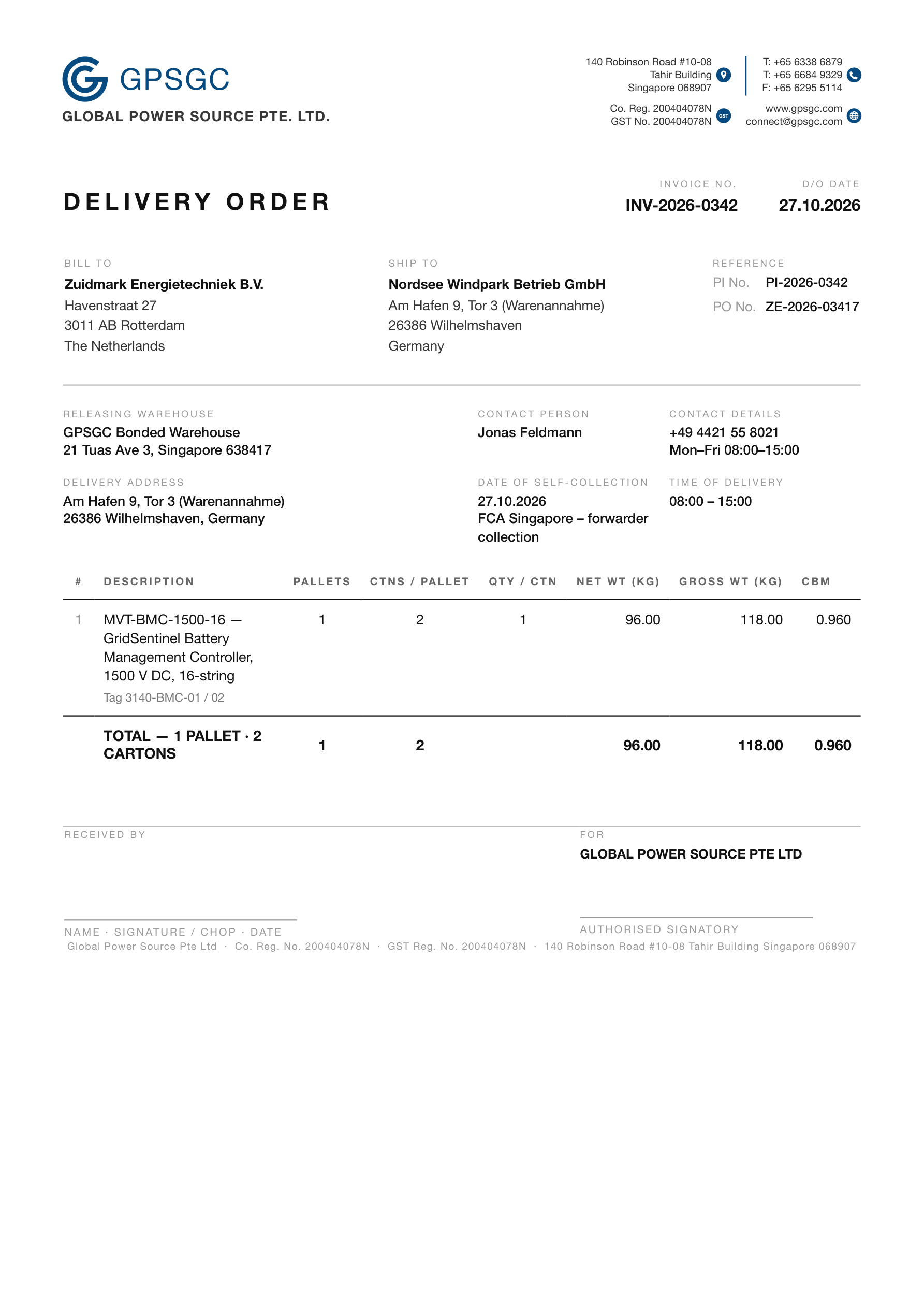
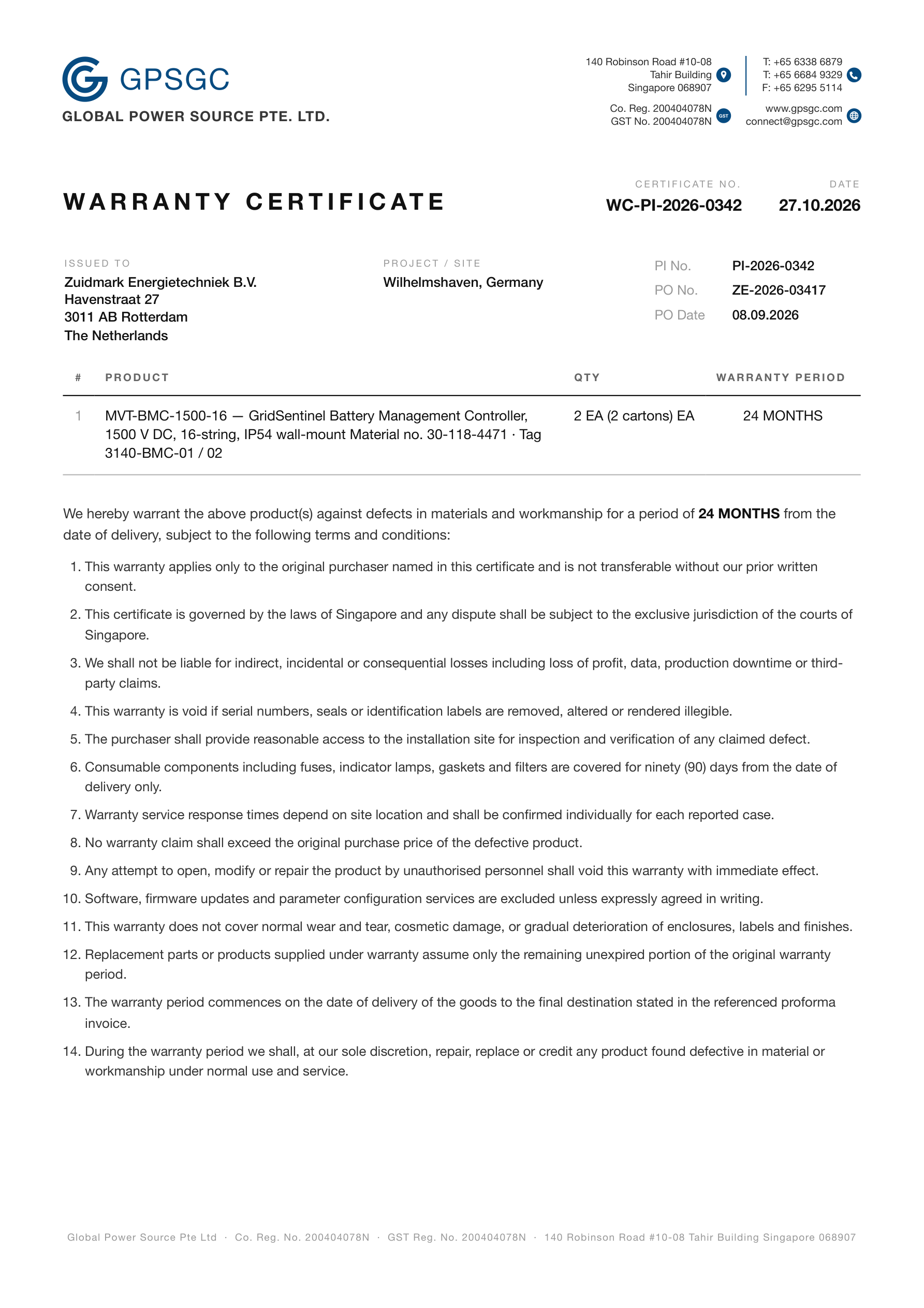
One PO in, the whole set out. Invoice, Packing List, Certificate of Origin, Warranty, Draft B/L, Delivery Order.
Read from the PO, assumptions declared. Anything not on the order is listed up top. Nothing invented.
Pallets drawn, not listed. Cartons, weights, dimensions and CBM on the Packing List.
Teams, WhatsApp or Email. One tap, every PDF attached, cover note drafted.
Post-trained on the documents below

Any layout your customer, bank or customs office asks for — on your own letterhead.

Proforma Invoice Packing List Commercial Invoice Certificate of Origin Draft Bill of Lading Insurance FTA Forms — E, A, D, K… Back-to-back Movement Certificates Warranty Certificate Transit Certificates Handling Instructions Bill of Materials

The whole set, on the phone. Six PDFs from one PO. Tap to read, then send with all attached.
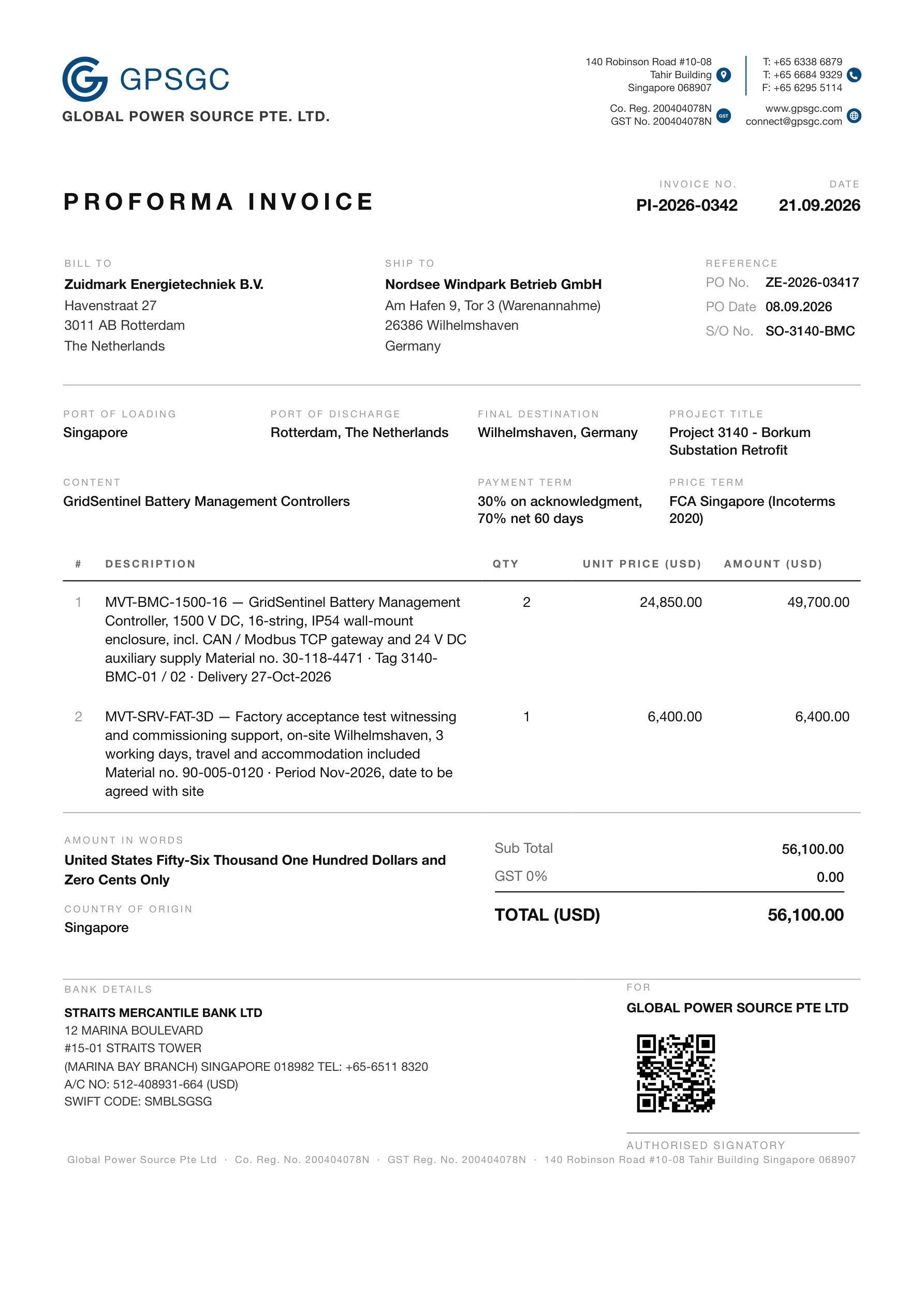
Generated from one order — real output
Proforma Invoice.
Proforma Invoice. Parties and lines from the PO. Terms, amount in words, bank details.
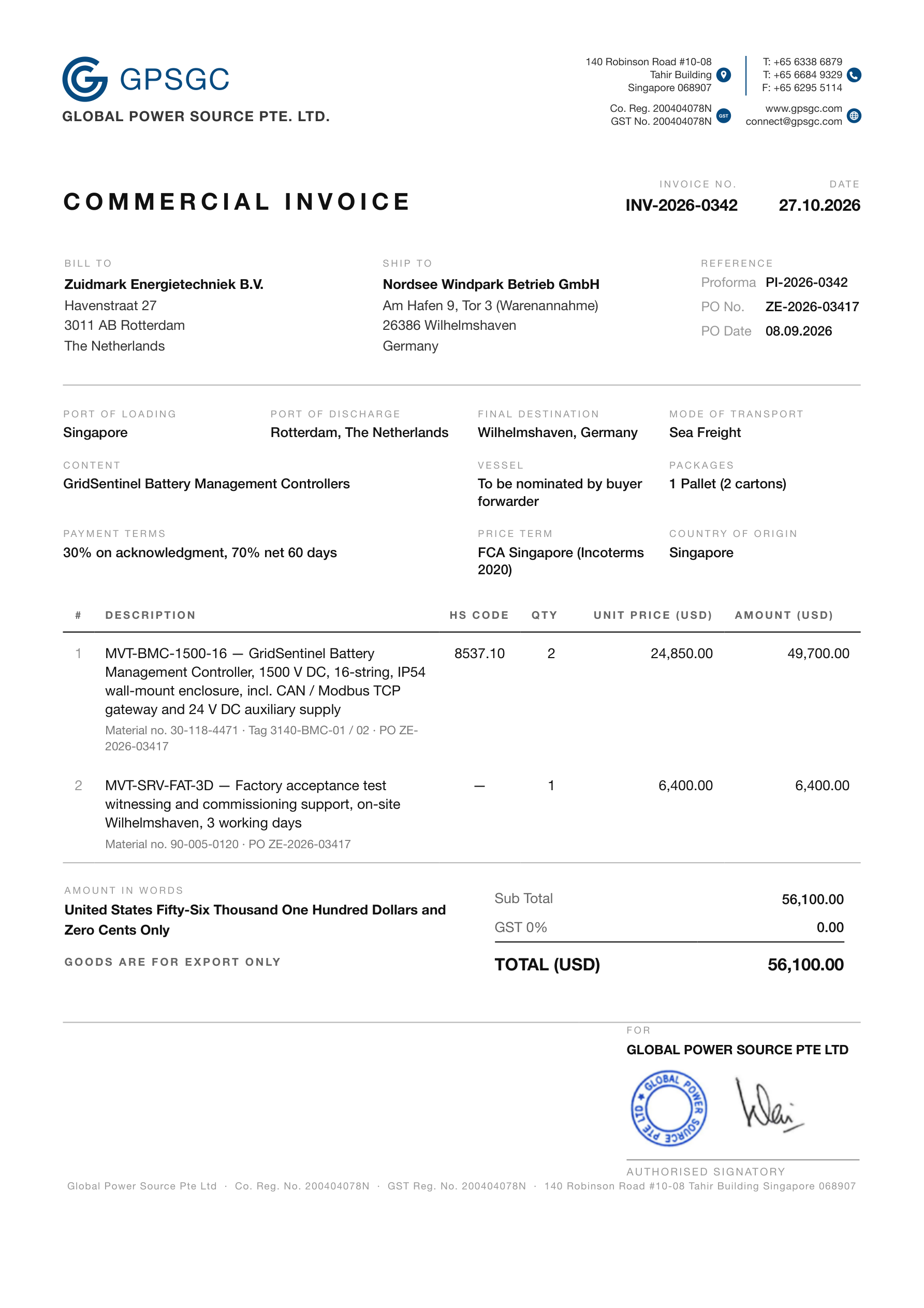
Commercial Invoice.
Commercial Invoice. HS codes, ports, packages — referenced to the Proforma and the PO.
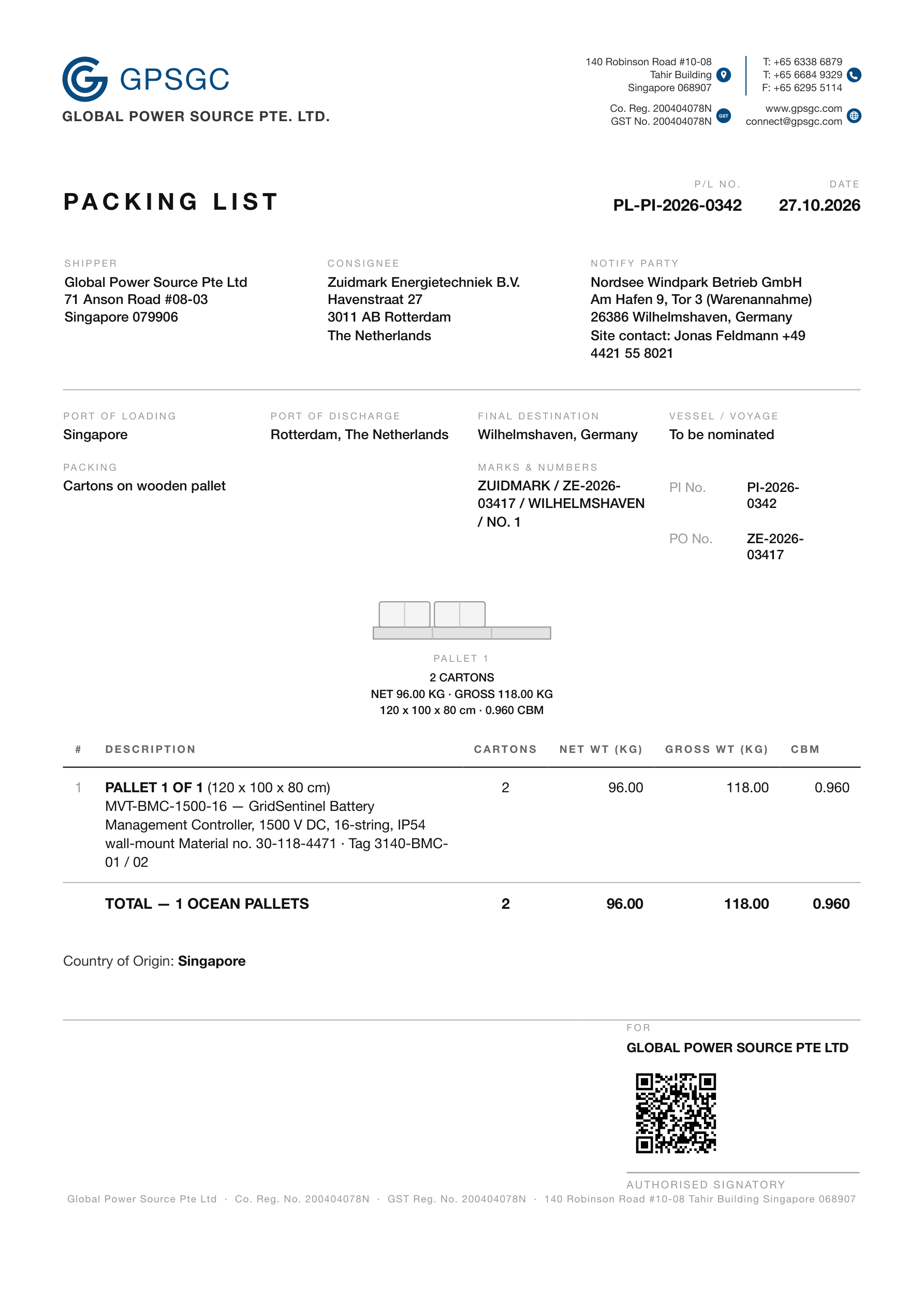
Packing List.
Packing List. The pallet drawn. Weights, dimensions and CBM per pallet.
Certificate of Origin.
Certificate of Origin. Goods, HS code, quantity. Origin certified for clearance.
Draft Bill of Lading.
Draft Bill of Lading. Parties, packages, weight, measurement — marked draft for the carrier.
Delivery Order.
Delivery Order. Warehouse, collection window, totals summed from the Packing List.
Warranty Certificate.
Warranty Certificate. Product, quantity, 24 months from delivery.
04

Sailings, cut-offs and booking. Straight from the carrier.

Route and dates come from the documents just made. Ask for schedules; every sailing appears in the same thread.

Maerskmore carriers coming
Live schedules. Vessel, voyage, ETD, ETA, transit days. Fastest flagged.
Sea route drawn. Real shipping lanes, nautical miles, via Suez, Panama or the Cape.
Cut-offs you cannot miss. Documentation, gate-in and VGM, in local time, on every sailing.
Pick the sailing; E1pi books it. Booking placed, documents uploaded, no forms (booking write access being enabled by Maersk, Sep 2026).
Then the rest of the voyage. Track & trace, bills of lading, carrier invoices, demurrage — checked against your books.

Screen by screen

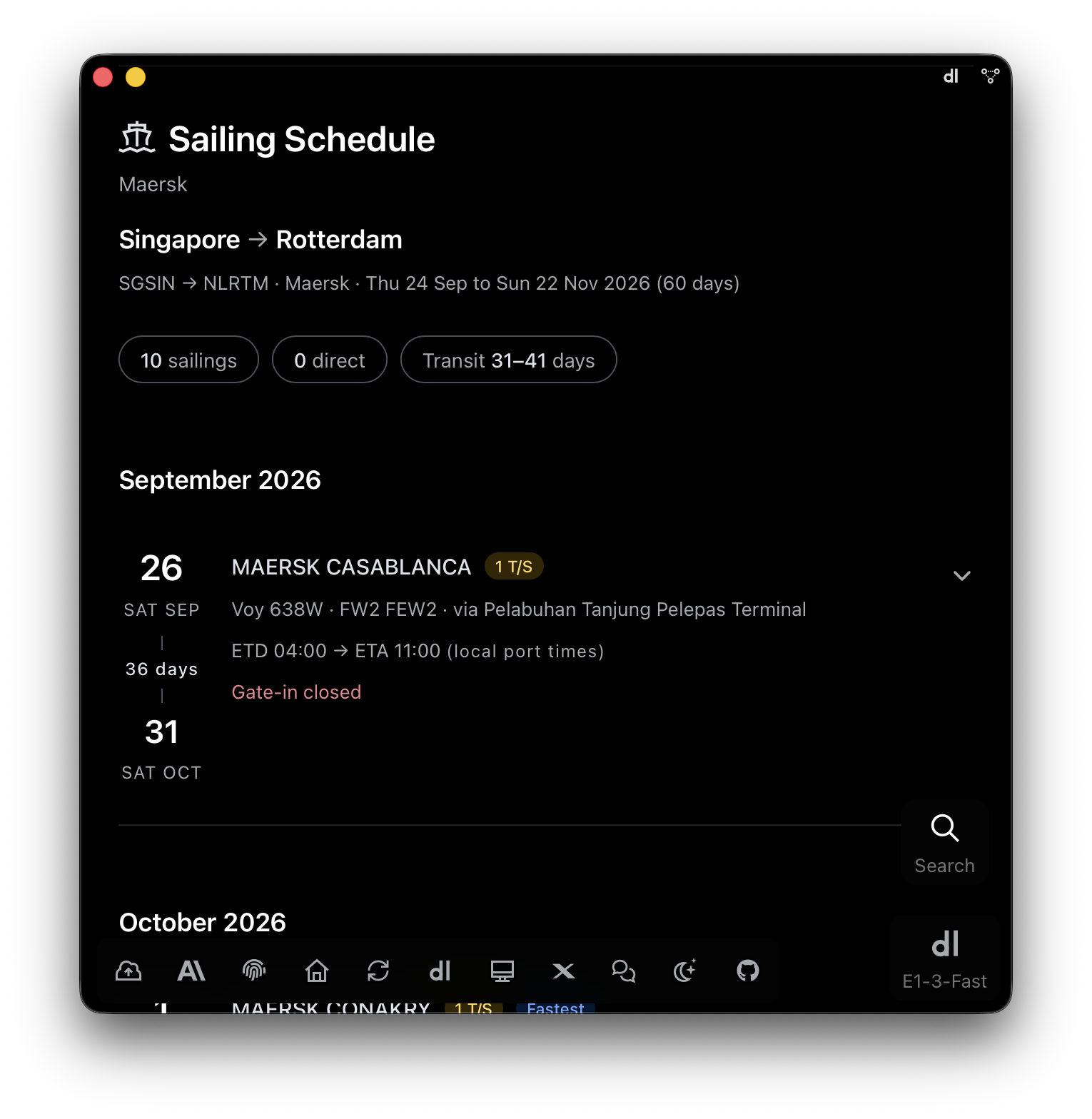
E1pi Mac app — Sailing Schedule, Maersk, Singapore to Rotterdam, SGSIN to NLRTM, Thu 24 Sep to Sun 22 Nov 2026 (60 days): 10 sailings, 0 direct, transit 31 to 41 days; September 2026 — Sat 26 Sep MAERSK CASABLANCA, 1 transhipment, Voy 638W FW2 FEW2 via Pelabuhan Tanjung Pelepas Terminal, ETD 04:00 to ETA 11:00 local port times, 36 days, arriving Sat 31 Oct, gate-in closed
Ten sailings in one ask. Singapore to Rotterdam, 60 days, 31 to 41 days in transit. Closed gate-ins say so.
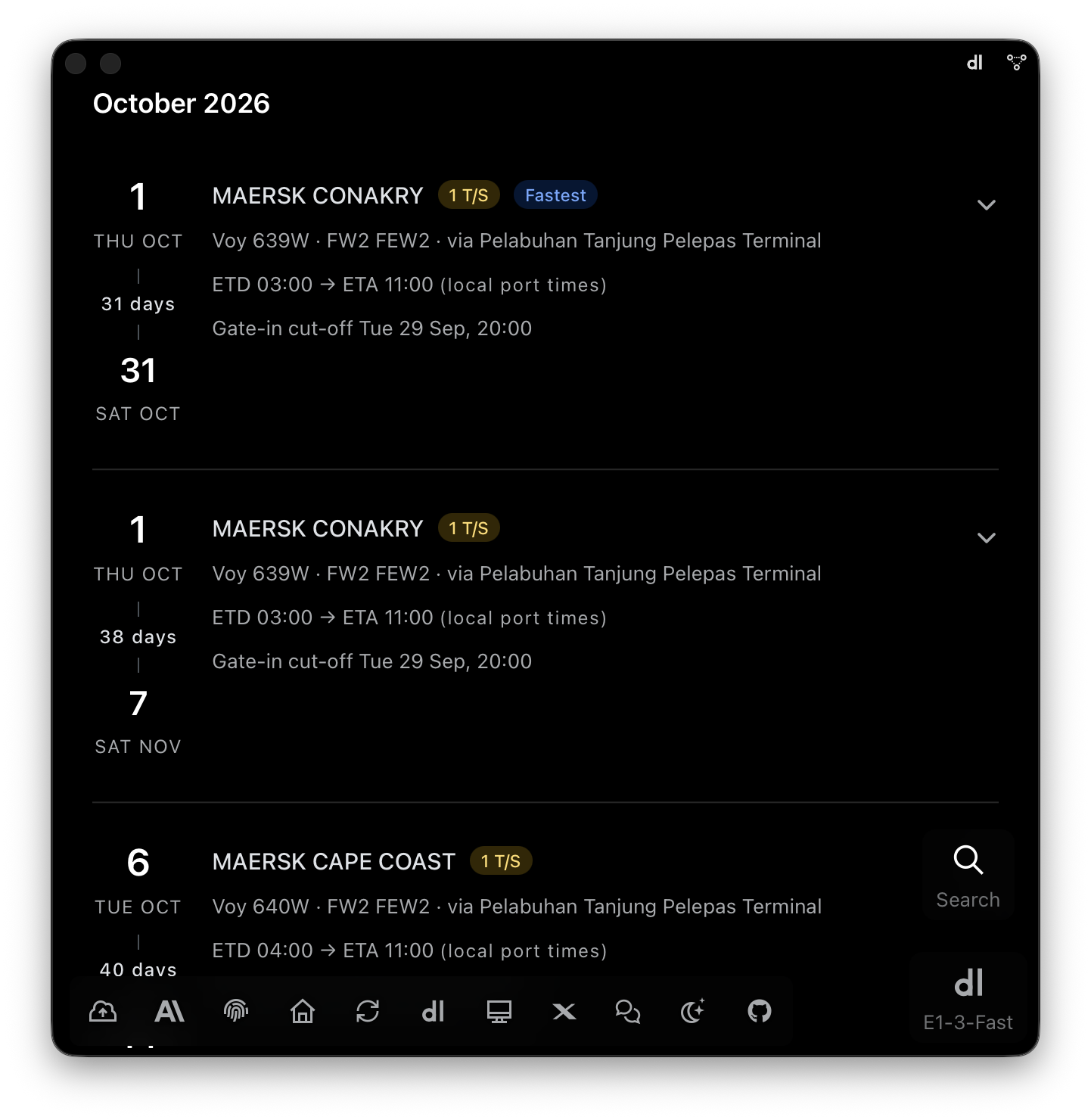
E1pi Mac app — October 2026 sailings: Thu 1 Oct MAERSK CONAKRY, 1 transhipment, flagged Fastest, Voy 639W FW2 FEW2 via Pelabuhan Tanjung Pelepas Terminal, ETD 03:00 to ETA 11:00, 31 days, arriving Sat 31 Oct, gate-in cut-off Tue 29 Sep 20:00; the same vessel with a slower connection, 38 days, arriving Sat 7 Nov; Tue 6 Oct MAERSK CAPE COAST Voy 640W, 40 days
Cut-offs on every sailing. The fastest flagged, its slower connection right under it.
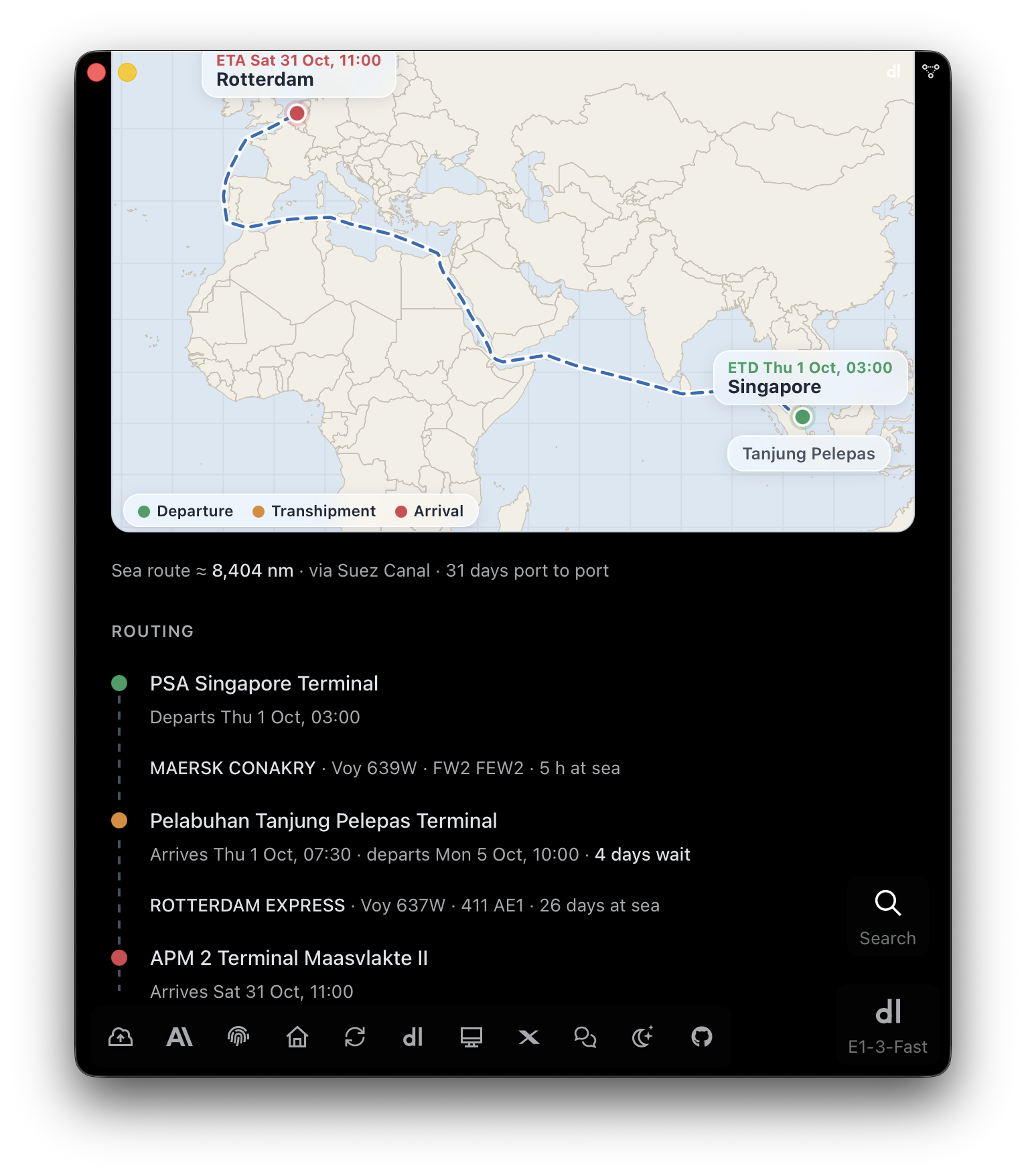
E1pi Mac app — a sailing expanded into its route map: Singapore, ETD Thu 1 Oct 03:00, via Tanjung Pelepas and the Suez Canal to Rotterdam, ETA Sat 31 Oct 11:00, departure, transhipment and arrival pins; sea route about 8,404 nautical miles, 31 days port to port; routing — PSA Singapore Terminal departs Thu 1 Oct 03:00 on MAERSK CONAKRY Voy 639W, 5 hours at sea; Pelabuhan Tanjung Pelepas Terminal arrives Thu 1 Oct 07:30, departs Mon 5 Oct 10:00, 4 days wait, on ROTTERDAM EXPRESS Voy 637W 411 AE1, 26 days at sea; APM 2 Terminal Maasvlakte II arrives Sat 31 Oct 11:00
The route, leg by leg. 8,404 nautical miles via Suez, 31 days port to port. Every terminal on the map.
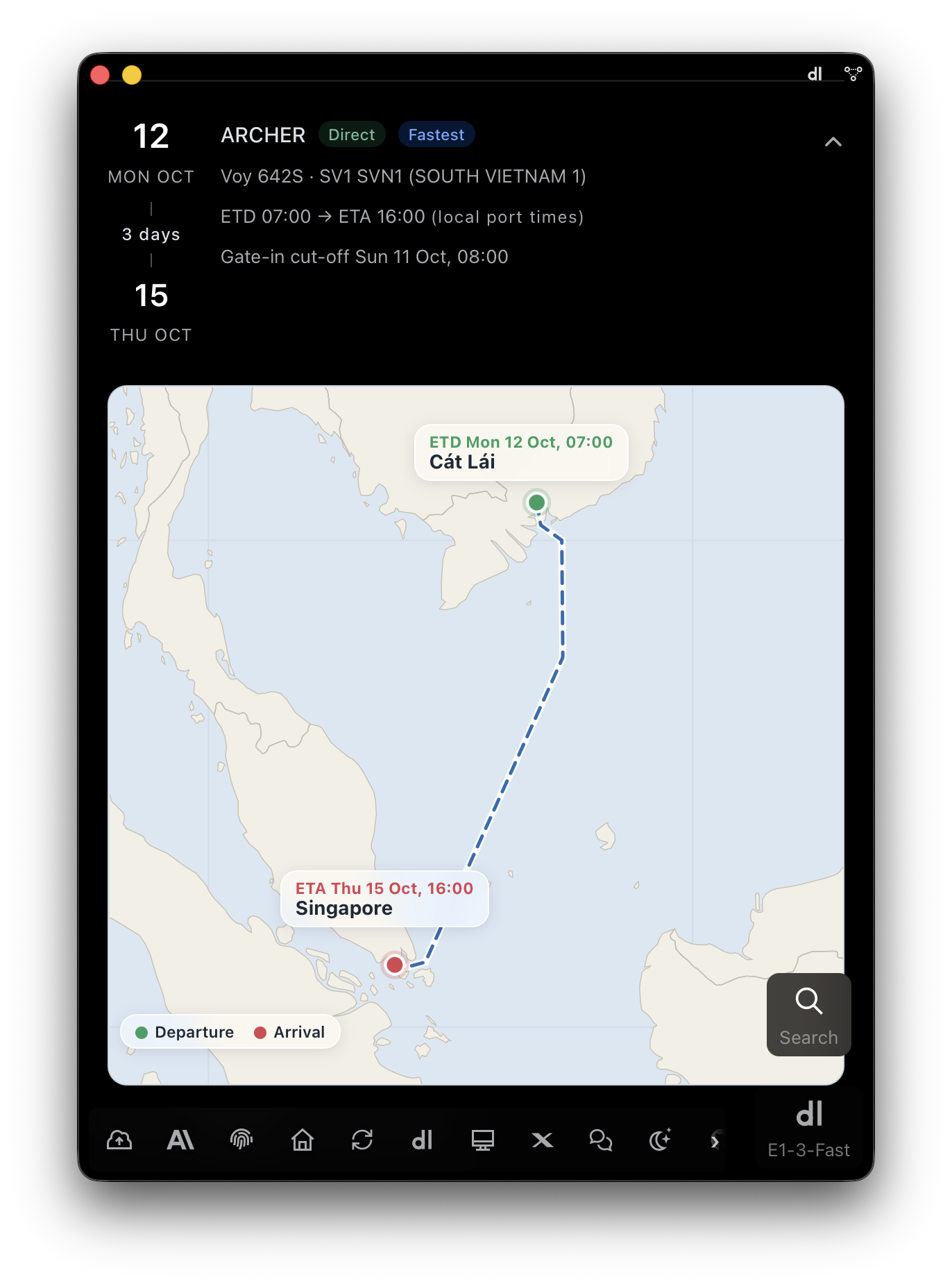
E1pi Mac app — Mon 12 Oct ARCHER, Direct, flagged Fastest, Voy 642S SV1 SVN1 (South Vietnam 1), ETD 07:00 to ETA 16:00 local port times, 3 days, arriving Thu 15 Oct, gate-in cut-off Sun 11 Oct 08:00; route map from Cat Lai, ETD Mon 12 Oct 07:00, down the coast to Singapore, ETA Thu 15 Oct 16:00, departure and arrival pins
Any lane, the same answer. Cát Lái to Singapore, direct, three days, drawn on the map.

Stock valuation, every method side by side

FIFO, weighted average, latest cost — switch in a sentence, or compare them in one report.

Switch in a sentence. FIFO today, weighted average tomorrow.
Every method, one report. The difference is the decision.
Live from the ERP. Stock as it stands now, every company at once.

How many fit? Which truck? Drawn in 3D, not guessed.

From size and weight alone, E1pi builds every unit, carton, pallet and container in true 3D — then finds the cheapest legal load and draws it. The same model measures your warehouse.

Every product becomes a 3D object. Unit, carton, pallet, container — at true size and weight.
Every way to pack is tried. Orientation, layers, stacking, position — scored on space, weight, cost.
Legal at both ends. Pallet cap, door height, payload, and the road limit in both countries.
The lowest-cost plan wins, drawn. Pallets, layers, container load and floor plan in isometric 3D.
Trucks planned the same way. 1 t to 14 t classes — vehicles needed, each load drawn.
The same model measures your warehouse. Stock lines become floor area. The bill is checked against space measured, not claimed.
From plan to Packing List. Pallet data flows into the trade documents. One tap to send.

Screen by screen

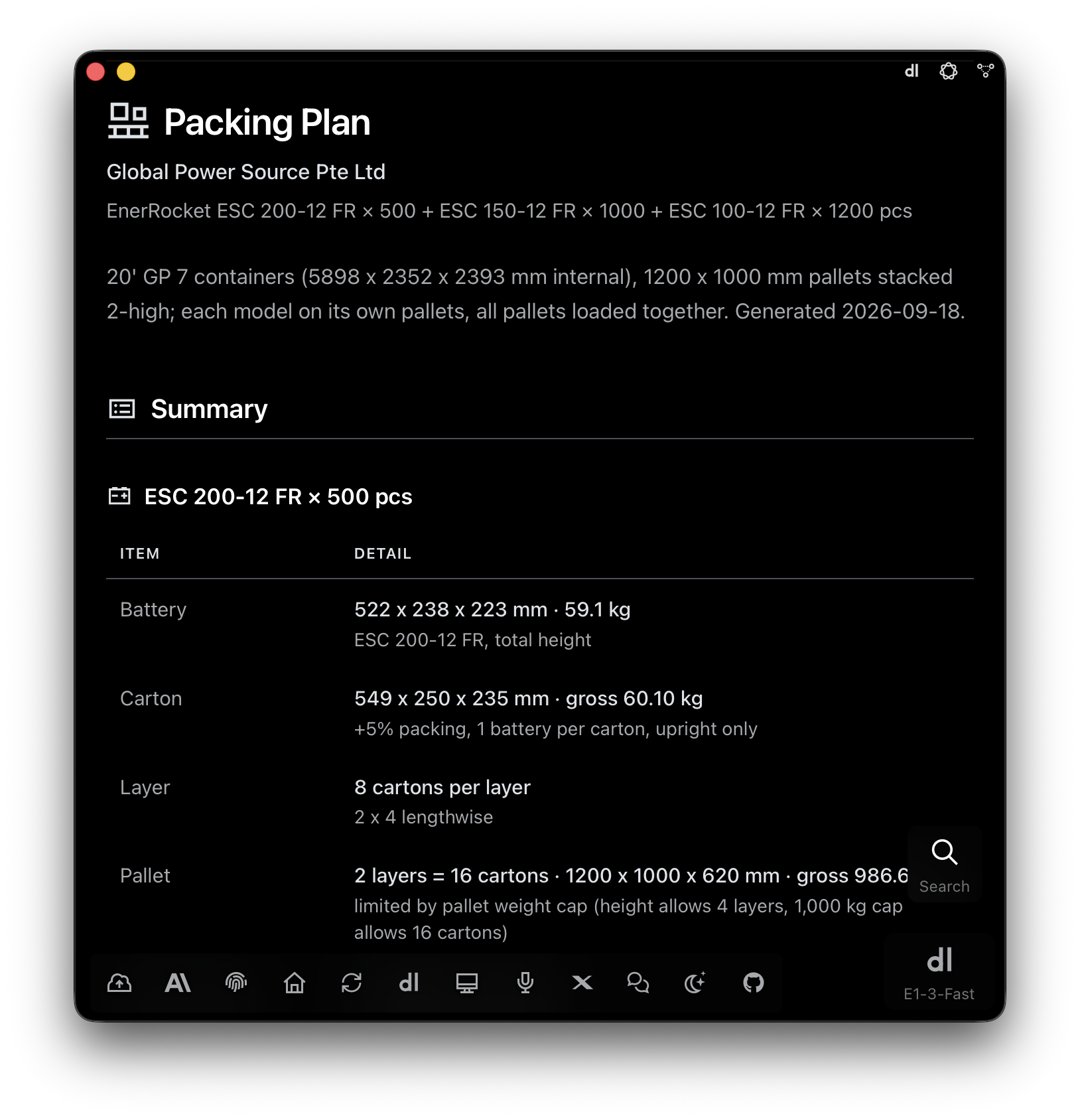
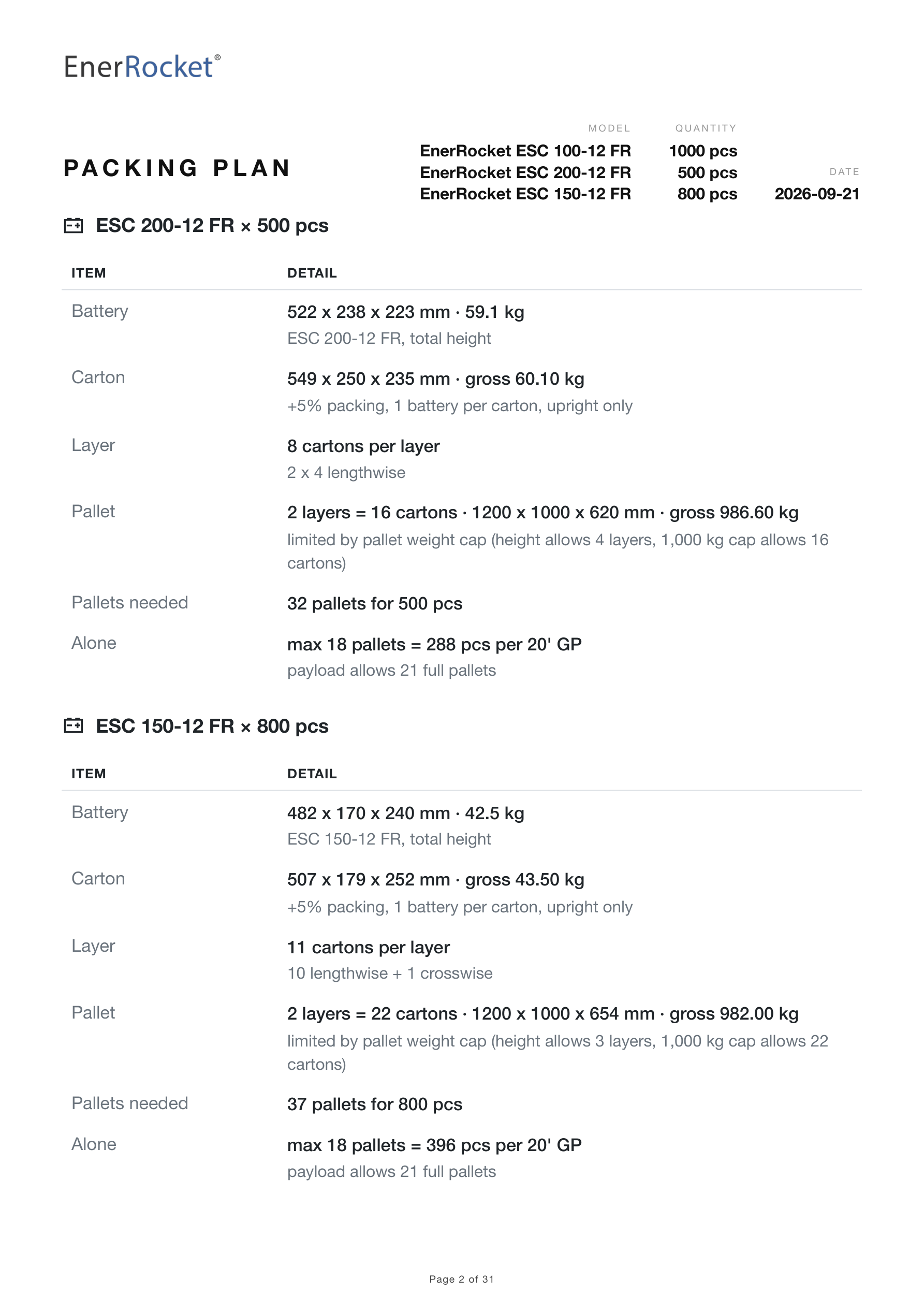
E1pi Mac app — Packing Plan for Global Power Source Pte Ltd: EnerRocket ESC 200-12 FR x 500, ESC 150-12 FR x 1000, ESC 100-12 FR x 1200 pcs in seven 20 ft GP containers (5898 x 2352 x 2393 mm internal), 1200 x 1000 mm pallets stacked two-high; summary for ESC 200-12 FR — battery 522 x 238 x 223 mm at 59.1 kg, carton 549 x 250 x 235 mm gross 60.10 kg with 5% packing, 8 cartons per layer 2 x 4 lengthwise, pallet 2 layers = 16 cartons 1200 x 1000 x 620 mm gross 986.60 kg, limited by the 1,000 kg pallet weight cap though height allows 4 layers
Each model worked out. Battery to carton to pallet — 16 cartons, 986.60 kg, capped by weight, not height.
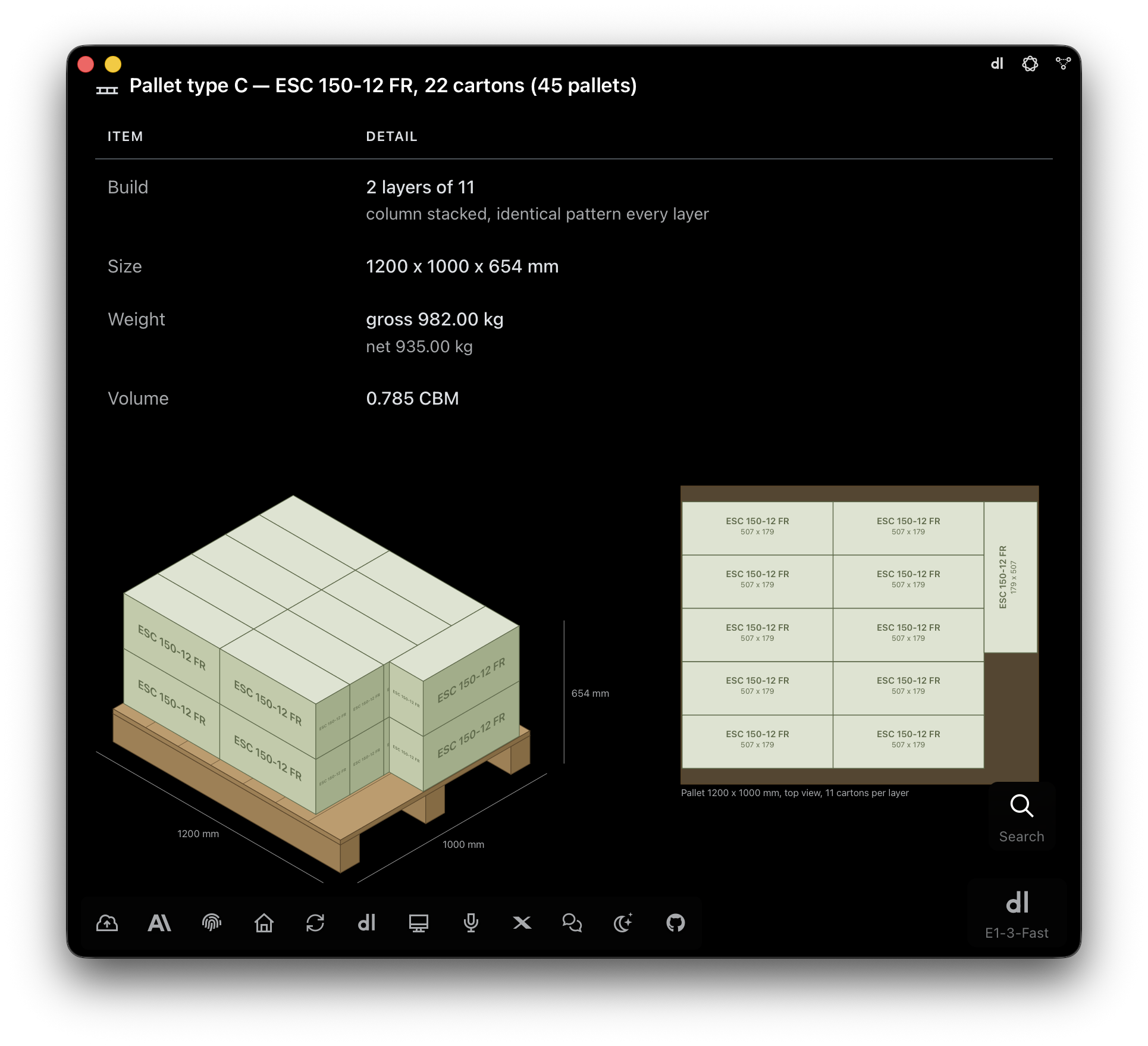
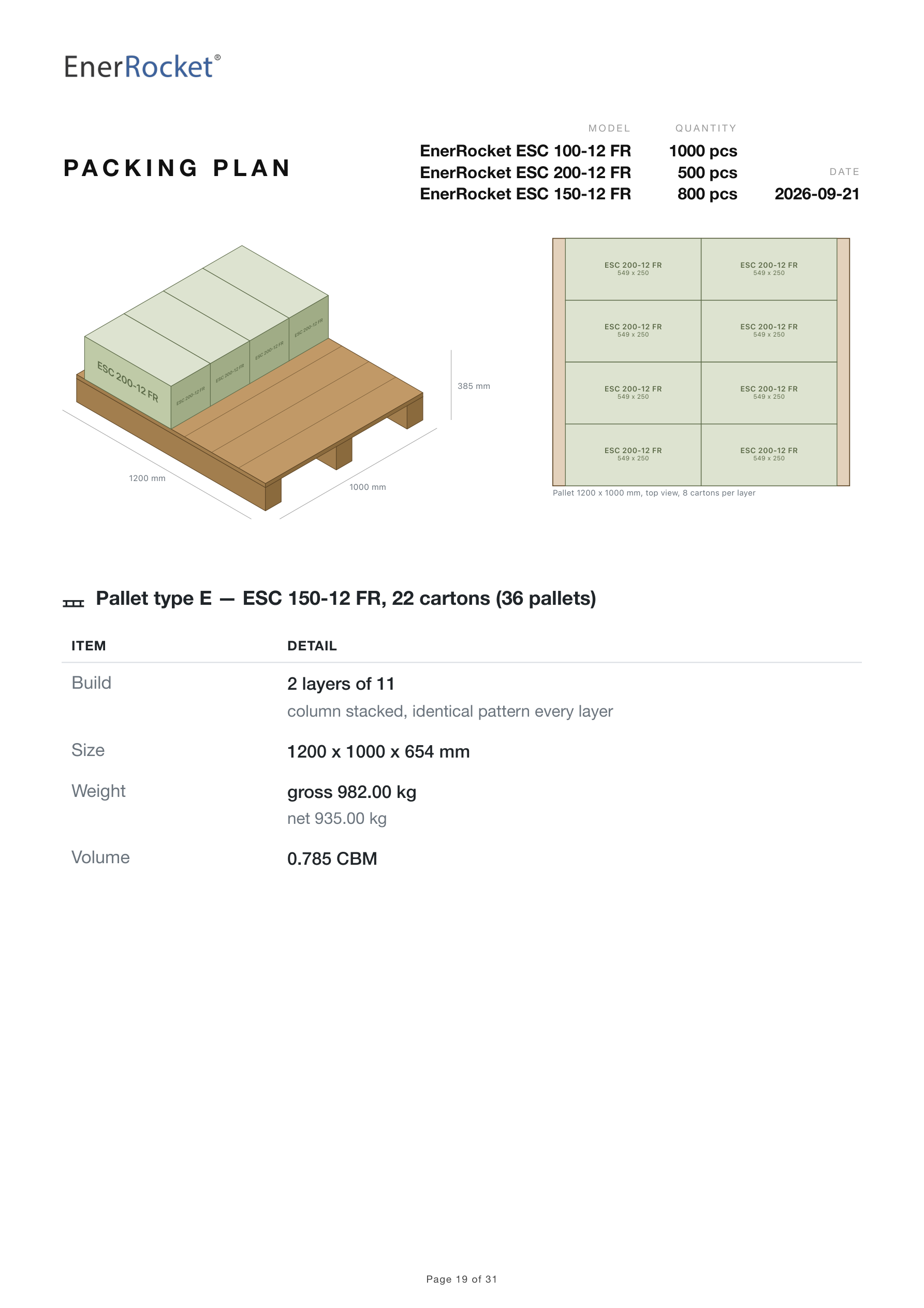
E1pi Mac app — Pallet type C, ESC 150-12 FR, 22 cartons, 45 pallets: build 2 layers of 11, column stacked, identical pattern every layer; size 1200 x 1000 x 654 mm; weight gross 982.00 kg, net 935.00 kg; volume 0.785 CBM; isometric drawing of the pallet with the model printed on every carton face and dimensions, and the top view of one layer with 11 cartons of 507 x 179 mm
Pallet type C, drawn and dimensioned. 22 cartons in two layers, isometric and top view. 45 of them.
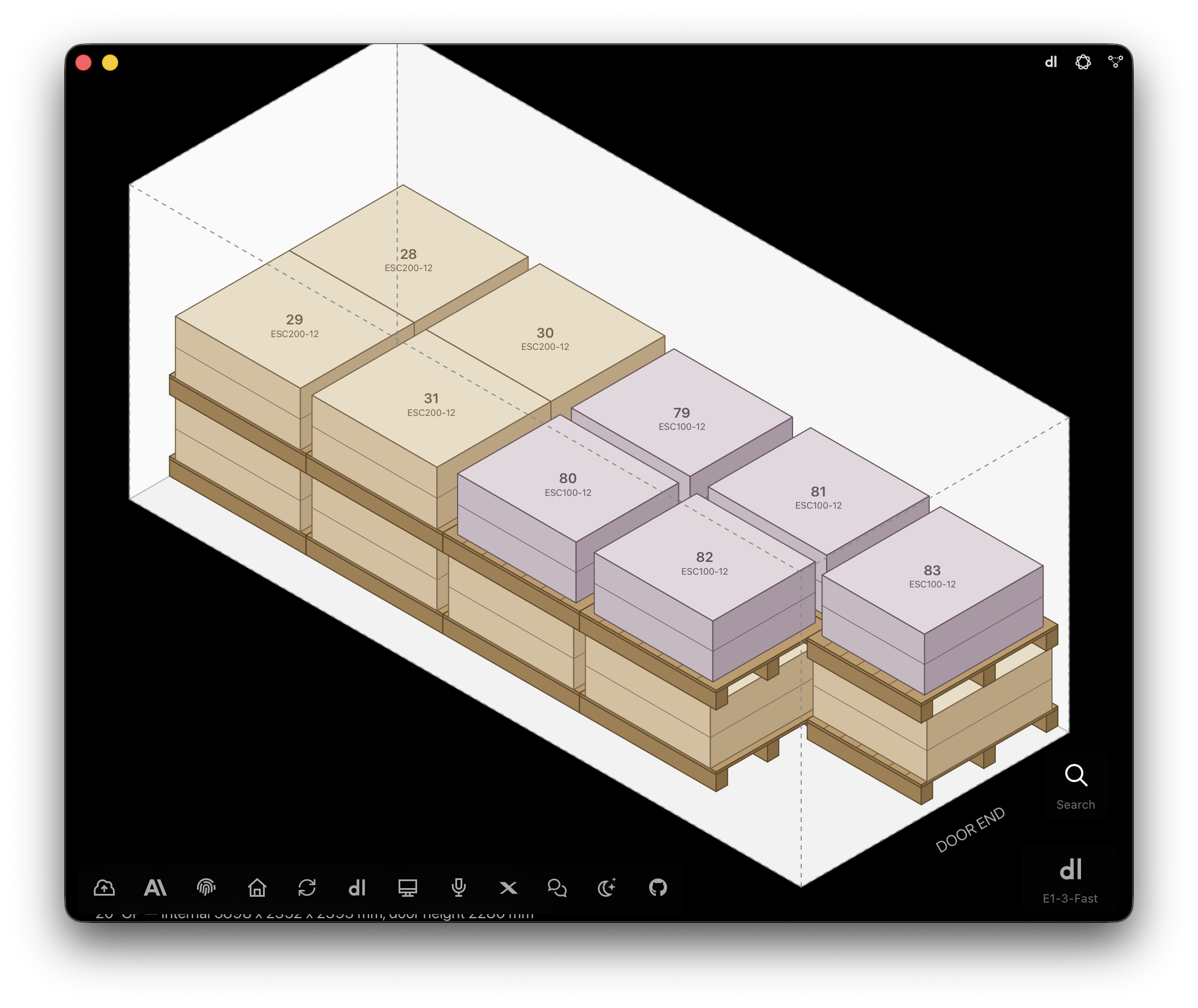
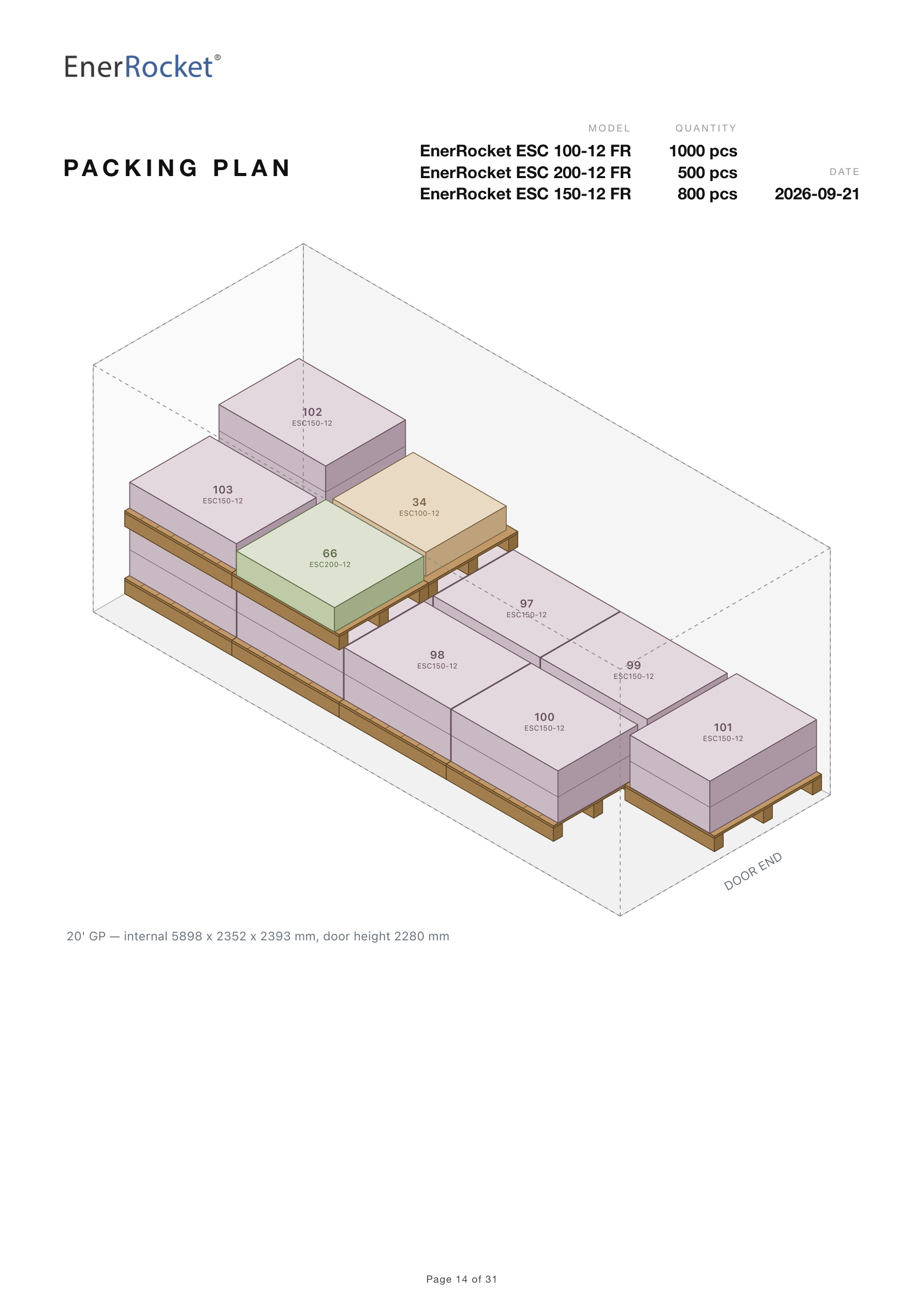
E1pi Mac app — isometric 3D drawing of a mixed 20 ft GP container load: ESC 200-12 pallets 28 to 31 at the far wall and ESC 100-12 pallets 79 to 83 towards the door, each pallet numbered and colour-coded by model, stacked two-high, door end marked; 20 ft GP internal 5898 x 2352 x 2393 mm, door height 2280 mm
The mixed container. Heavy pallets to the far wall, every pallet numbered and colour-coded.
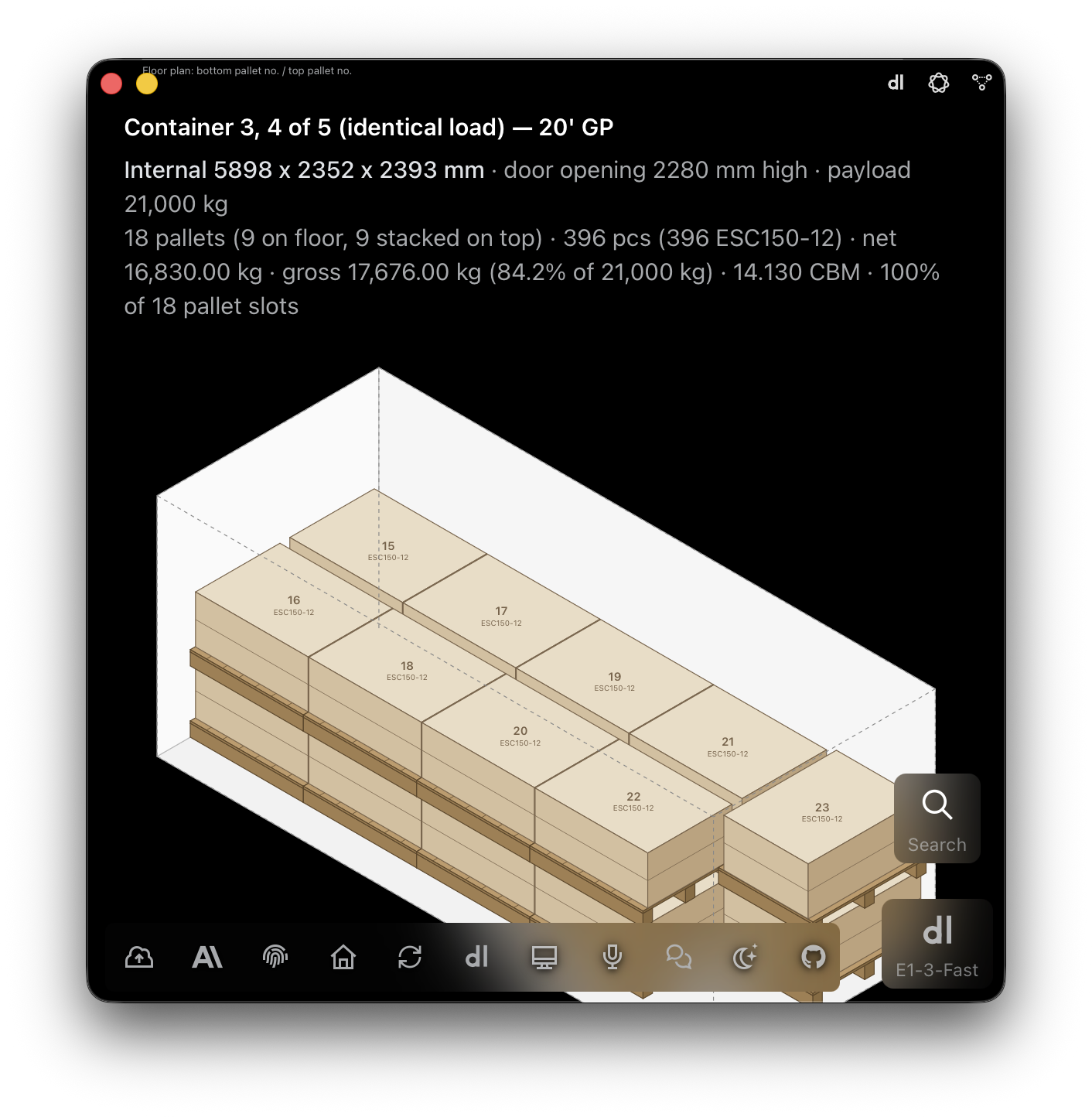
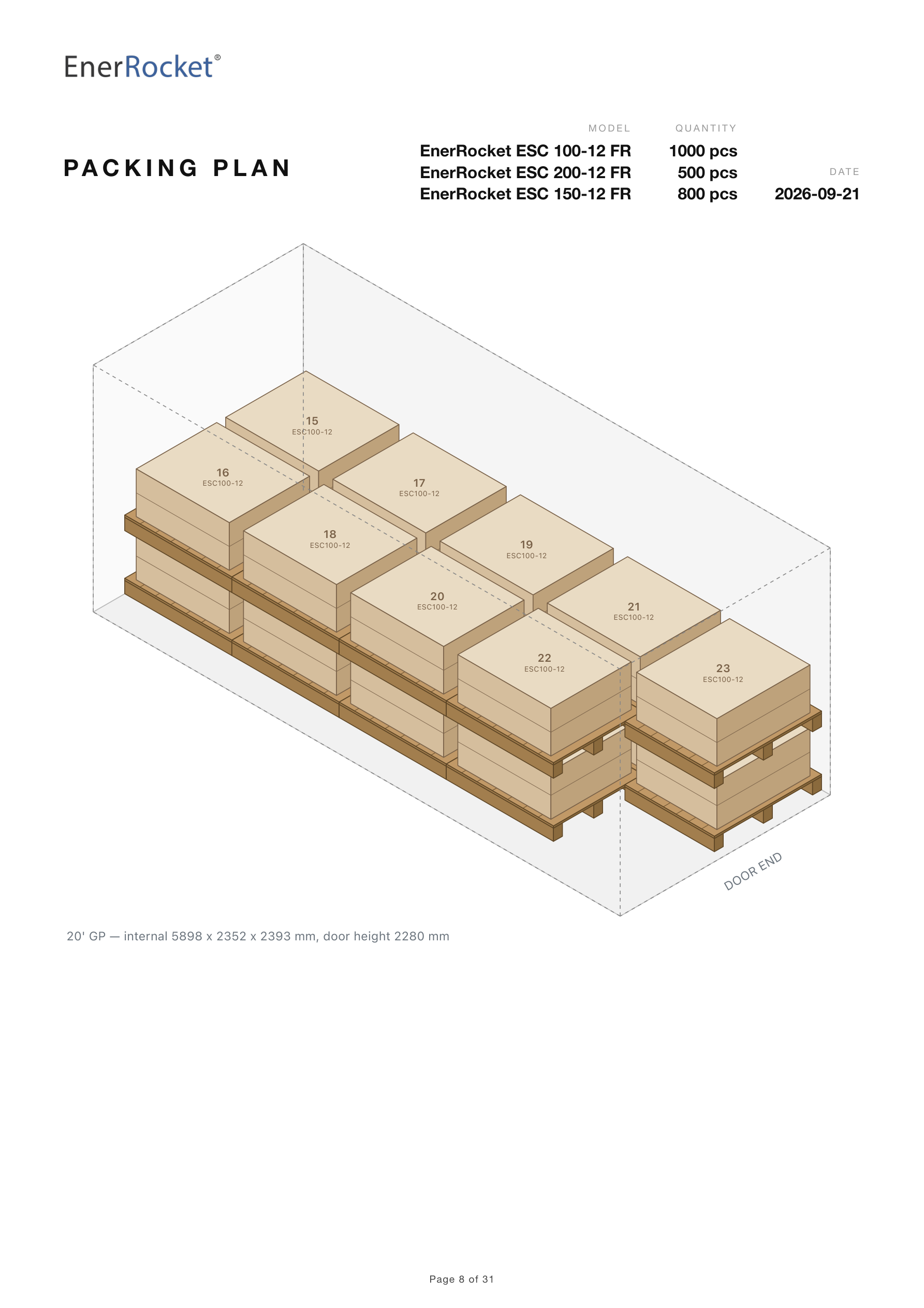
E1pi Mac app — Container 3, 4 of 5 (identical load), 20 ft GP: internal 5898 x 2352 x 2393 mm, door opening 2280 mm high, payload 21,000 kg; 18 pallets, 9 on the floor and 9 stacked on top, 396 pcs ESC150-12, net 16,830.00 kg, gross 17,676.00 kg (84.2% of 21,000 kg), 14.130 CBM, 100% of 18 pallet slots; isometric drawing of the load with pallets 15 to 23 on top
The weight check. 17,676 kg against a 21,000 kg payload. Weight proven before space is called full.
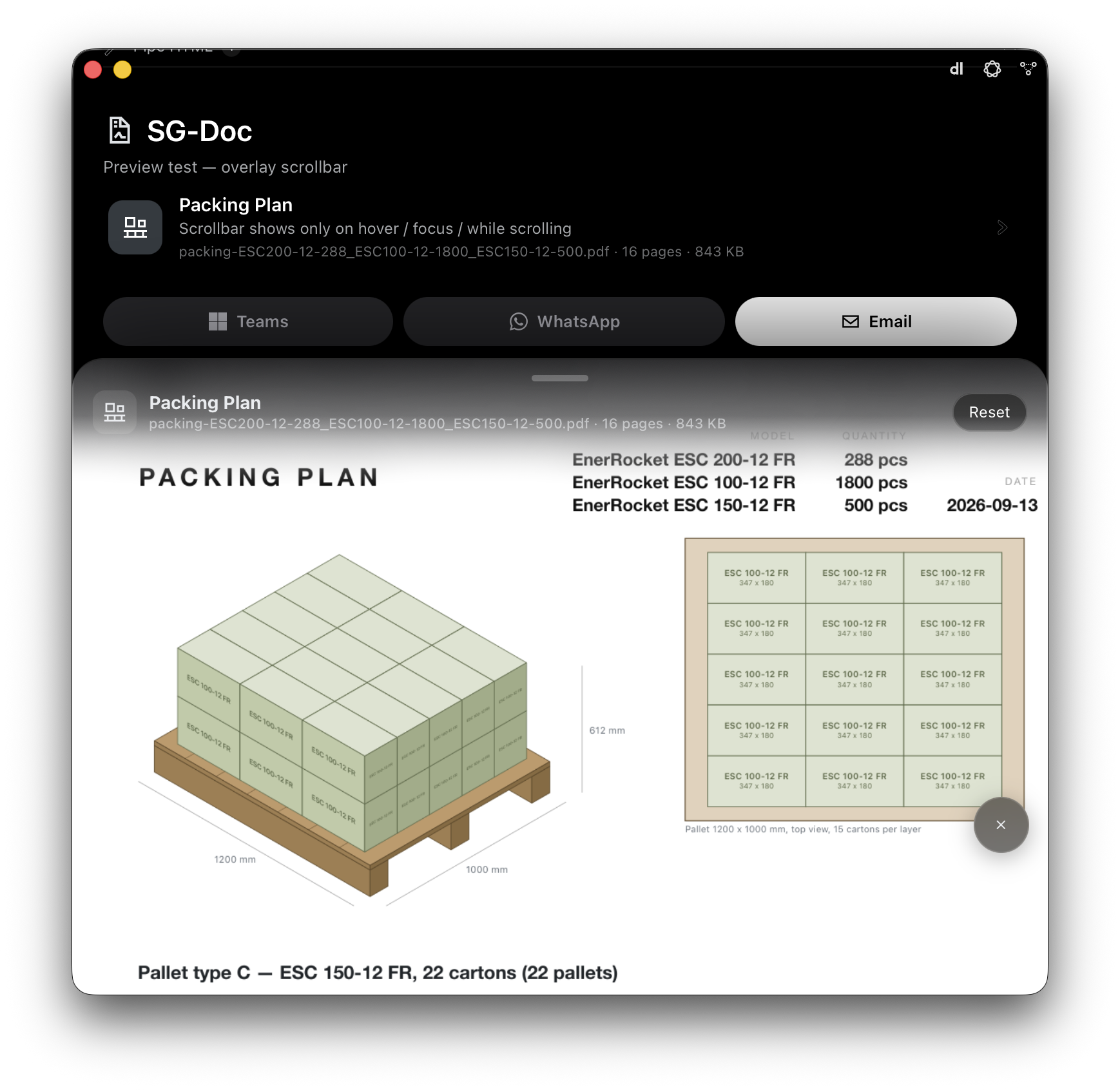
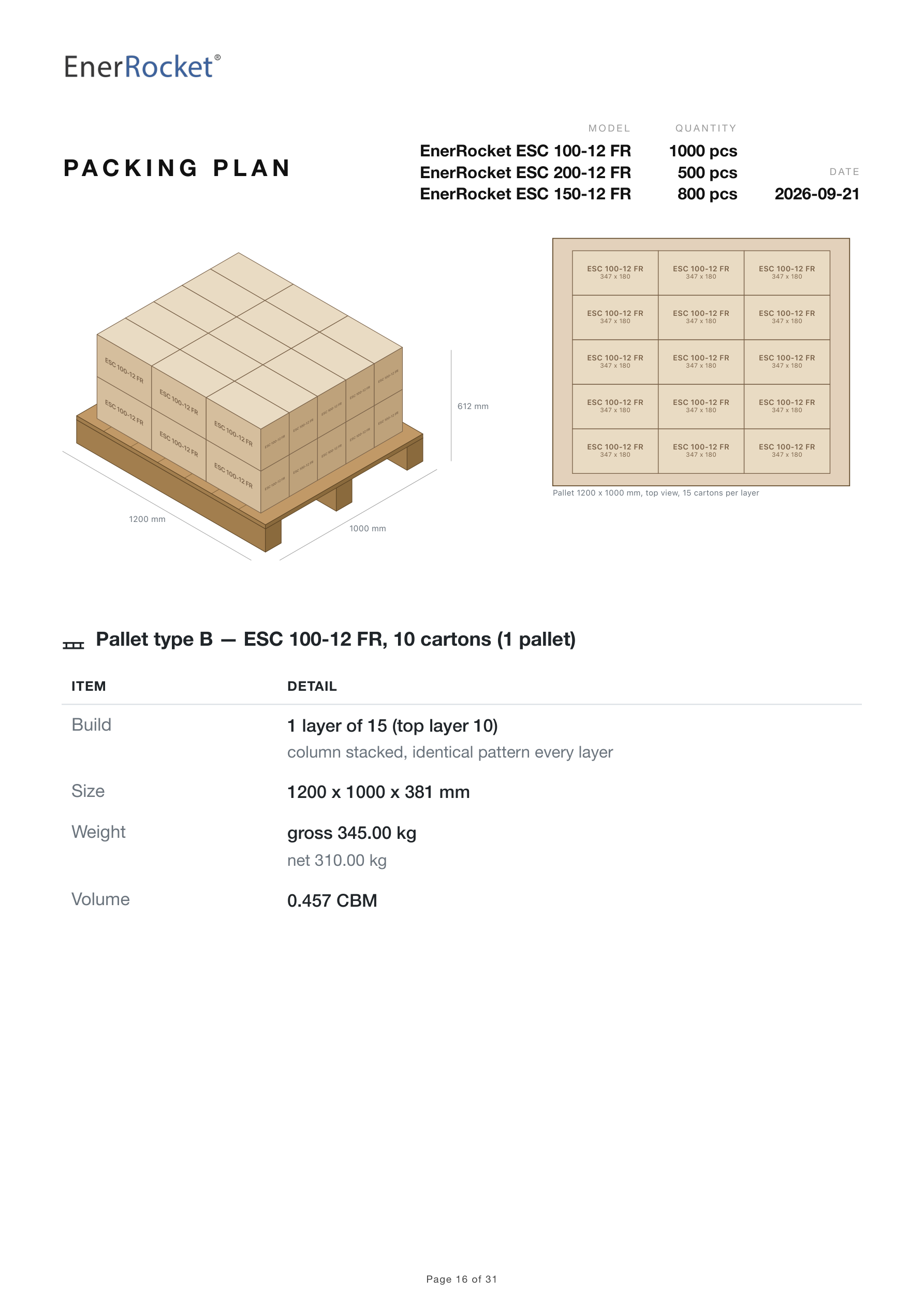
E1pi Mac app — the Packing Plan PDF, 16 pages, 843 KB, with Teams, WhatsApp and Email buttons, previewed below: PACKING PLAN header with EnerRocket ESC 200-12 FR 288 pcs, ESC 100-12 FR 1800 pcs, ESC 150-12 FR 500 pcs, an isometric pallet of 15 cartons per layer of ESC 100-12 FR with 1200 and 1000 mm dimensions and 612 mm height, and the top-view layer plan
Ready to send. The 16-page plan, previewed, then Teams, WhatsApp or Email in one tap.
The plan E1pi produced — 2,300 batteries, six 20 ft containers
Each model worked out.
Each model worked out. Carton, layer, pallet, and what caps it.
The last container, mixed.
The last container, mixed. Leftover pallets colour-coded, heavy ones to the far wall.
A full container, one model.
A full container, one model. 18 pallets two-high, every pallet numbered.
Pallet type B, the part pallet.
Pallet type B, the part pallet. The 10 cartons left over, drawn and ready for the Packing List.
Pallet types D and E.
Pallet types D and E. A part pallet and a standard pallet, isometric and top view.
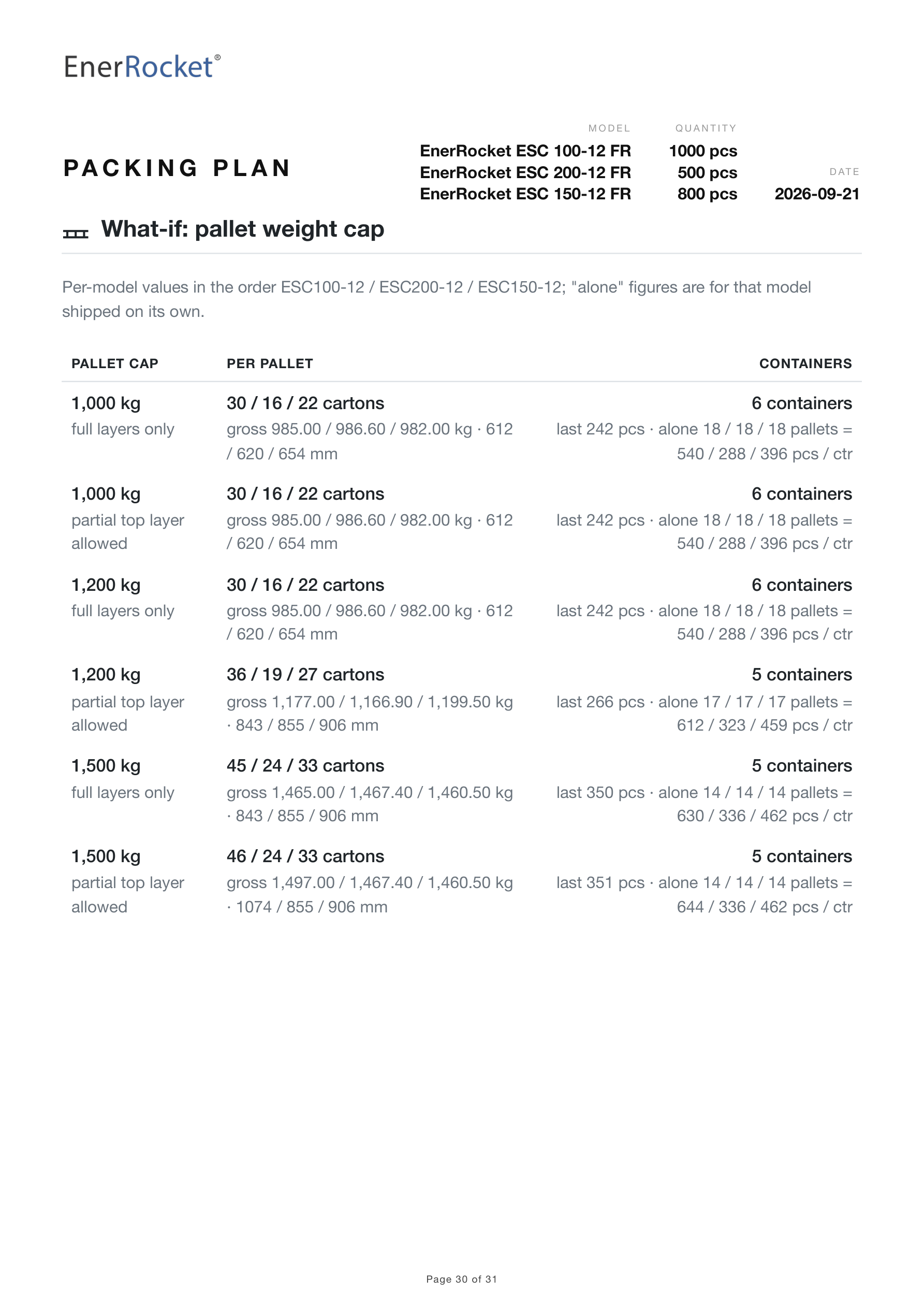
What if the pallet cap changes.
What if the pallet cap changes. 1,000, 1,200 or 1,500 kg — six containers or five.
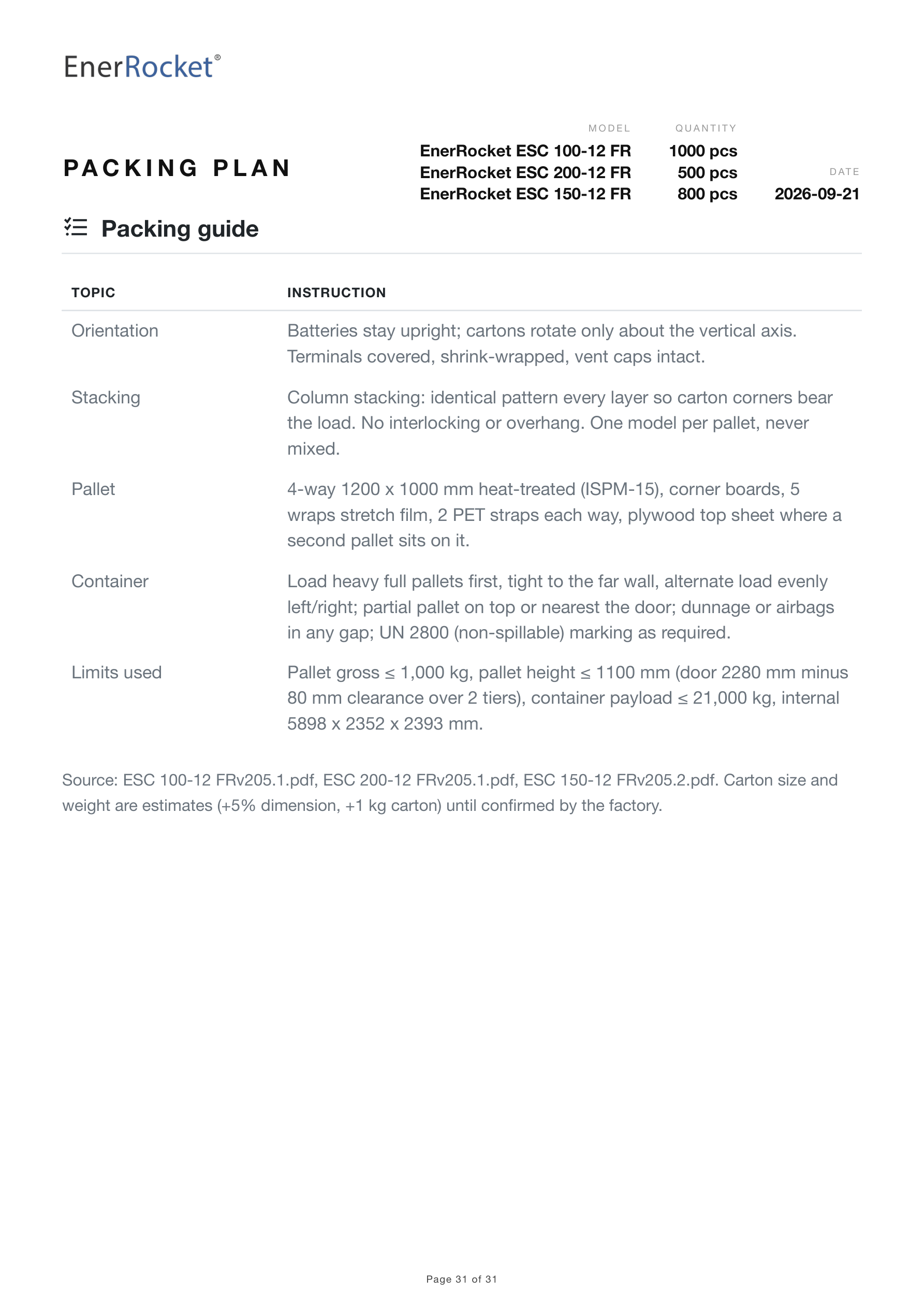
Packing guide.
Packing guide. Orientation, stacking, loading order, limits used, sources named.

Monday 9 am. The whole week, on one page.

A scheduled script wakes before your team does. E1pi reads every ERP, bank, carrier and calendar, then emails one PDF inside the company — cash by day, who pays late, what breaks this week, and the few decisions that still need a person. Below: the real brief for week 41.

The same sources, checked on a vendor’s bill →
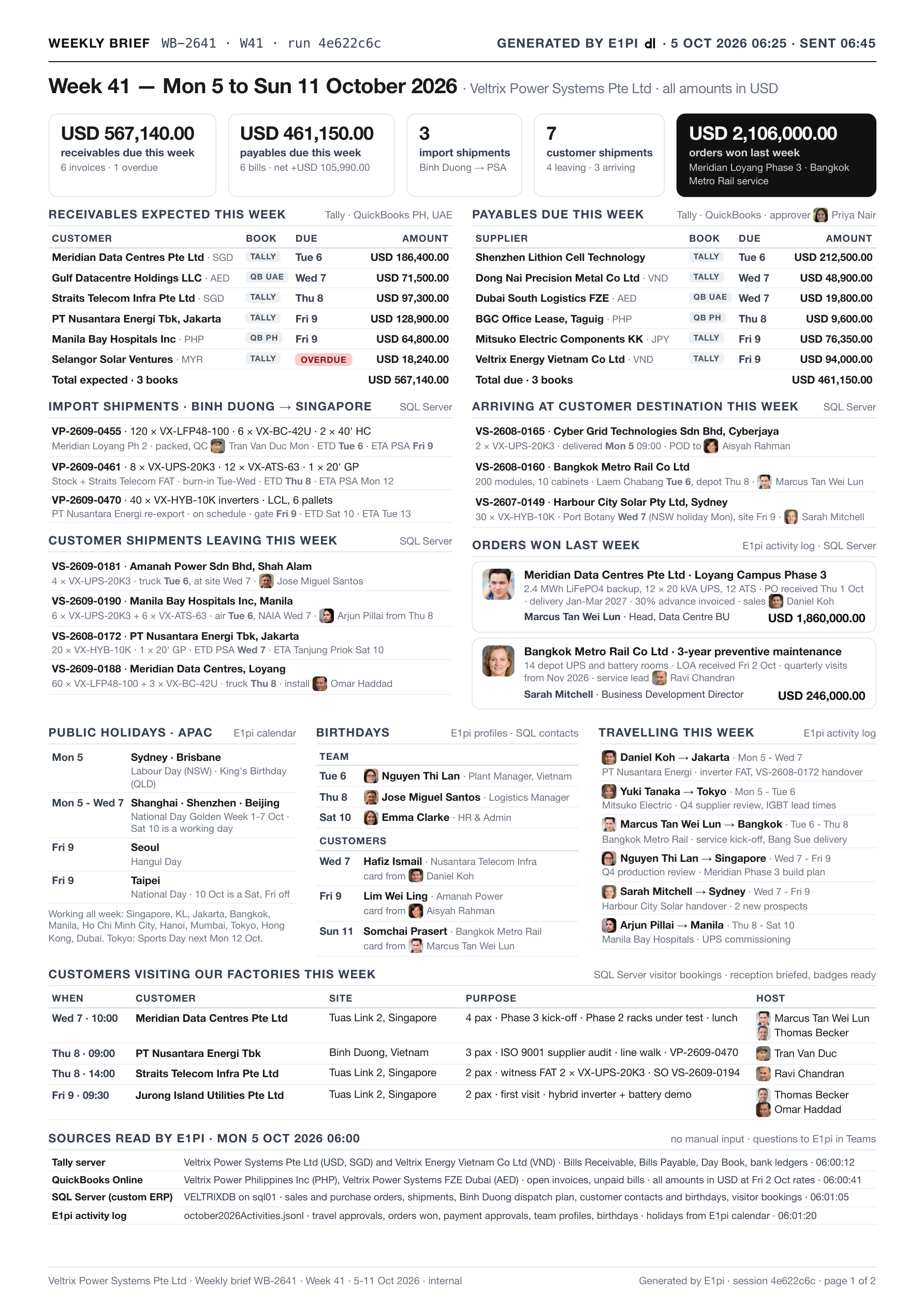
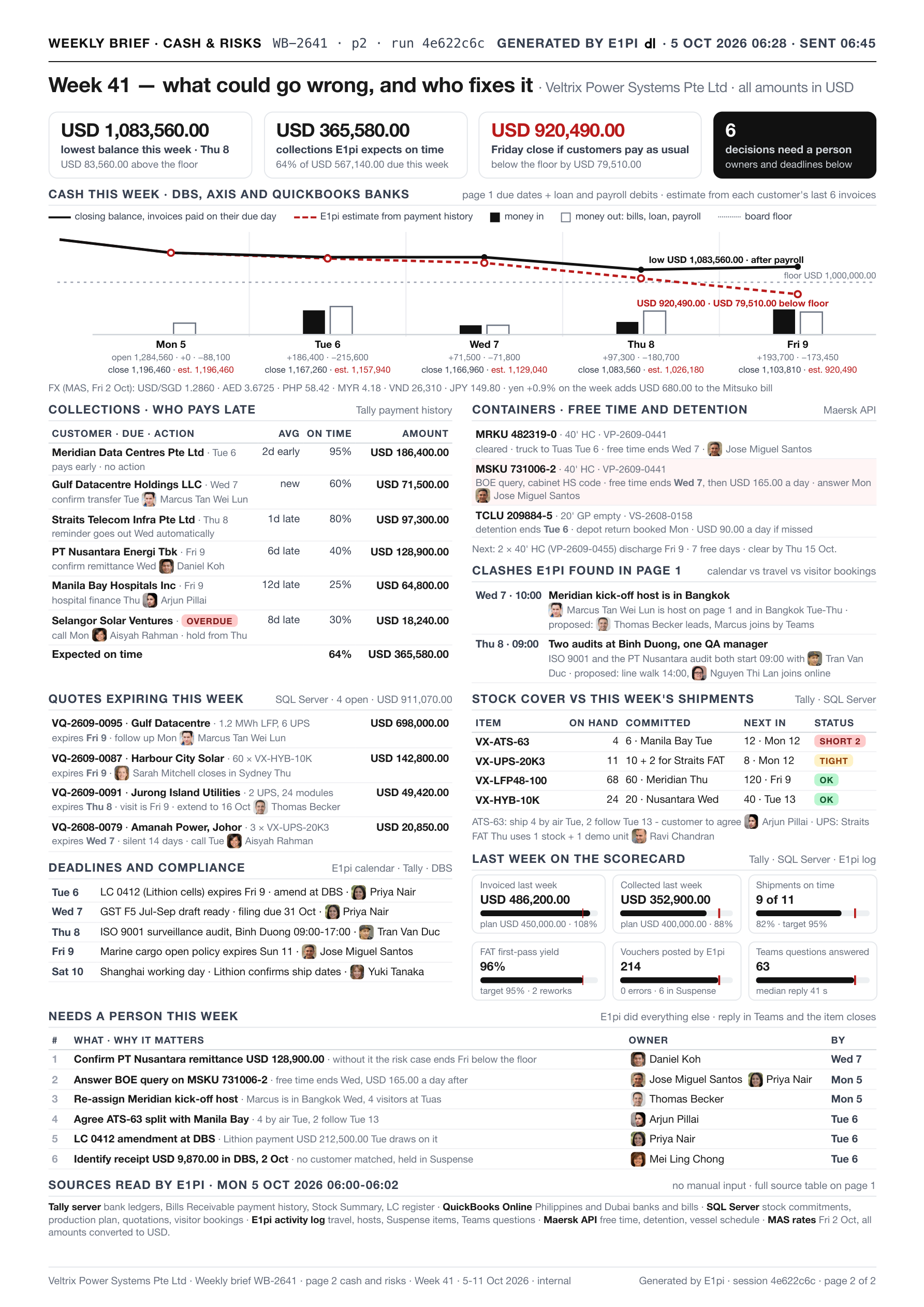
Runs on a schedule. Every Monday 9 am — no one asks, no one forgets.
Every source read live. Tally, QuickBooks, SQL Server, banks, Maersk, MAS rates, calendars and travel.
Cash forecast by day. Opening, money in, money out, closing — any breach of the board floor flagged, with the day it happens.
Collections ranked, owners named. Each customer’s on-time history from Tally. Who to call, who reminds itself, who to escalate.
Free time and detention watched. Every container, the day charges start, the person who must act.
Clashes found across systems. The host travelling on the day of the kick-off. Two audits, one QA manager. Calendar vs travel vs visitors.
One PDF, emailed internally. Page 1 the week, page 2 cash and risks. No login, no portal, no app to open.
Only what needs a person is asked. Everything else already done. Reply in Teams and the item closes.
Page 1 — the week.
Page 1 — the week. Due dates, visitors, meetings, shipments, production, scoreboard. Tap the page to read it full size.
Page 2 — cash and risks.
Page 2 — cash and risks. Cash by day, collections, containers, clashes, expiring quotes, deadlines, stock cover, decisions. Tap the page to read it full size.
How we think about it

We ran our own companies on E1pi for two years before releasing it. Every task is started by a person and approved by a person. It is not AI versus people. It is your people with E1pi, versus your competitor’s people without it.

2 yearsrunning our own companies on E1pi
15companies on one E1pi, in one view
12fundamental reports, live from the books
0payments made without a human yes
1fixed monthly price

Built with E1pi.
Installs itself at your place.

Most AI tools want your files on their servers. E1pi keeps everything on a PC in your office. Many users, every device, one admin in control.

How it was built →
Work together
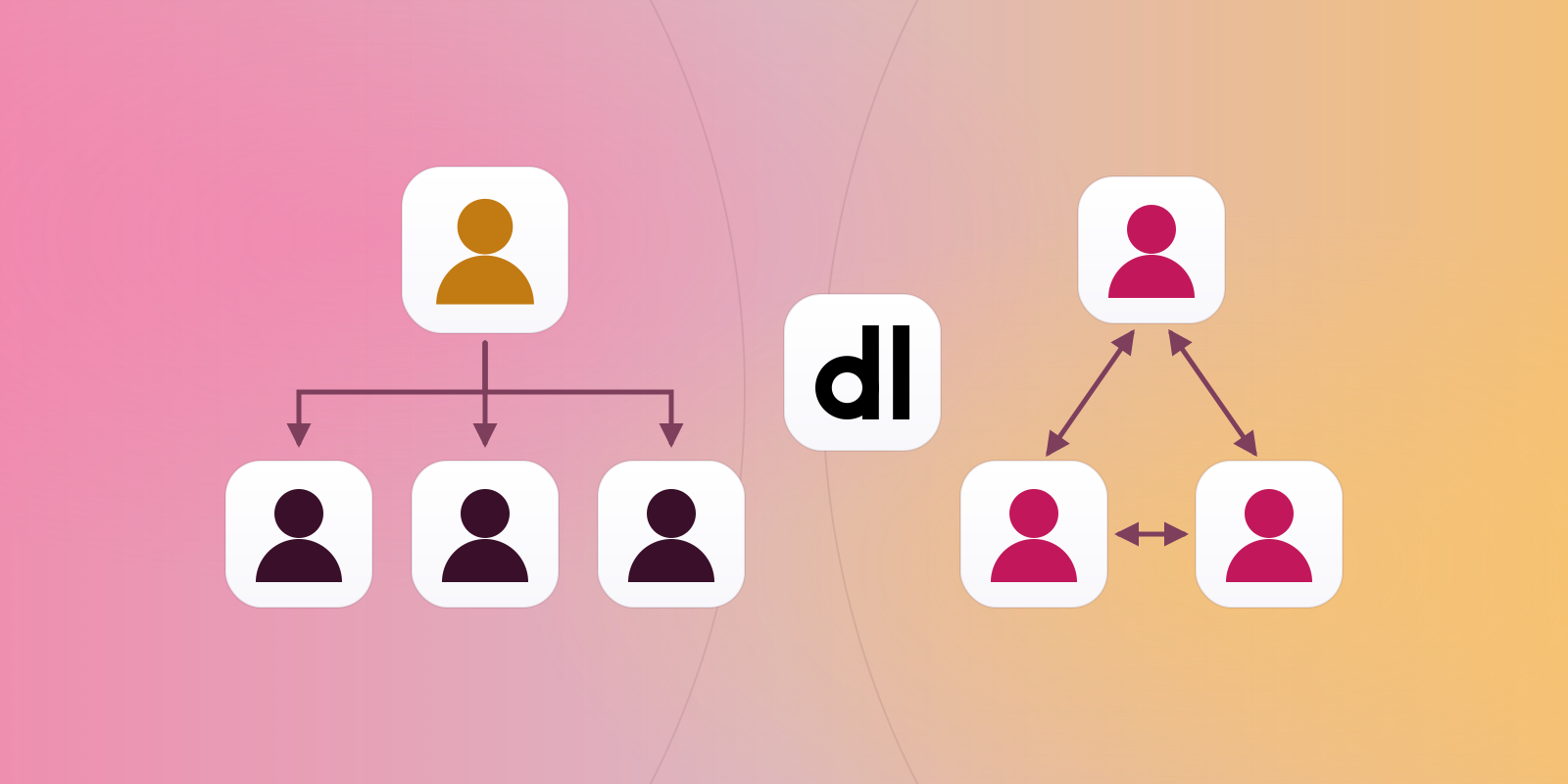
  • One session, every device. Start on the iPhone, continue on the PC.
  • Group sessions: anyone prompts, everyone sees.
  • Teams and WhatsApp both ways. A notification the moment something needs you.
Sign in without passwords
  • Face ID or fingerprint on the LAN. Plus a device certificate from outside.
  • The AI installs the certificate with you, end to end.
  • Extend it to suppliers — the defence against a forged bank-change email.
Your rules, your data
  • Company Skills for everyone, Private Skills for one — plain documents you can edit.
  • Private mode saves a conversation where you choose.
  • Users and roles from Microsoft 365 or Google Workspace.
Watch, steer, extend
  • Every thought, tool call and result on screen. Steer it the moment it drifts.
  • Desktop view from the phone. A shared iPhone simulator.
  • Host your own MCP servers inside the harness.

An iPhone simulator, shared with the team. Build on Windows, verify on a phone, ship — from one window. This is how we build E1pi.

Any website, in the drawer. Type @web. The page opens over the conversation; the next request is typed with it still open.

Screen by screen
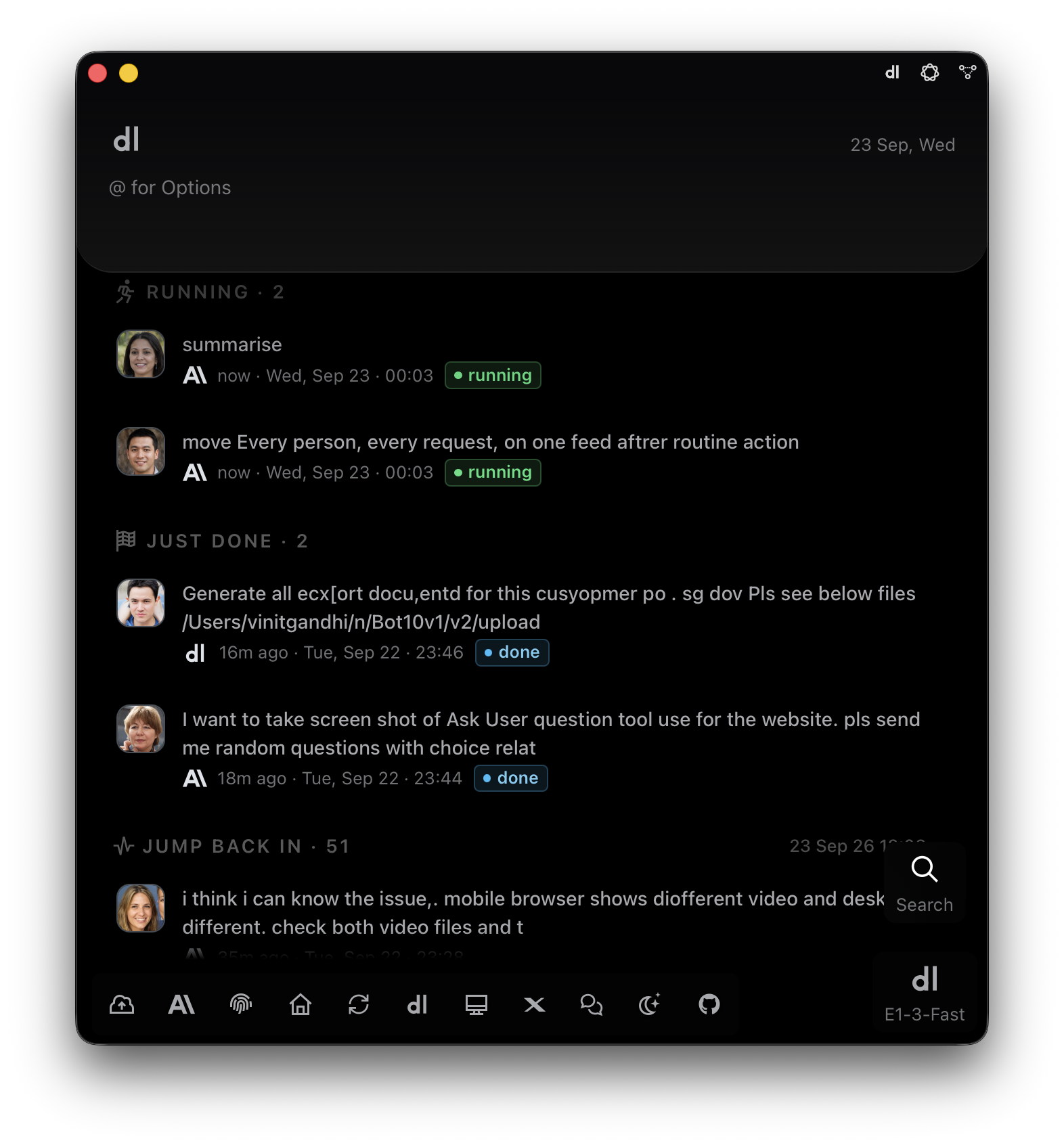
E1pi Mac app home — composer with @ for Options; Running · 2 shows two team members' requests in progress at the same moment, each with their photo and a green running badge; Just Done · 2 with done badges; Jump Back In · 51 recent conversations; icon bar and the E1-3-Fast model badge at the bottom
Two colleagues, two tasks, one moment. Running now, just done, jump back in — for the whole team.
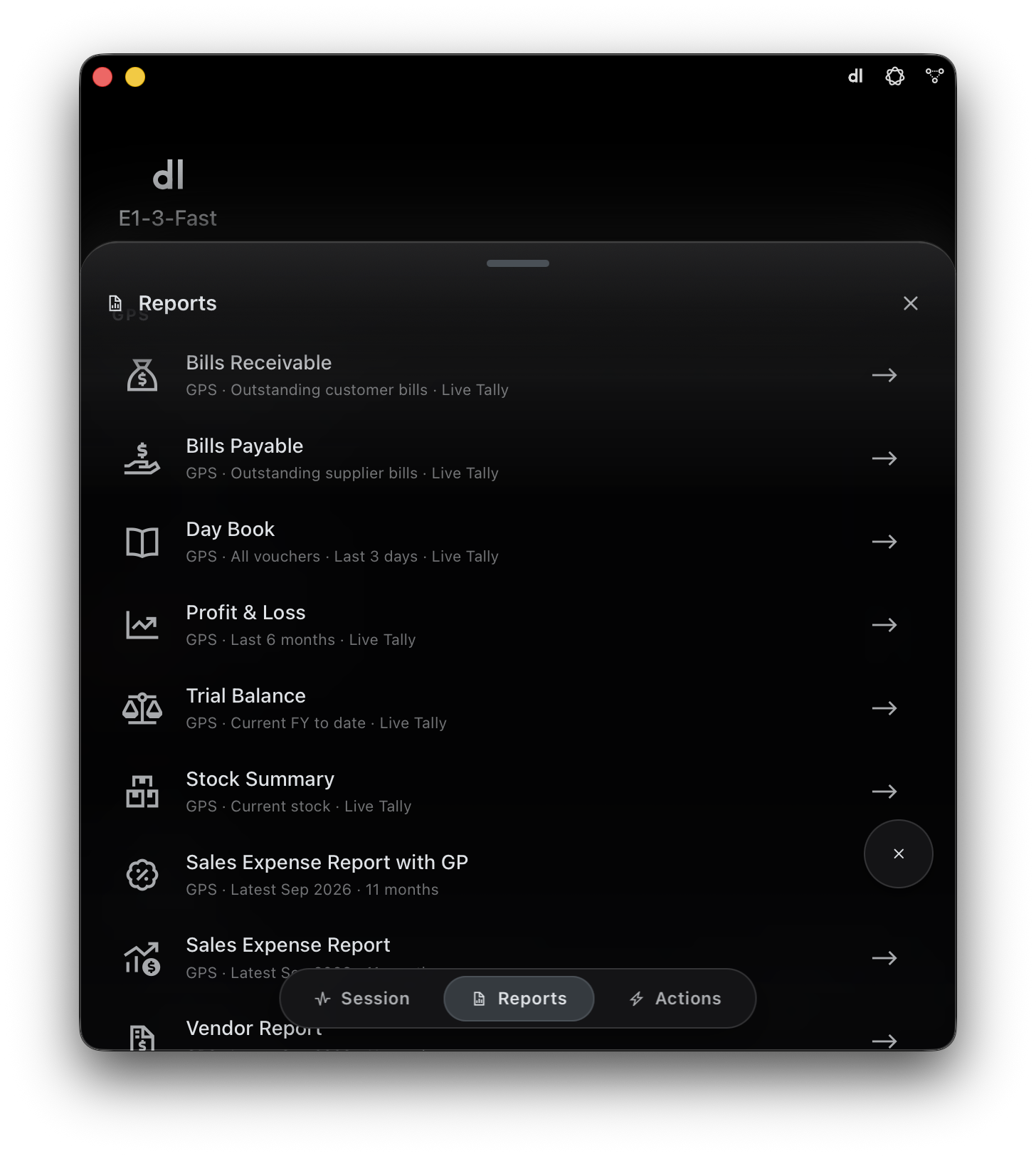
E1pi Mac app — Reports sheet for the GPS company: Bills Receivable, Bills Payable, Day Book, Profit & Loss, Trial Balance, Stock Summary, Sales Expense Report with GP, Sales Expense Report, Vendor Report — each a one-tap live Tally report; Session / Reports / Actions switcher at the bottom
Reports, one tap away. Each person sees only what they are cleared for.
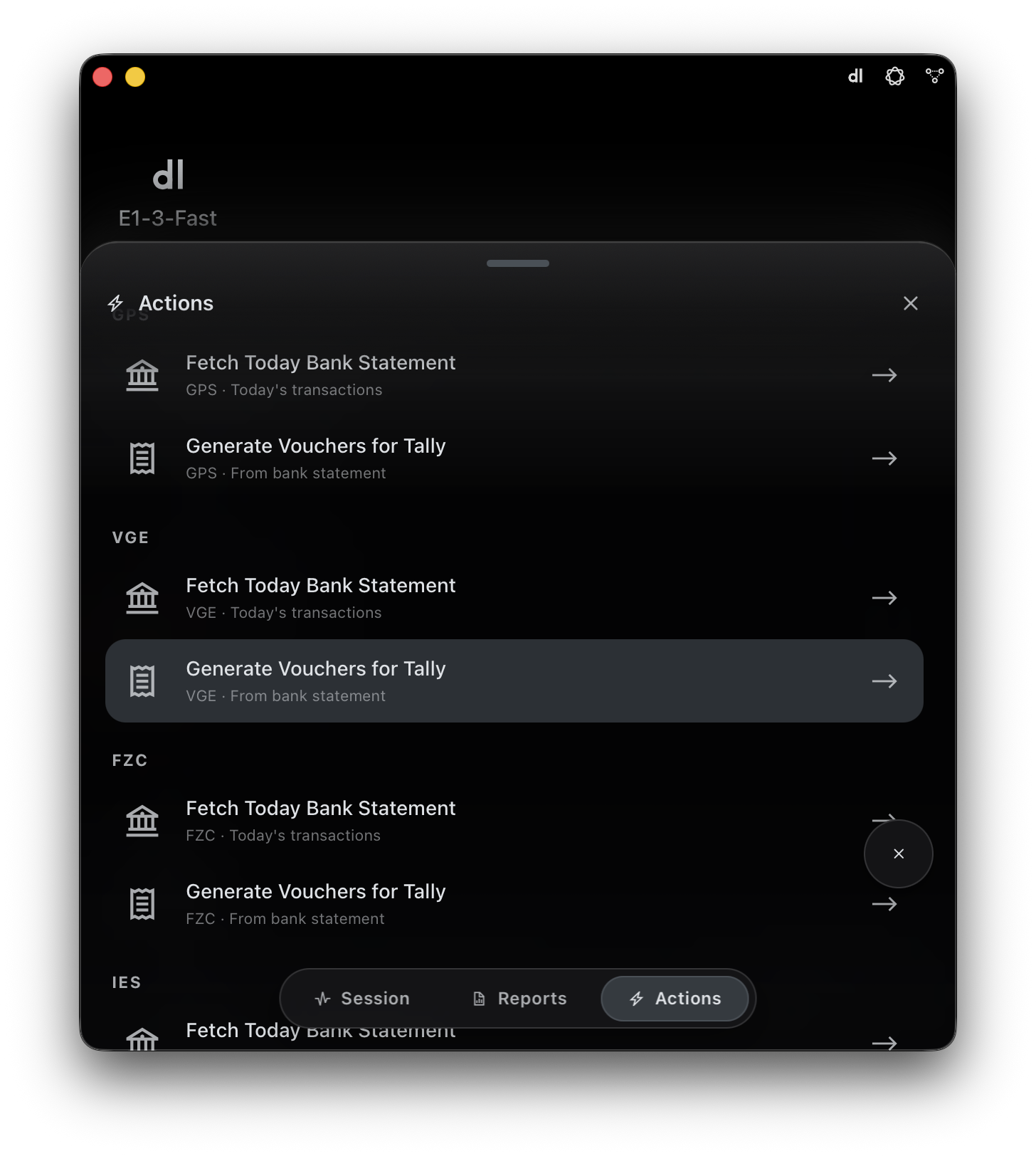
E1pi Mac app — Actions sheet grouped by company (GPS, VGE, FZC, IES): Fetch Today Bank Statement and Generate Vouchers for Tally from the bank statement, one tap each
Routine actions, per company. Fetch the statement, generate the vouchers — one tap each.
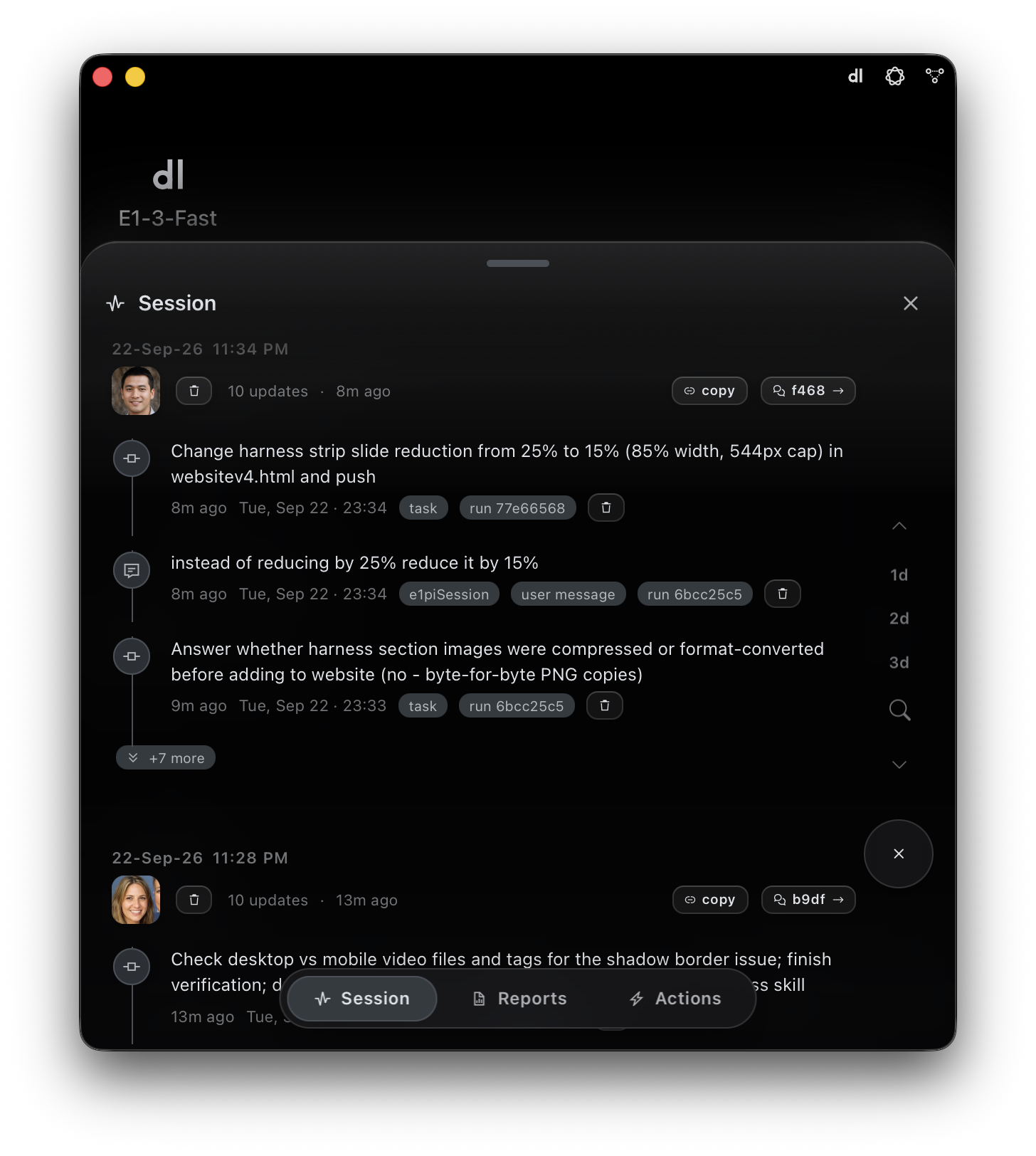
E1pi Mac app — Session sheet: a dated activity feed grouped by person, each entry with their photo, the task the AI logged, the original user message, run id chips, copy and open-session buttons, and a 1d / 2d / 3d jump rail
Every request, on one feed. Who asked, what the AI did, a link to the session.
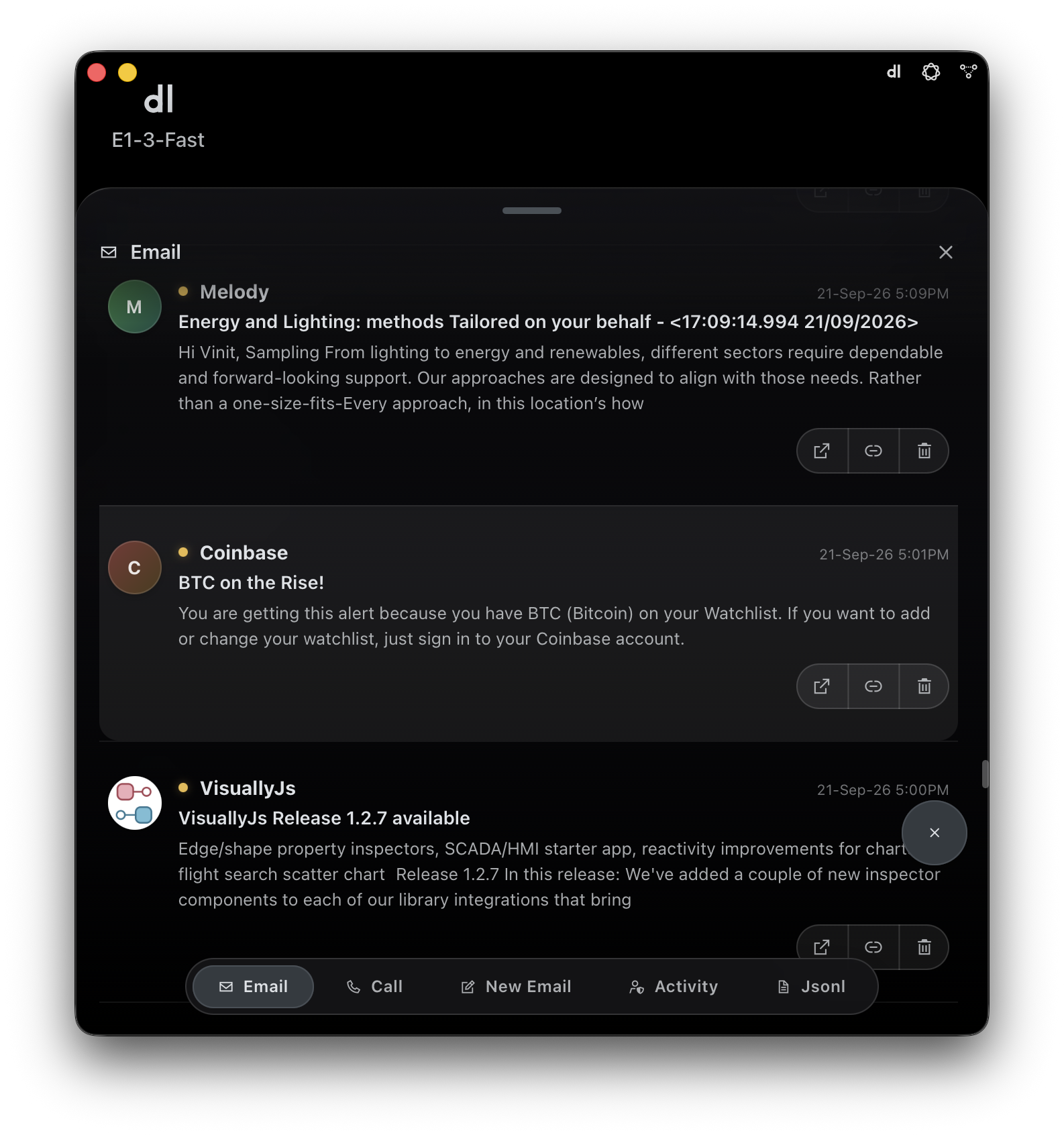
E1pi Mac app — Email sheet showing the signed-in person's Microsoft 365 inbox inside the harness, with open, link and delete buttons on each mail and Email / Call / New Email / Activity / Jsonl tabs
Your own mailbox, inside. Microsoft 365 mail and calls, signed in as yourself.
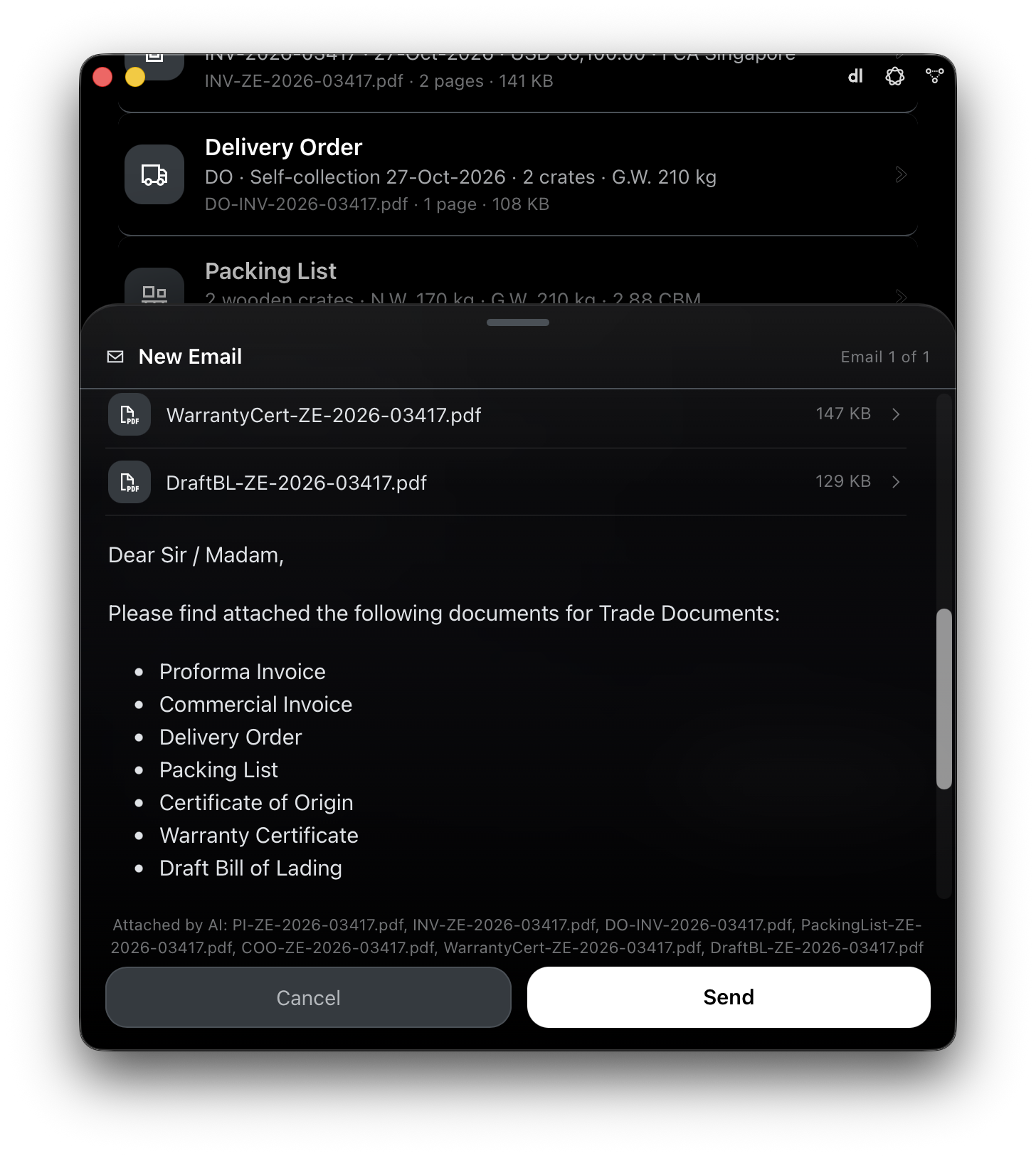
E1pi Mac app — New Email draft prepared by the AI with seven trade-document PDFs attached (Proforma Invoice, Commercial Invoice, Delivery Order, Packing List, Certificate of Origin, Warranty Certificate, Draft Bill of Lading); Cancel and Send buttons for the person to decide
The AI drafts, a person sends. Seven documents attached, note written. Nothing leaves until someone taps Send.
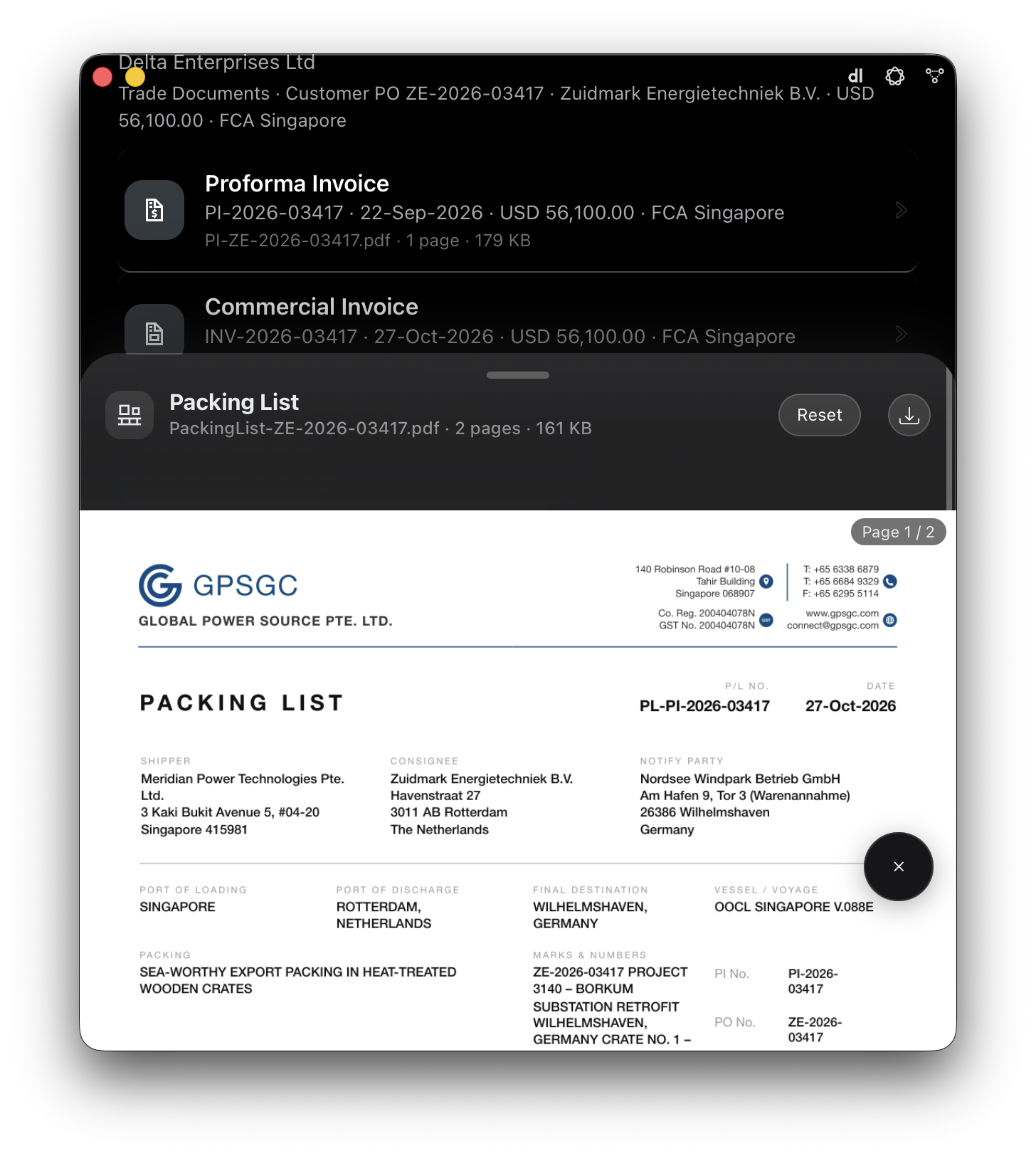
E1pi Mac app — built-in PDF viewer opening in an offcanvas sheet over the trade-document list: Packing List PL-PI-2026-03417, page 1 of 2, with Reset and download buttons, the GPSGC letterhead, shipper, consignee, notify party, ports and marks visible
Read the PDF without leaving. Built‑in viewer, every device.
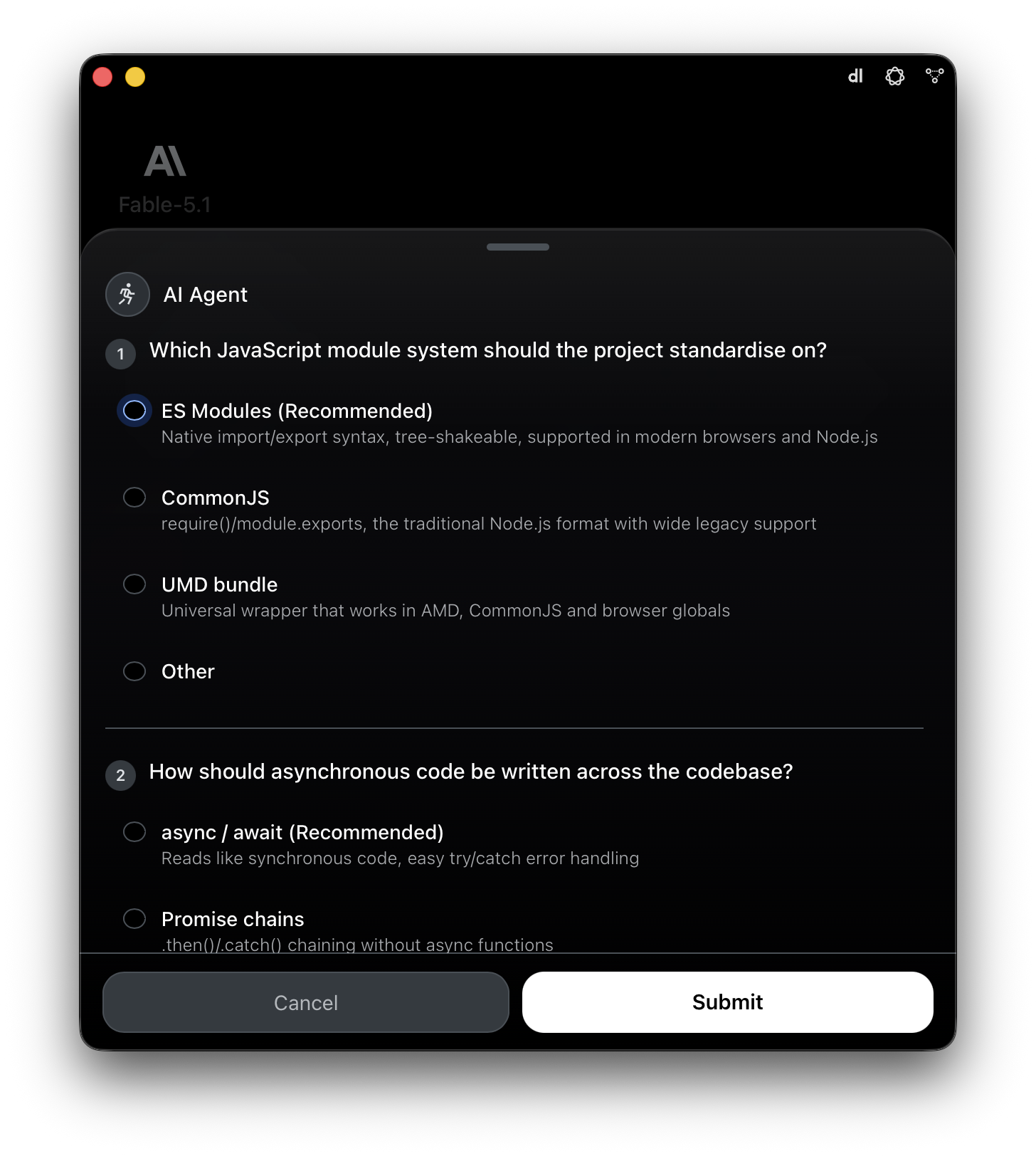
E1pi Mac app — AI Agent sheet asking the user two multiple-choice questions before proceeding, with a Recommended option marked, an Other choice, and Cancel / Submit buttons
It asks before it decides. Options on screen, recommendation marked. The AI does not guess.
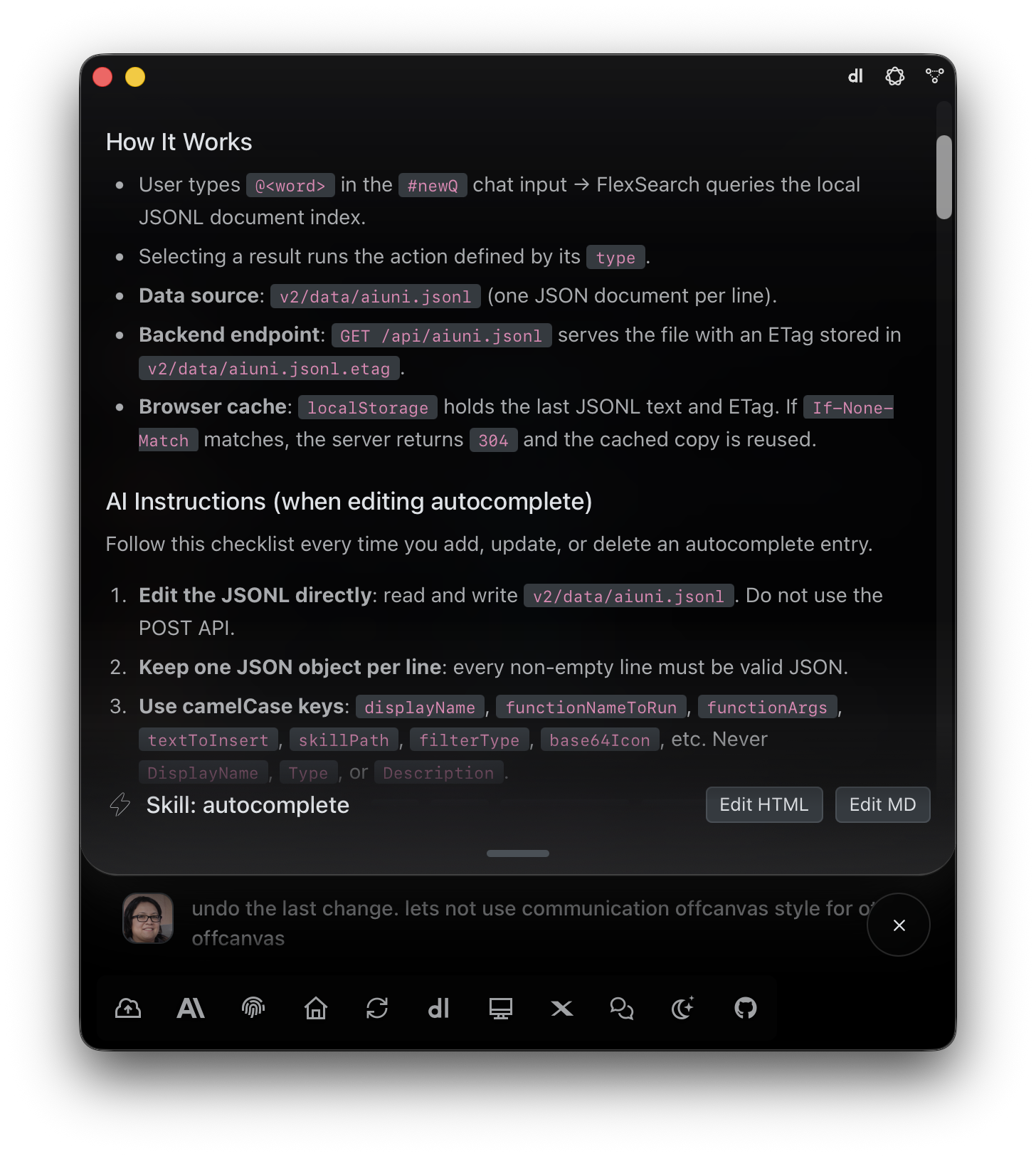
E1pi Mac app — Skill editor showing the autocomplete skill's How It Works and AI Instructions sections, with Edit HTML and Edit MD buttons
Admins shape what the AI knows. Edit a skill, save. The whole team follows the new rules.
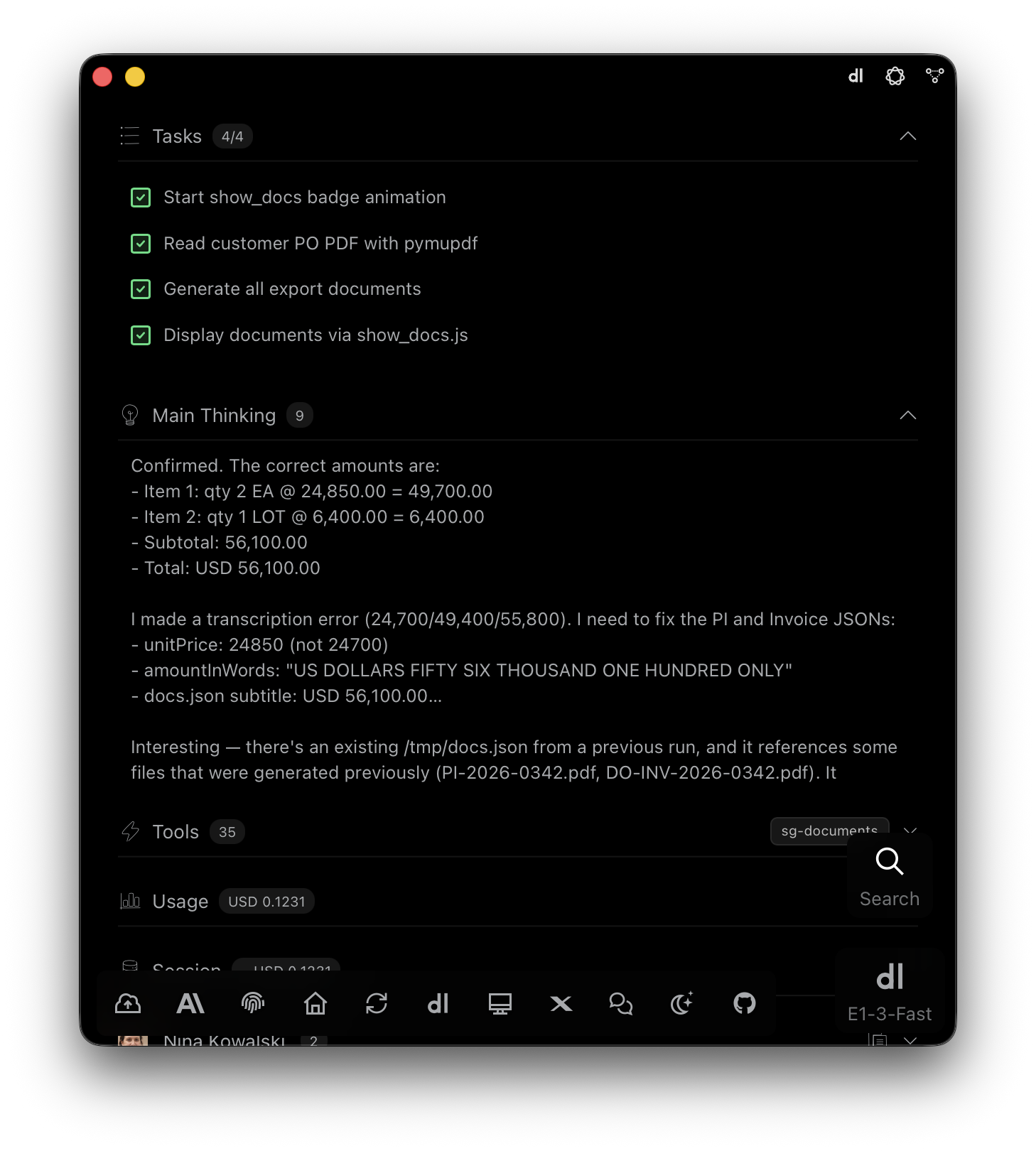
E1pi Mac app — run detail: Tasks 4 of 4 ticked (start badge animation, read customer PO PDF, generate all export documents, display documents), Main Thinking 9 showing the AI confirming line amounts and catching its own transcription error before fixing the PI and invoice JSON, Tools 35 with the sg-documents skill, Usage USD 0.1231
The plan and the reasoning, in the open. Here: catching its own error before the invoice went out.
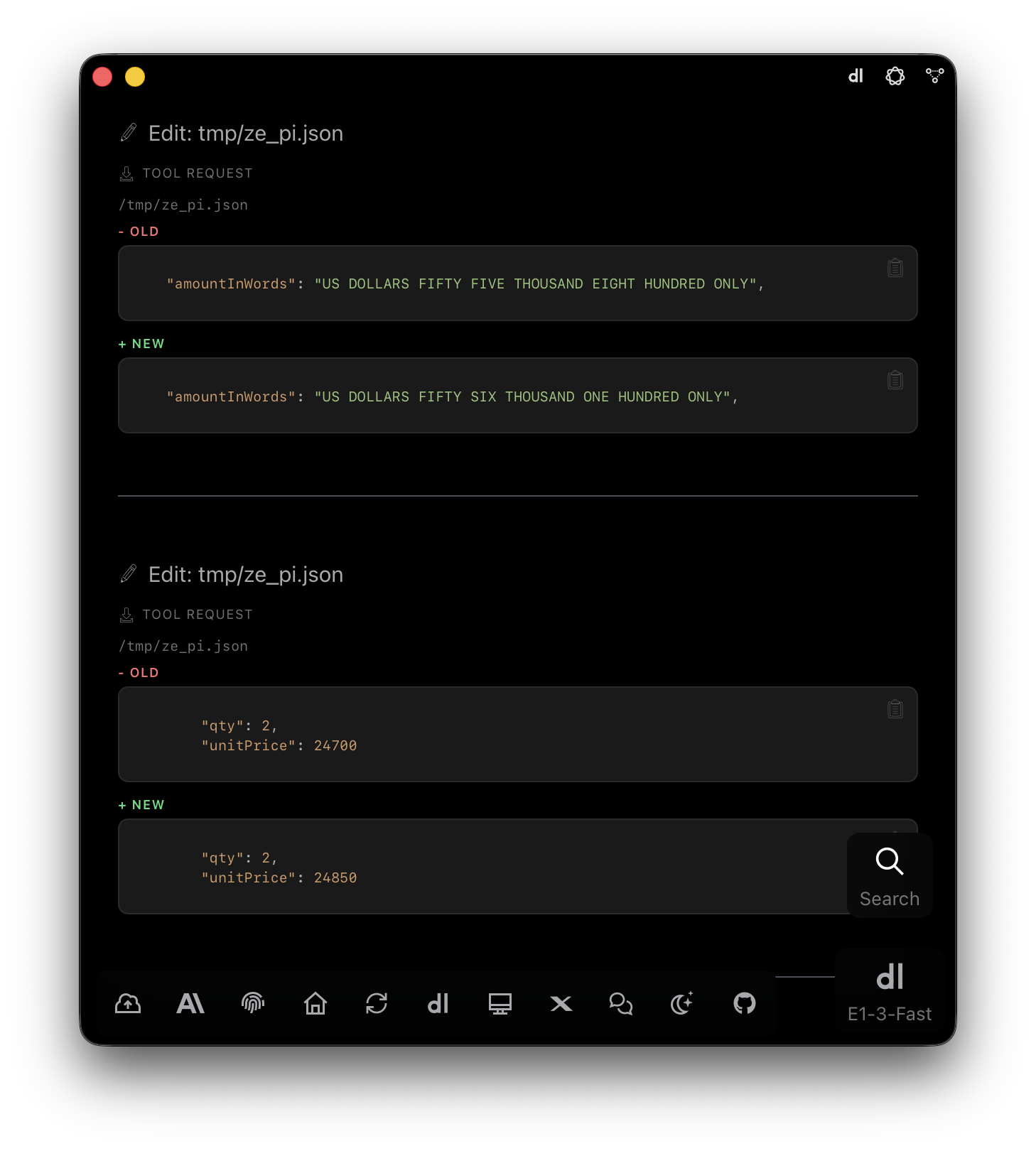
E1pi Mac app — two Edit tool requests on tmp/ze_pi.json shown as OLD and NEW: amount in words corrected from fifty five thousand eight hundred to fifty six thousand one hundred, and unit price corrected from 24700 to 24850, each with a copy button
Every change, old and new. Anyone reviewing sees exactly what moved.
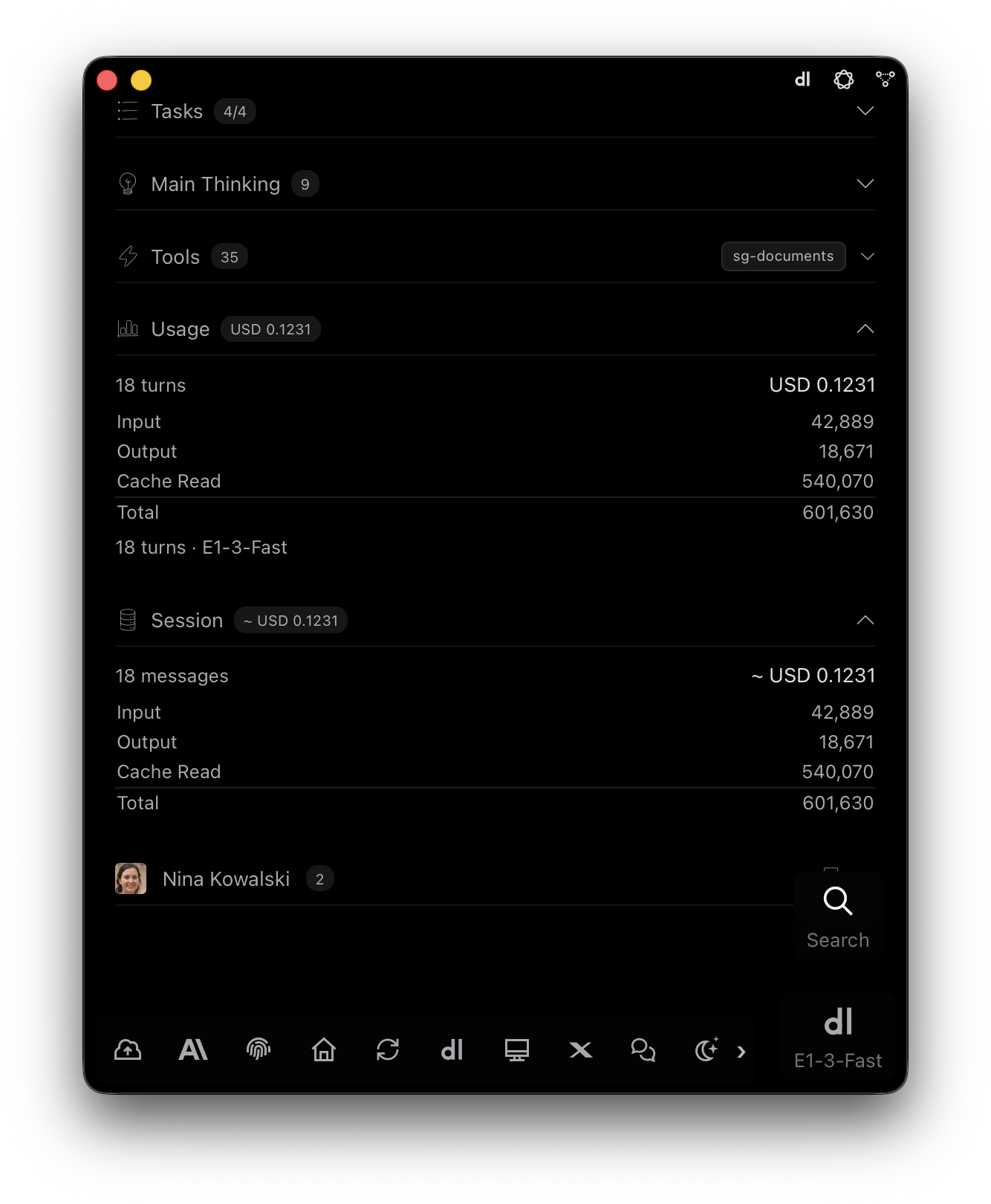
E1pi Mac app — Usage panel: 18 turns, USD 0.1231, input 42,889, output 18,671, cache read 540,070, total 601,630 tokens on E1-3-Fast; Session panel with the same totals; requesting user Nina Kowalski with 2 runs
Every run accounted for. A full set of export documents for USD 0.1231.
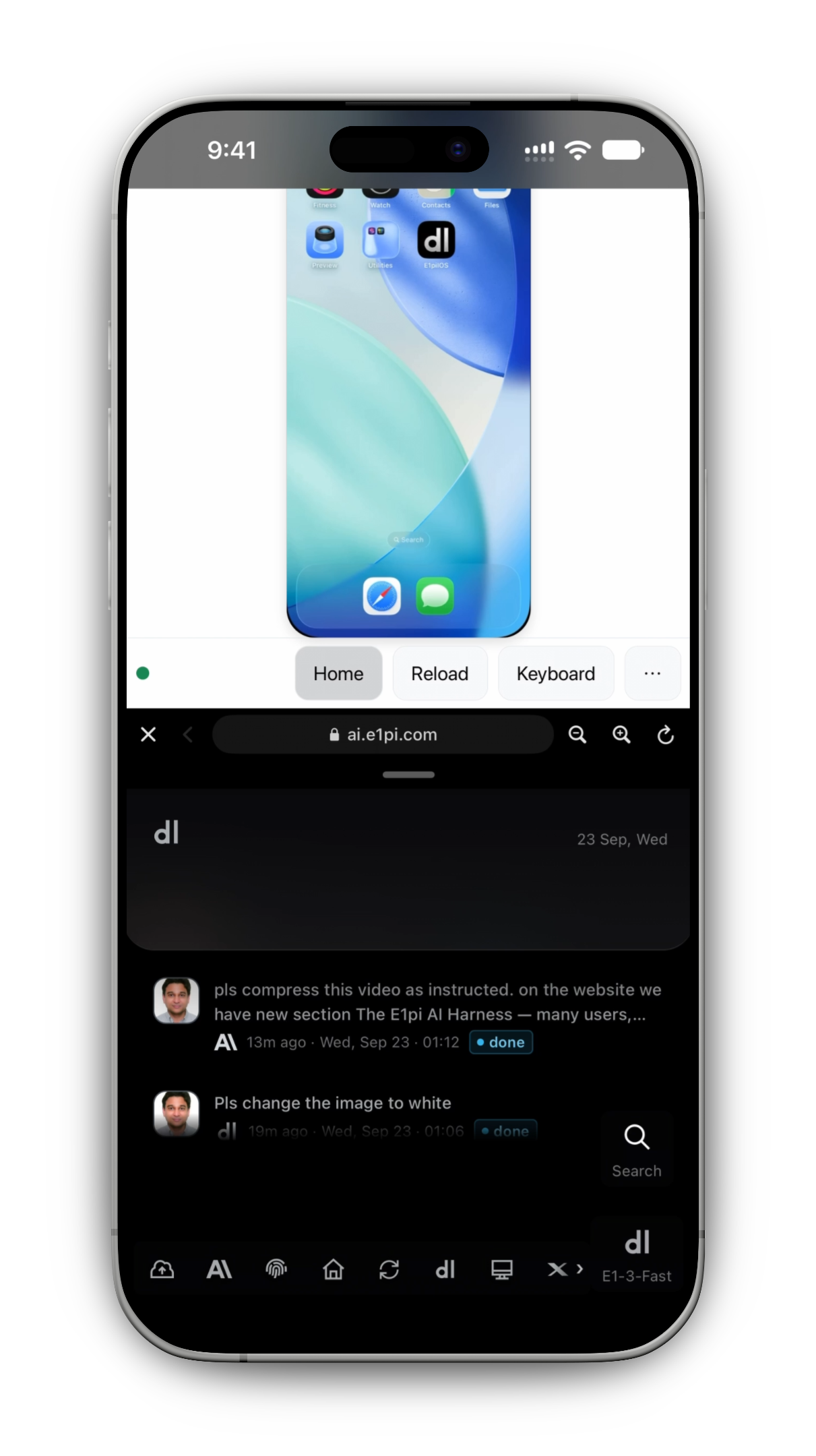
E1pi iPhone app — the in-app web drawer open over the conversation, showing the E1pi iPhone simulator on ai.e1pi.com with Home, Reload and Keyboard controls; the composer and the Just Done feed with two finished requests sit underneath
A web drawer above the conversation. Here, the iPhone simulator — the AI’s iOS work checked without leaving the app.
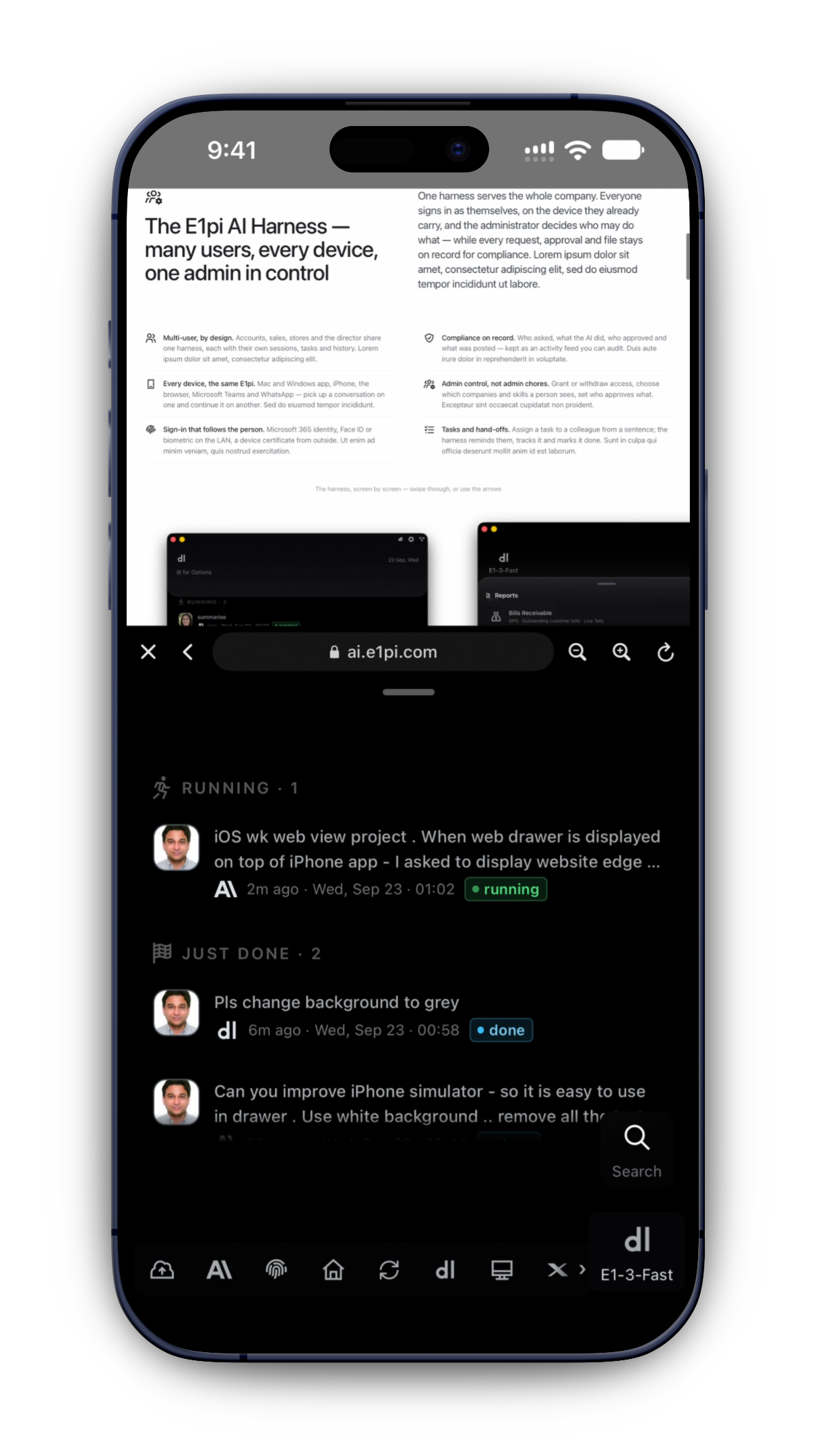
E1pi iPhone app — the in-app web drawer showing the E1pi website's AI Harness section on ai.e1pi.com, with the home feed (Running · 1, Just Done · 2) and the icon bar still visible underneath
The same drawer, showing the website. Read, scroll, pull down, carry on.

Questions owners ask us

Plain answers. If yours is not here, ask us.

Can I download a trial today?

Not yet. E1pi is in private preview until the general release in the last week of October 2026. Register for a demo or preview access and we set you up.

How is E1pi installed?

Once you are on the preview — or from general release — download the Mac or Windows app and sign in. E1pi installs what it needs, downloads itself and starts. You watch every command. No consultant.

Is E1pi open source?

No — but not a black box. The code sits on your own disk. Your IT can read every line; your admin can see every AI call.

Which computer do I need?

Any recent Mac or Windows PC in your office, ideally on the same network as your accounts software. Your team reaches it from browser, iPhone or Mac.

Do I have to change my accounting software?

No. Tally Prime, SAP and QuickBooks today; Zoho and Xero within a month. Your books stay where they are.

Will it post entries or make payments on its own?

No. Every entry, payment, filing and document waits for a person’s yes. You decide who, and how many.

What if it makes a mistake?

Every entry shows the document it came from, so a mistake is visible before posting. To correct anything, tell E1pi in a sentence.

Does my team need training?

If they can send a WhatsApp message, they can use E1pi. Most start with one bank statement.

Where is my data?

On a computer in your own office. The model sees a few hundred words at a time — never whole files. Want nothing to leave? We install the model on your premises.

I have custom software of my own. Can E1pi work with it?

Yes. E1pi learns where your data lives and puts it in the same twelve reports.

Which carriers does E1pi talk to?

Maersk today — schedules, cut-offs, tracking, bookings, bills of lading, invoices. More carriers coming, same one-line request.

What does it cost?

One fixed monthly subscription. Unlimited AI — no tokens, no caps. First month free. Talk to us for the figure for your size.

Give your team their day back.
Keep your hand on the pen.

Join the private preview, or see a demo first. Either way, we set you up on your own books — nothing to import.

Or email demo@e1pi.com